







Definition & Meaning
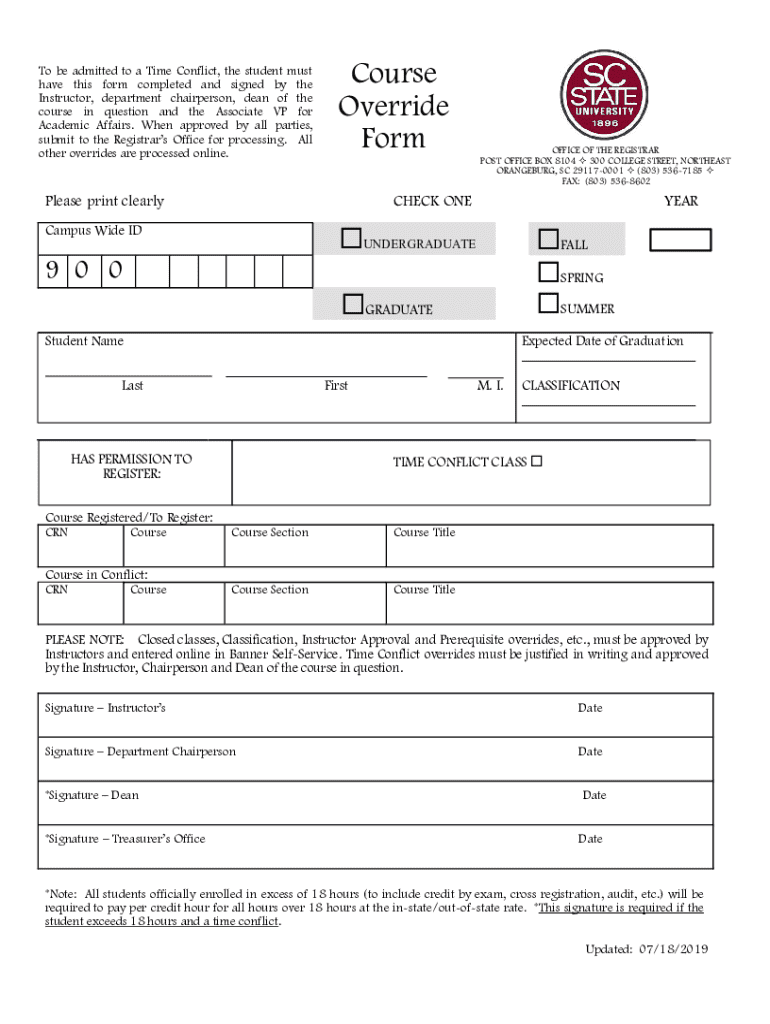
The SCSU course override is a formal process used by students at Southern Connecticut State University to enroll in courses that have specific registration restrictions or conflicts. This document enables students to gain approval to register for courses that may exceed normal credit limits, resolve time conflicts, or have prerequisite requirements. It is a vital tool for students seeking to customize their academic schedules to fit their individual educational needs.
How to Use the SCSU Course Override
To utilize the SCSU course override, students must follow a systematic procedure. Begin by identifying the course requiring an override, then consult with the course instructor to discuss potential enrollment. This initial step usually involves reviewing your academic standing and the reasons you wish to enroll in the course. After receiving preliminary approval from the instructor, further endorsements are needed from the department chairperson and the dean. To ensure all necessary permissions, finalize the process with the Associate VP for Academic Affairs before submitting the completed form to the Registrar's Office.
How to Obtain the SCSU Course Override
Obtaining the SCSU course override involves securing a physical or digital copy of the form. Typically, these forms are available on the university's website or through the Registrar's Office. It is crucial for students to fill out the form accurately, providing all relevant information about the course and the reason for the requested override. Additionally, students must gather all requisite signatures mentioned in the previous section, ensuring that all approvals align with the academic guidelines set by the university.
Steps to Complete the SCSU Course Override
- Identify the Course: Determine which course requires an override and why you wish to enroll.
- Consult with Instructor: Discuss your situation with the course instructor for their recommendation and preliminary approval.
- Gather Approvals: Secure necessary endorsements from the department chairperson, dean, and Associate VP for Academic Affairs.
- Complete the Form: Fill out the SCSU course override form with complete and accurate information.
- Submit the Form: Once fully signed, submit the form to the Registrar's Office for processing and final registration.
Why Should You Use the SCSU Course Override
Using the SCSU course override allows students to adapt their academic schedules to accommodate unique constraints and opportunities, such as exceeding typical credit hour limits or resolving scheduling conflicts. This flexibility can be instrumental for students seeking to graduate ahead of schedule or those needing specific courses to meet program requirements. Overrides facilitate academic pursuits by breaking through typical registration barriers without compromising educational integrity.
Key Elements of the SCSU Course Override
The form for the SCSU course override includes several critical elements:
- Course Information: Details about the course such as course code, title, and credit hours.
- Justification: A comprehensive explanation of why the override is necessary.
- Signatures: Approval signatures from the instructor, department chairperson, dean, and Associate VP for Academic Affairs.
- Student Information: Personal details of the student including name, student ID, and contact information.
Important Terms Related to SCSU Course Override
- Prerequisite Override: Approval to enroll in a course without meeting its prerequisite requirements.
- Credit Override: Permission to exceed the maximum allowed credit hours in a semester.
- Time Conflict Override: Approval to register for courses that have overlapping schedules.
Examples of Using the SCSU Course Override
Consider a student who needs two overlapping courses to complete their major in time for graduation. By using the SCSU course override, they can seek approval from instructors and relevant authorities to register despite schedule conflicts. Another scenario involves a student interested in a higher-level course who has not met the prerequisites. With proper justification and faculty approval, the override could allow participation in the course to advance learning and career readiness.


