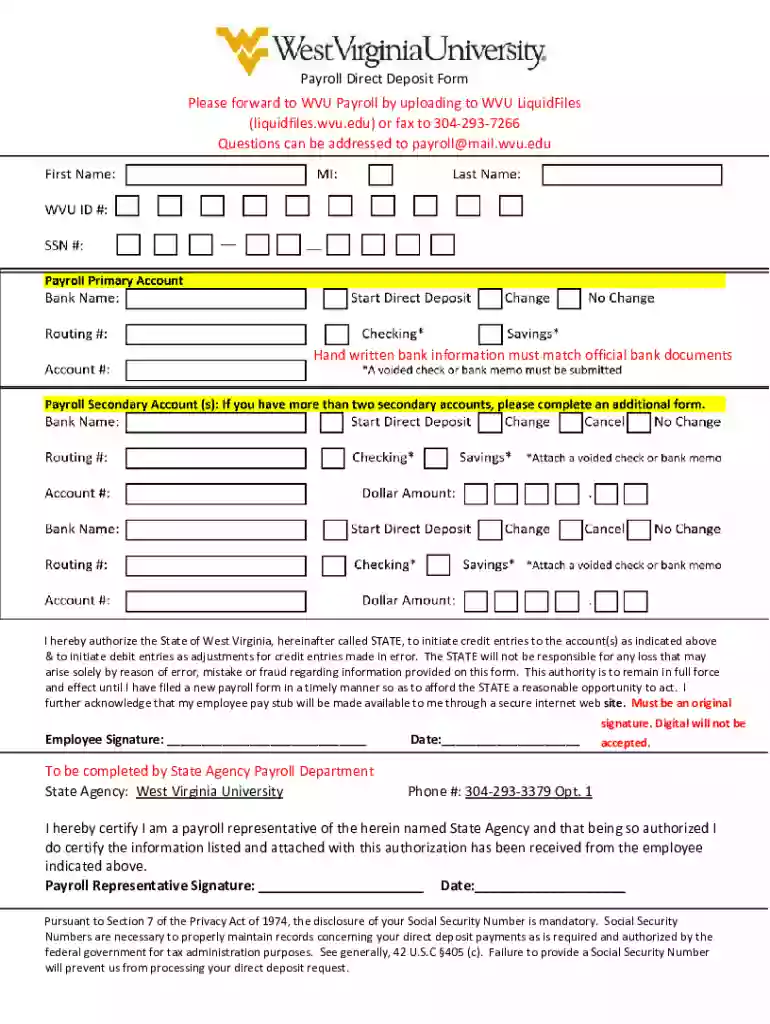
Direct Deposit - WVU Shared Services - West Virginia University 2026

Get Form
payroll direct deposit bank Preview on Page 1

Here's how it works

01. Edit your payroll direct deposit bank online
Type text, add images, blackout confidential details, add comments, highlights and more.

02. Sign it in a few clicks
Draw your signature, type it, upload its image, or use your mobile device as a signature pad.

03. Share your form with others
Send payroll direct deposit employee form via email, link, or fax. You can also download it, export it or print it out.

How to use or fill out Direct Deposit - WVU Shared Services - West Virginia University with our platform

Form edit decoration
9.5
Ease of Setup
DocHub User Ratings on G2
9.0
Ease of Use
DocHub User Ratings on G2
  1. Click ‘Get Form’ to open the Direct Deposit form in the editor.
  2. Begin by entering your personal information, including your name and Social Security Number. Ensure that the Social Security Number is accurate, as it is mandatory for processing.
  3. In the bank information section, provide your bank account number and routing number. Make sure this information matches your official bank documents to avoid any discrepancies.
  4. Review the authorization statement carefully. By signing, you authorize the State of West Virginia to initiate credit entries to your specified account.
  5. Sign and date the form in the designated areas. Remember, handwritten signatures are required; digital signatures will not be accepted.
  6. Once completed, save your document and upload it to WVU LiquidFiles or fax it to the provided number for submission.

Start using our platform today for free to streamline your direct deposit form completion!

See more Direct Deposit - WVU Shared Services - West Virginia University versions

We've got more versions of the Direct Deposit - WVU Shared Services - West Virginia University form. Select the right Direct Deposit - WVU Shared Services - West Virginia University version from the list and start editing it straight away!
Versions Form popularity Fillable & printable
2021 4.8 Satisfied (40 Votes)
be ready to get more

Complete this form in 5 minutes or less

Get form

Got questions?

We have answers to the most popular questions from our customers. If you can't find an answer to your question, please contact us.
Contact us
Contact us at 304-293-6006 or SharedServices@mail.wvu.edu.
In other words, submitting the deposit does not mean youre legally responsible for paying tuition or attending that school. If you decide not to attend, most schools will keep the deposit. That makes enrollment deposits nonrefundable, but not binding.
If you are accepted to WVU as an undergraduate student, we will send instructions for paying your academic deposit to your WVU email address. The academic deposit is $150 for West Virginia residents and $250 for all other students.
E-Refund is the fastest way to get your refund. To sign up go to studentaccounts.wvu.edu/refunds. If this option does not apply, we will mail you a paper check made payable to the student. The check will be mailed to the mailing address on file in the STAR system.
The academic deposit is fully refundable if you submit the cancellation form before May 1 (December 1 for students enrolling in the spring).

Security and compliance

At DocHub, your data security is our priority. We follow HIPAA, SOC2, GDPR, and other standards, so you can work on your documents with confidence.

Learn more
ccpa2
pci-dss
gdpr-compliance
hipaa
soc-compliance
be ready to get more

Complete this form in 5 minutes or less

Get form

People also ask

In order for the funds to be transferred from the payer, the recipient must provide the name of their bank, their account number, and the banks routing number to the person or business making the deposit. Alternatively, they may provide a voided check which has the same information printed on it.
Applicants with a converted GPA of at least 2.0 on a 4.0 scale can be admitted. WVU will calculate a combined GPA if you attended multiple institutions. If you were admitted based on in progress results, your final GPA will be updated when you provide the final required documents.

Related links