




Here's how it works

01. Edit your sfn 958 online
Type text, add images, blackout confidential details, add comments, highlights and more.

02. Sign it in a few clicks
Draw your signature, type it, upload its image, or use your mobile device as a signature pad.

03. Share your form with others
Send it via email, link, or fax. You can also download it, export it or print it out.
How to use or fill out Ways to Apply Health and Human Services North Dakota with our platform

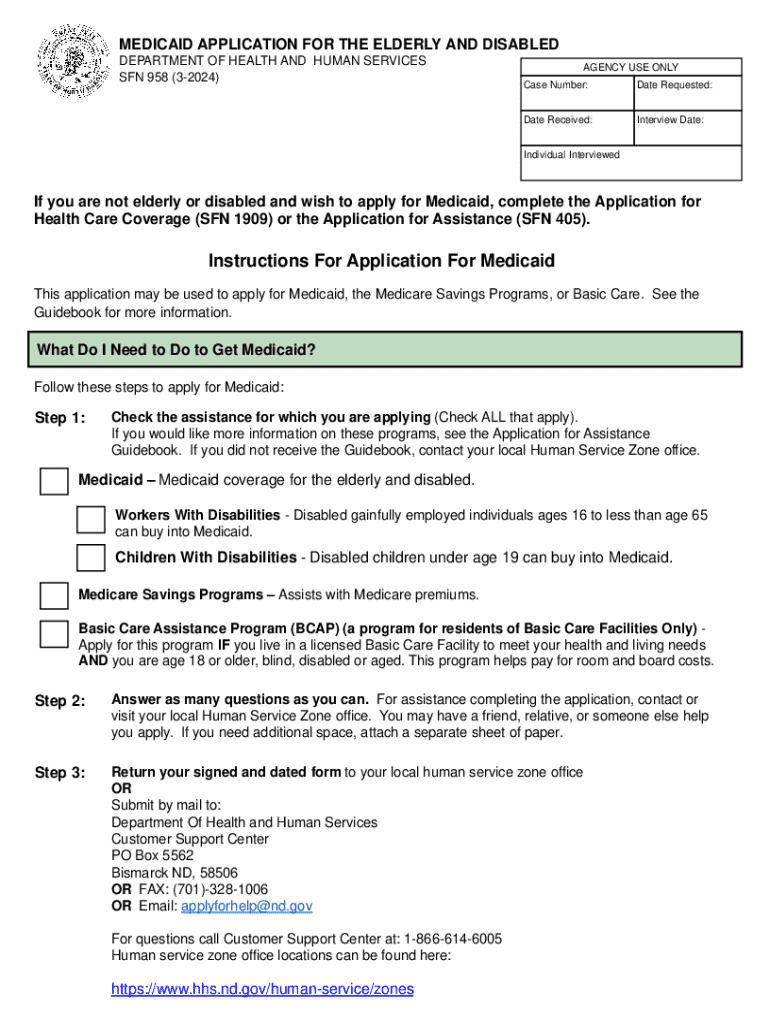
- Click ‘Get Form’ to open the Medicaid Application for the Elderly and Disabled in the editor.
- Begin by checking the assistance programs you are applying for. Options include Medicaid, Workers With Disabilities, Children With Disabilities, Medicare Savings Programs, and Basic Care Assistance Program. Ensure you check all that apply.
- Fill out personal information including your name, address, and contact details. If applicable, provide directions to your home if it is in a rural area.
- Complete the sections regarding household members. List everyone living in your home and provide their details such as age, relationship, and Social Security Numbers.
- Provide proof of income, assets, expenses, and any other required documentation as specified in the form. Attach additional sheets if necessary.
- Sign and date your application at the end of the form. Make sure to return it to your local human service zone office or submit it via mail or fax as instructed.
Start using our platform today to easily fill out your Medicaid application online for free!
Fill out Ways to ApplyHealth and Human Services North Dakota online
It's free
It's free
See more Ways to ApplyHealth and Human Services North Dakota versions
We've got more versions of the Ways to ApplyHealth and Human Services North Dakota form. Select the right Ways to ApplyHealth and Human Services North Dakota version from the list and start editing it straight away!
Security and compliance
At DocHub, your data security is our priority. We follow HIPAA, SOC2, GDPR, and other standards, so you can work on your documents with confidence.
Learn more


