FL-130 S 2026

Get Form
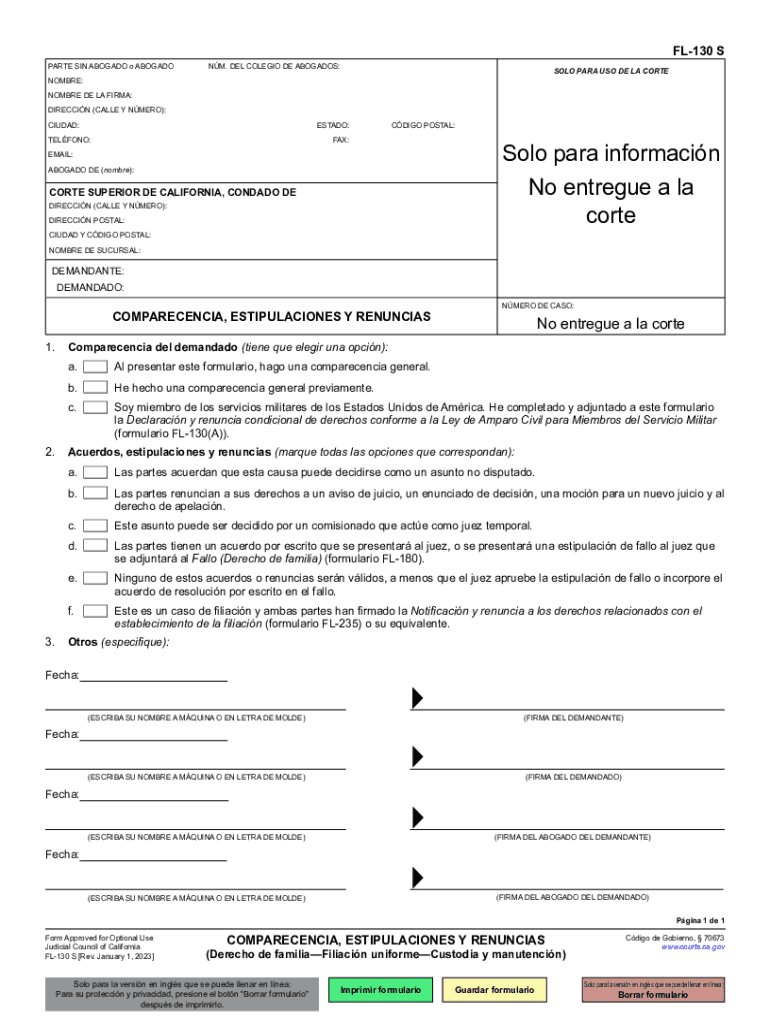
FL-130 S Preview on Page 1

Here's how it works

01. Edit your form online
Type text, add images, blackout confidential details, add comments, highlights and more.
02. Sign it in a few clicks
Draw your signature, type it, upload its image, or use your mobile device as a signature pad.
03. Share your form with others
Send it via email, link, or fax. You can also download it, export it or print it out.

How to use or fill out FL-130 S with our platform

Form edit decoration
9.5
Ease of Setup
DocHub User Ratings on G2
9.0
Ease of Use
DocHub User Ratings on G2
  1. Click ‘Get Form’ to open the FL-130 S in the editor.
  2. Begin by filling in your name, firm name, address, city, state, phone number, fax, and email at the top of the form. Ensure all information is accurate for proper identification.
  3. Next, indicate the court's name and address where your case will be filed. This is crucial for jurisdiction purposes.
  4. In the 'Comparecencia' section, select one of the options regarding your appearance in court. Make sure to check only one box that applies to your situation.
  5. Proceed to the 'Acuerdos, estipulaciones y renuncias' section. Mark all applicable agreements or waivers relevant to your case. Review each option carefully before making selections.
  6. Finally, sign and date the form at the bottom. Ensure that all parties involved also provide their signatures where required.

Start using our platform today for free to streamline your document editing and signing process!

See more FL-130 S versions

We've got more versions of the FL-130 S form. Select the right FL-130 S version from the list and start editing it straight away!
Versions Form popularity Fillable & printable
2023 4.2 Satisfied (33 Votes)
2006 4.9 Satisfied (224 Votes)
be ready to get more

Complete this form in 5 minutes or less

Get form

Got questions?

We have answers to the most popular questions from our customers. If you can't find an answer to your question, please contact us.
Contact us
A joint petition for divorce is a procedure where both parties file for divorce together instead of doing it separately. This process saves divorcees time by choosing to come to an agreement together before going to court. Both parties also must agree to the full terms of divorce before filing.
Appearance, Stipulations, and Waivers (Family LawUniform ParentageCustody and Support) (FL-130) Tell the court that you and your spouse or domestic partner want the court to approve your written agreement or stipulated judgment without going to court for a trial.
A divorce decree is the complete court order ending your marriage, with all the details about how property is divided, how you will share time with your children, and what, if any, child support is granted. It also states why the marriage is being dissolved.
Six weeks and a day after the court makes the conditional order, you can apply to the court for a final order (either as a sole applicant or as joint applicants with your spouse). This legally ends your marriage.
Fill out forms Appearance, Stipulations, and Waivers (form FL-130) You and your spouse must sign the form. Declaration for Default or Uncontested Dissolution or Legal Separation (form FL-170) Judgment (form FL-180) Notice of Entry of Judgment (form FL-190)
be ready to get more

Complete this form in 5 minutes or less

Get form

People also ask

Californias Form FL-180 is the Formal Divorce Decree Here is Californias form FL-190 that also accompanies the divorce decree so you can see what that looks like. This is the form that confirms the courts entry of the divorce.
You and your spouse will each date and sign it. Then, set the form aside. The FL-130 will be filed with the court clerk when you file your divorce judgment.
To finish your divorce or legal separation, you must turn in a set of final forms. If you have any court orders or an agreement, you submit those as well. The court will review these forms to be sure nothing is missing and no mistakes on the forms. If not, the judge will sign the final form (the judgment).

Related links