




Here's how it works

01. Edit your form online
Type text, add images, blackout confidential details, add comments, highlights and more.

02. Sign it in a few clicks
Draw your signature, type it, upload its image, or use your mobile device as a signature pad.

03. Share your form with others
Send it via email, link, or fax. You can also download it, export it or print it out.
How to use or fill out SEPTIC TANK PUMPING INSPECTION REPORT - County Of Ventura with our platform

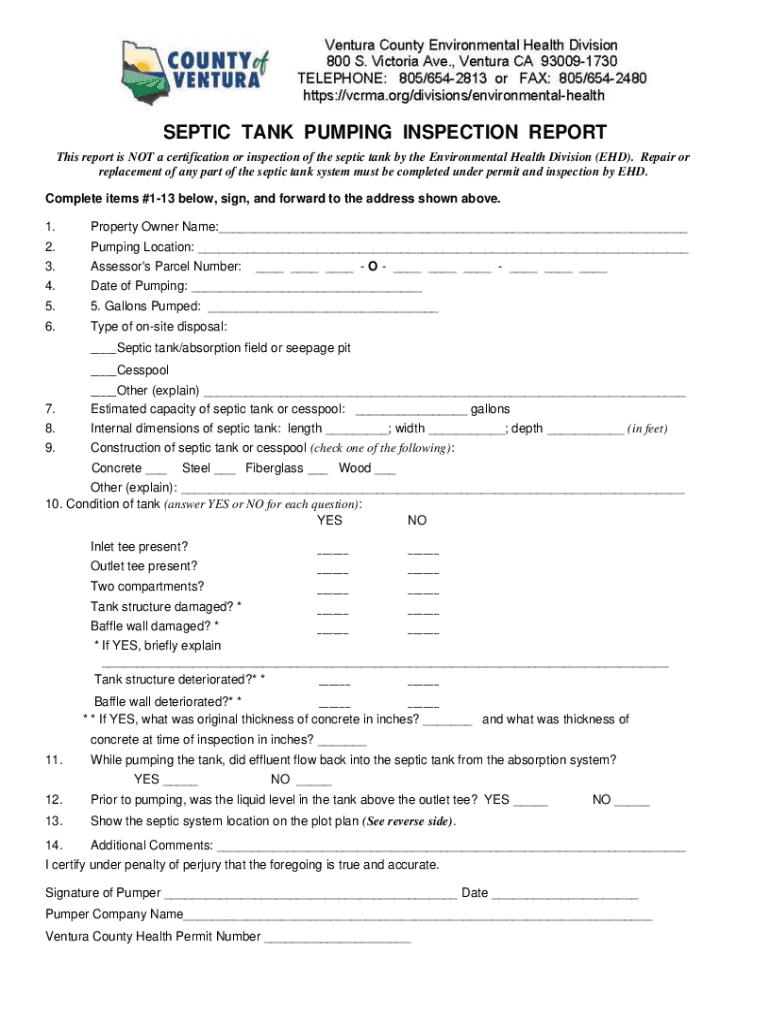
- Click ‘Get Form’ to open the SEPTIC TANK PUMPING INSPECTION REPORT in the editor.
- Begin by entering the Property Owner Name in the designated field. This is essential for identifying the responsible party.
- Fill in the Pumping Location and Assessor's Parcel Number to provide specific details about where the pumping occurred.
- Enter the Date of Pumping and Gallons Pumped, ensuring accurate records of service.
- Select the Type of on-site disposal by checking the appropriate box, and provide an explanation if 'Other' is selected.
- Complete internal dimensions of the septic tank, including length, width, and depth in feet.
- Indicate the Construction type of your septic tank or cesspool by checking one of the options provided.
- Answer YES or NO for each condition question regarding tank integrity and functionality. Provide explanations where necessary.
- Confirm whether effluent flowed back into the septic tank during pumping and if liquid levels were above outlet tee prior to pumping.
- Draw a plot plan showing all relevant structures and septic system locations as instructed on the form.
- Finally, sign and date at the bottom of the form to certify accuracy before submission.
Start using our platform today to easily complete your SEPTIC TANK PUMPING INSPECTION REPORT for free!
Fill out SEPTIC TANK PUMPING INSPECTION REPORT - County Of Ventura online
It's free
It's free
See more SEPTIC TANK PUMPING INSPECTION REPORT - County Of Ventura versions
We've got more versions of the SEPTIC TANK PUMPING INSPECTION REPORT - County Of Ventura form. Select the right SEPTIC TANK PUMPING INSPECTION REPORT - County Of Ventura version from the list and start editing it straight away!
Security and compliance
At DocHub, your data security is our priority. We follow HIPAA, SOC2, GDPR, and other standards, so you can work on your documents with confidence.
Learn more


