Type text, add images, blackout confidential details, add comments, highlights and more.
02. Sign it in a few clicks
Draw your signature, type it, upload its image, or use your mobile device as a signature pad.
03. Share your form with others
Send form 1620 via email, link, or fax. You can also download it, export it or print it out.
How to use or fill out Esap Application Form - Fill Online, Printable, Fillable, Blank
Ease of Setup
DocHub User Ratings on G2
Ease of Use
DocHub User Ratings on G2
Click ‘Get Form’ to open it in the editor.
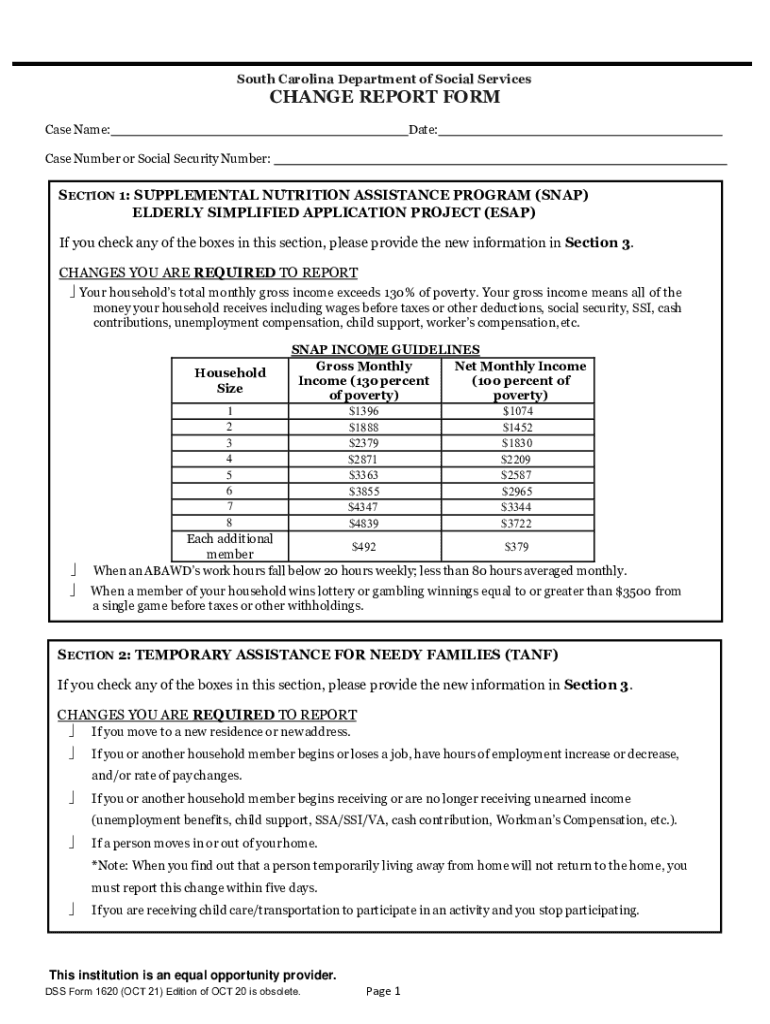
Begin with Section 1: Supplemental Nutrition Assistance Program (SNAP). If your household's total monthly gross income exceeds 130% of poverty, check the appropriate box and provide the new information in Section 3.
Move to Section 2: Temporary Assistance for Needy Families (TANF). Check any boxes that apply regarding changes in residence, employment status, or household composition. Again, report this information in Section 3.
In Section 3, fill out the new information corresponding to your selections from Sections 1 and 2. Include details like new address, employment information, and any changes in household members.
Complete Section 4 if you wish to report optional information such as rent or mortgage amounts.
Finally, review all entries for accuracy before signing and dating the form at the bottom.
Start using our platform today to fill out your Esap Application Form easily and for free!
Fill out Esap Application Form - Fill Online, Printable, Fillable, Blank online It's free
See more Esap Application Form - Fill Online, Printable, Fillable, Blank versions
We've got more versions of the Esap Application Form - Fill Online, Printable, Fillable, Blank form. Select the right Esap Application Form - Fill Online, Printable, Fillable, Blank version from the list and start editing it straight away!
THE ONLINE APPLICATION IS NOW OPEN! Final Application Deadline: February $90 non-refundable application fee. SAT, SAT I/ II, ACT, AP, TOEFL, DET, IELTS
This Instruction Manual (Applied) provides instructions for advanced use of the FR-E700 series CC-Link type inverters. Electric Shock Prevention 2. Fire
Cookie consent notice
This site uses cookies to enhance site navigation and personalize your experience.
By using this site you agree to our use of cookies as described in our Privacy Notice.
You can modify your selections by visiting our Cookie and Advertising Notice.