




Here's how it works



How to use or fill out Student Transportation Services of Waterloo Region with our platform

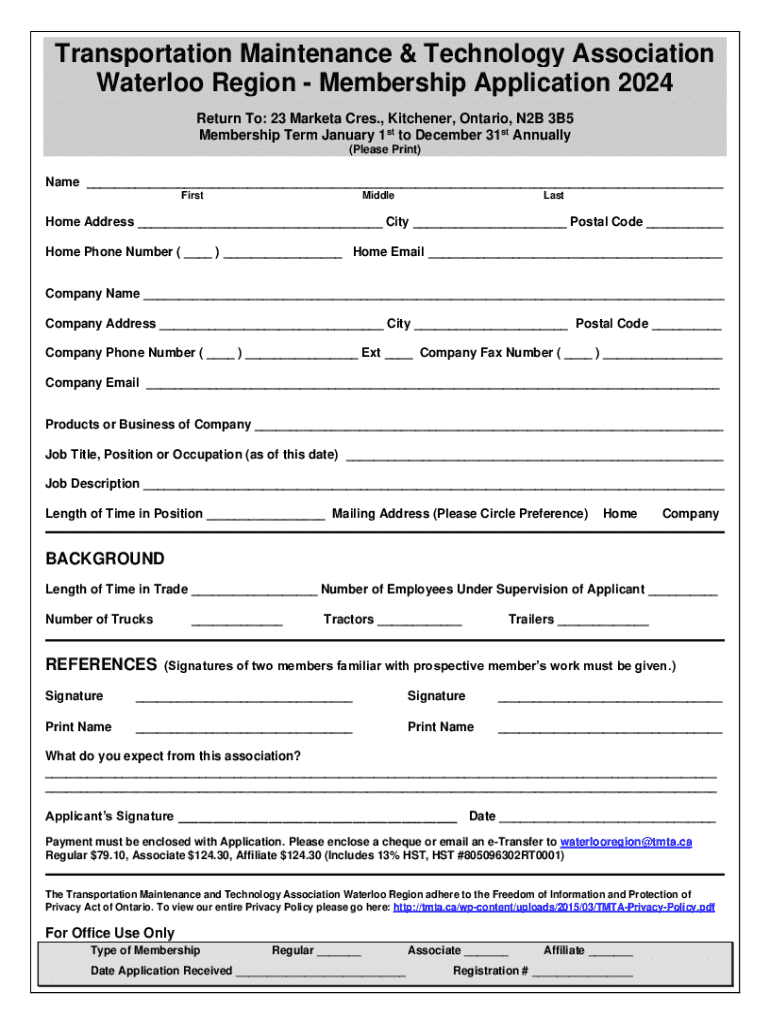
- Click ‘Get Form’ to open the Student Transportation Services of Waterloo Region application in the editor.
- Begin by entering your name in the designated fields: First, Middle, and Last. Ensure accuracy for identification purposes.
- Fill out your home address, including City and Postal Code. This information is crucial for communication and service delivery.
- Provide your home phone number and email address. This allows for easy contact regarding your application status.
- Next, enter your company details if applicable, including Company Name, Address, Phone Number, and Email. This section helps us understand your professional background.
- Detail your job title and description along with the length of time in that position. This information supports your membership eligibility.
- Indicate the number of employees you supervise and provide details about your fleet (trucks, tractors, trailers).
- Secure two references by obtaining their signatures and printed names in the designated area.
- Complete the final sections regarding what you expect from the association and sign with the date provided.
Start filling out your application today using our platform for a seamless experience!
It's free
See more Student Transportation Services of Waterloo Region versions
Got questions?
What do I need to sign my Student Transportation Services of Waterloo Region electronically?
Electronic document signing requires a software solution that works in compliance with data security and eSignature regulations. DocHub is a perfect tool for that, as it fulfills all the aforementioned requirements. Whatever method you prefer to sign your Student Transportation Services of Waterloo Region in DocHub, your electronic signature will be legally binding and court-admissible.
How to manage my Student Transportation Services of Waterloo Region from Gmail?
If your go-to electronic mail service is Gmail, you can easily incorporate your DocHub editor into your work. Edit your Student Transportation Services of Waterloo Region with DocHub tools and attach it to your drafts in Gmail. See how effortless it can be to exchange papers and collaborate having a swift PDF editing solution at hand.
Security and compliance
At DocHub, your data security is our priority. We follow HIPAA, SOC2, GDPR, and other standards, so you can work on your documents with confidence.
Learn more


