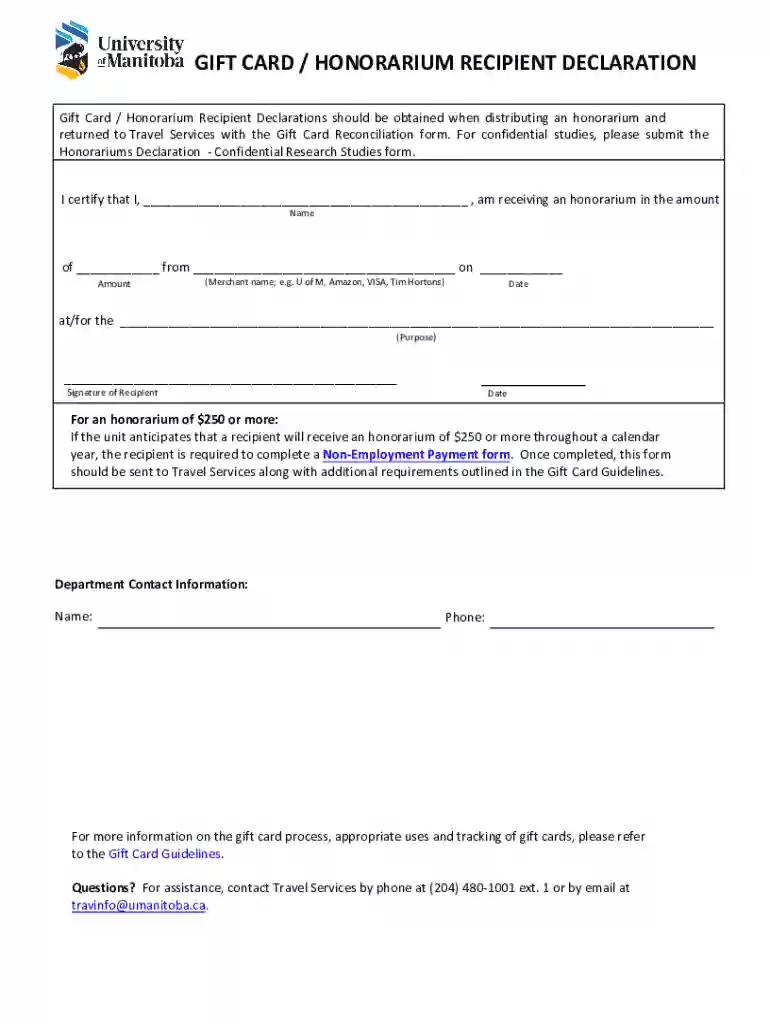
GIFT CARD HONORARIUM RECIPIENT DECLARATION - University of Manitoba 2026

Get Form
GIFT CARD HONORARIUM RECIPIENT DECLARATION - University of Manitoba Preview on Page 1

Here's how it works

01. Edit your form online
Type text, add images, blackout confidential details, add comments, highlights and more.

02. Sign it in a few clicks
Draw your signature, type it, upload its image, or use your mobile device as a signature pad.

03. Share your form with others
Send it via email, link, or fax. You can also download it, export it or print it out.

How to use or fill out GIFT CARD HONORARIUM RECIPIENT DECLARATION - University of Manitoba with our platform

Form edit decoration
9.5
Ease of Setup
DocHub User Ratings on G2
9.0
Ease of Use
DocHub User Ratings on G2
  1. Click ‘Get Form’ to open the GIFT CARD HONORARIUM RECIPIENT DECLARATION in the editor.
  2. Begin by entering your name in the designated field where it states 'I certify that I, ______________ , am receiving an honorarium in the amount'.
  3. Next, input the honorarium amount in the field labeled 'of ___ from'.
  4. Fill in the merchant name (e.g., U of M, Amazon) in the section that reads 'from ___________ on ___'.
  5. Specify the date of receipt in the provided space labeled 'on ___'.
  6. Describe the purpose for receiving this honorarium at 'at/for the _______________________'.
  7. Sign and date at the bottom of the form where it states 'Signature of Recipient' and 'Date'.
  8. If applicable, ensure to complete a Non-Employment Payment form if your honorarium is $250 or more.
  9. Finally, review all entries for accuracy before submitting your completed form to Travel Services.

Start using our platform today to easily fill out your GIFT CARD HONORARIUM RECIPIENT DECLARATION for free!

be ready to get more

Complete this form in 5 minutes or less

Get form

Got questions?

We have answers to the most popular questions from our customers. If you can't find an answer to your question, please contact us.
Contact us
Honorarium payments are voluntary, one-time payments given as a token of appreciation for services outside formal employment, such as guest lectures, cultural performances, or advisory roles. They are typically taxable in the U.S. and can be paid via check, digital gift card, or prepaid debit card.
Redeem a Gift Card Open an Invest529 account. If you already have an account, skip to step 2. Set up Gift of College profile. Create a profile or, if you already have one, login to your current profile at GiftofCollege.com. Link your Invest529 account to your Gift of College profile. Redeem your gift card.
be ready to get more

Complete this form in 5 minutes or less

Get form