




Here's how it works



How to use or fill out Form I-800A, Supplement 1, Listing of Adult Member of the Household with Our Platform

- Click ‘Get Form’ to open it in the editor.
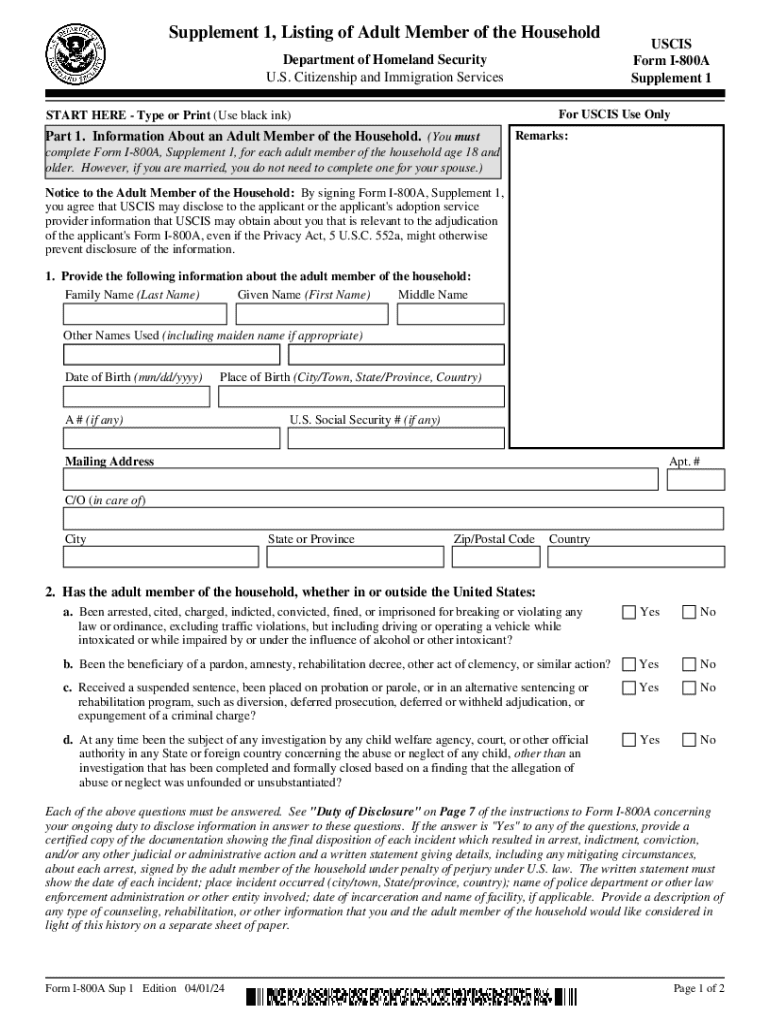
- Begin with Part 1, where you will provide information about the adult member of the household. Fill in their family name, given name, middle name, and any other names used. Ensure accuracy in the date and place of birth.
- Next, complete the address section including mailing address, apartment number if applicable, and country details.
- Answer all questions regarding legal history truthfully. If any answers are 'Yes', prepare to attach certified documentation as required.
- In Part 2, both the applicant and adult member must sign and date the form. Ensure that all signatures are completed to avoid delays.
Start using our platform today for free to streamline your form completion process!
It's free
See more Form I-800A, Supplement 1, Listing of Adult Member of the Household versions
Got questions?
How can I create an electronic signature in my Form I-800A, Supplement 1, Listing of Adult Member of the Household on Android?
Approving paperwork on a mobile device is fast, simple, and doesn’t require software installation when you have an account with DocHub. Log in from any browser, complete your empty fields with your information, and click on Sign → Create your signature. You can draw your eSignature the same way you usually do on paper, add its picture to your Form I-800A, Supplement 1, Listing of Adult Member of the Household, or type in your name and stylize its look. No matter what option you select, your paperwork will be valid.
Can I print my Form I-800A, Supplement 1, Listing of Adult Member of the Household and complete it on my own?
If you go for analog ways of completing your Form I-800A, Supplement 1, Listing of Adult Member of the Household, it is simple to download your file for printing. Search DocHub’s Forms & Templates catalog to find the exact file template you need and open it for editing or download it on your device in the format of your choice. It is easy to complete your form electronically and place your handwritten signature on it right after printing or eSign your file with DocHub.
Security and compliance
At DocHub, your data security is our priority. We follow HIPAA, SOC2, GDPR, and other standards, so you can work on your documents with confidence.
Learn more


