




Here's how it works

01. Edit your form online
Type text, add images, blackout confidential details, add comments, highlights and more.

02. Sign it in a few clicks
Draw your signature, type it, upload its image, or use your mobile device as a signature pad.

03. Share your form with others
Send it via email, link, or fax. You can also download it, export it or print it out.
How to use or fill out Tuncurry Market - Marine Rescue NSW - Forster Tuncurry with our platform

- Click ‘Get Form’ to open it in the editor.
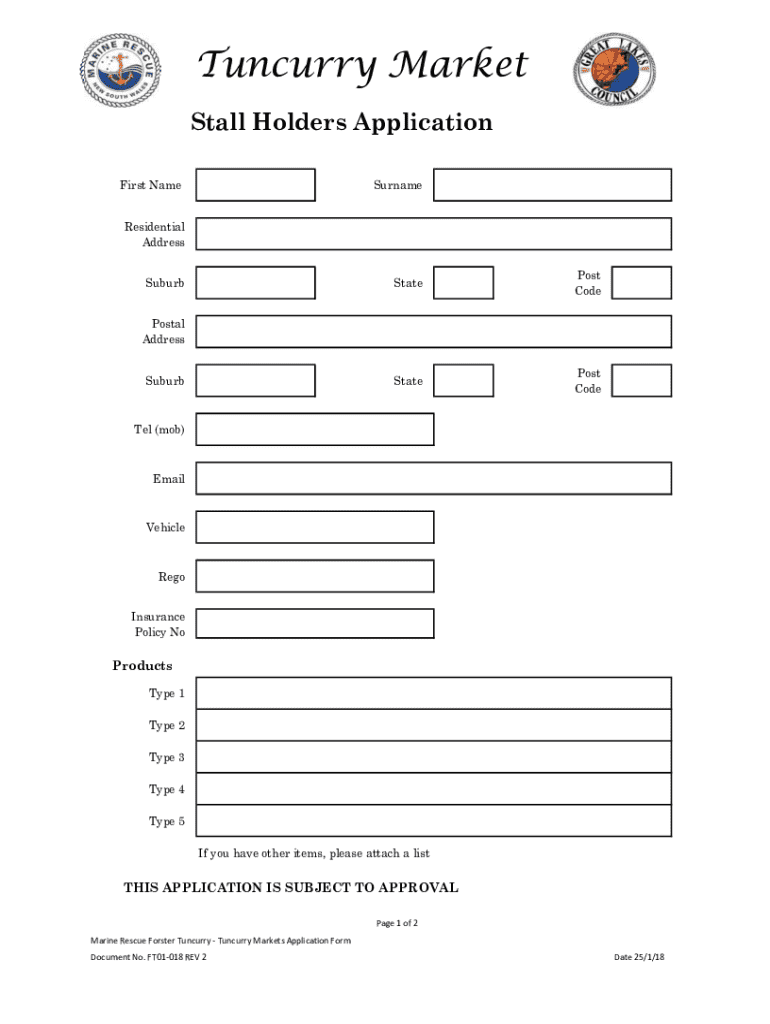
- Begin by entering your First Name and Surname in the designated fields. Ensure that all personal information is accurate for processing.
- Fill in your Residential Address, including Suburb, State, and Post Code. If your Postal Address differs, provide that information as well.
- Enter your contact details: Tel (mob) and Email. This will help the market management reach you regarding your application.
- Provide your Vehicle Registration and Insurance Policy Number in the respective fields to ensure compliance with market regulations.
- List the types of products you intend to sell by selecting from Type 1 to Type 5. If you have additional items, attach a separate list.
- Indicate whether you permit Tuncurry Markets to send you emails about their activities by selecting Yes or No.
- Confirm that you have read the Tuncurry Regulations and signed the Conditions and Code of Conduct by selecting Yes or No for each statement.
- Finally, sign and date the form at the bottom as both Stall Holder and Manager to validate your application.
Start filling out your application today for free using our platform!
Fill out Tuncurry Market - Marine Rescue NSW - Forster Tuncurry online
It's free
It's free
See more Tuncurry Market - Marine Rescue NSW - Forster Tuncurry versions
We've got more versions of the Tuncurry Market - Marine Rescue NSW - Forster Tuncurry form. Select the right Tuncurry Market - Marine Rescue NSW - Forster Tuncurry version from the list and start editing it straight away!
Security and compliance
At DocHub, your data security is our priority. We follow HIPAA, SOC2, GDPR, and other standards, so you can work on your documents with confidence.
Learn more


