




Here's how it works



How to use or fill out 112 Basin Street Ephrata WA 98823 Phone: (509) 754-4656 Fax with our platform

- Click ‘Get Form’ to open it in the editor.
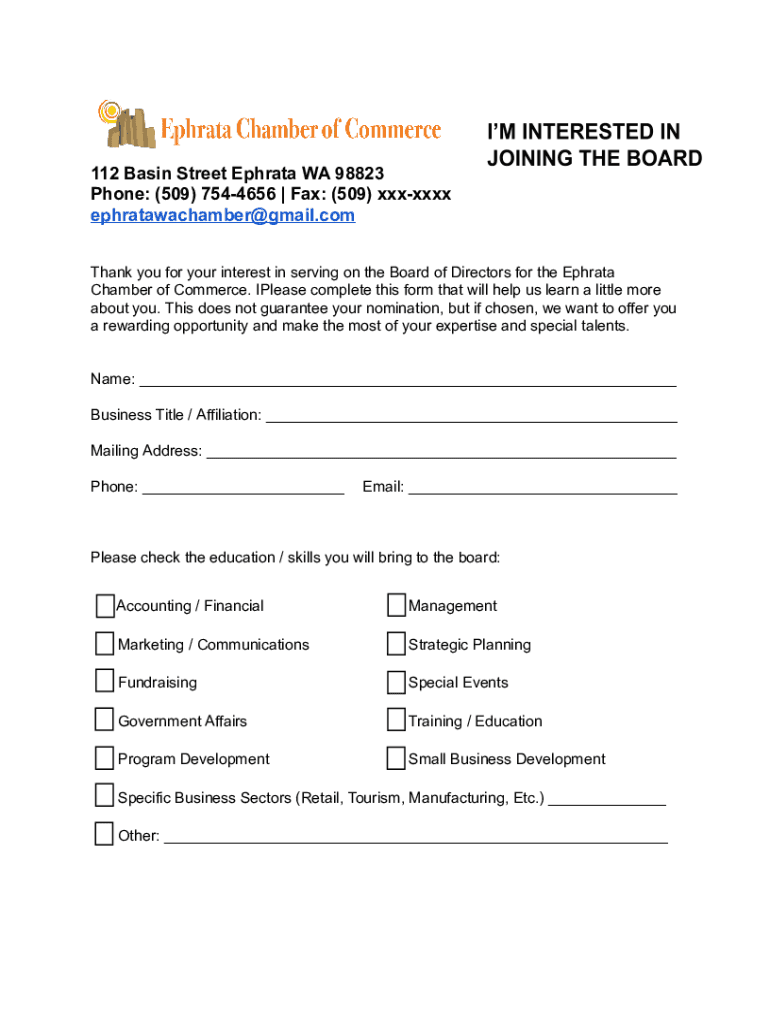
- Begin by entering your name in the designated field. This is essential for identifying your application.
- Next, fill in your Business Title or Affiliation. This helps us understand your professional background.
- Provide your Mailing Address and Phone number to ensure we can contact you easily.
- Enter your Email address for further communication regarding your application.
- Check the relevant education/skills boxes that you will bring to the board. This section highlights your qualifications.
- Indicate how long you have lived in the Ephrata area, as this information is valuable for community representation.
- Finally, in 100 words or less, describe why you want to become a Board Member and what ideas you have for enhancing the Chamber.
Start filling out your form today for free and streamline your application process!
It's free
See more 112 Basin Street Ephrata WA 98823 Phone: (509) 754-4656 Fax versions
| Versions | Form popularity | Fillable & printable |
|---|---|---|
| 2021 | 4.8 Satisfied (52 Votes) |
Got questions?
Can I fill out and sign my 112 Basin Street Ephrata WA 98823 Phone: (509) 754-4656 Fax online?
Sure, and it’s really straightforward! DocHub is an online PDF editor with advanced document management functions that allow you promptly adjust your forms, complete blank fields and insert new ones for others to fill out, and create electronic signatures in several ways. Import your 112 Basin Street Ephrata WA 98823 Phone: (509) 754-4656 Fax, give information as requested, and choose how you want to eSign your template - by typing your name, drawing your signature, uploading its image, or utilizing a QR code.
How to manage my 112 Basin Street Ephrata WA 98823 Phone: (509) 754-4656 Fax from Gmail?
In case your go-to electronic mail service is Gmail, it is simple to incorporate your DocHub editor in your work. Edit your 112 Basin Street Ephrata WA 98823 Phone: (509) 754-4656 Fax with DocHub instruments and attach it to your drafts in Gmail. See how straightforward it can be to exchange files and work together having a swift PDF editing solution at hand.
Security and compliance
At DocHub, your data security is our priority. We follow HIPAA, SOC2, GDPR, and other standards, so you can work on your documents with confidence.
Learn more


