




Here's how it works



How to use or fill out ilcma wp-contentuploads(Space is limited to the first 52 golfers!) June 5 - ILCMA with our platform

- Click ‘Get Form’ to open it in the editor.
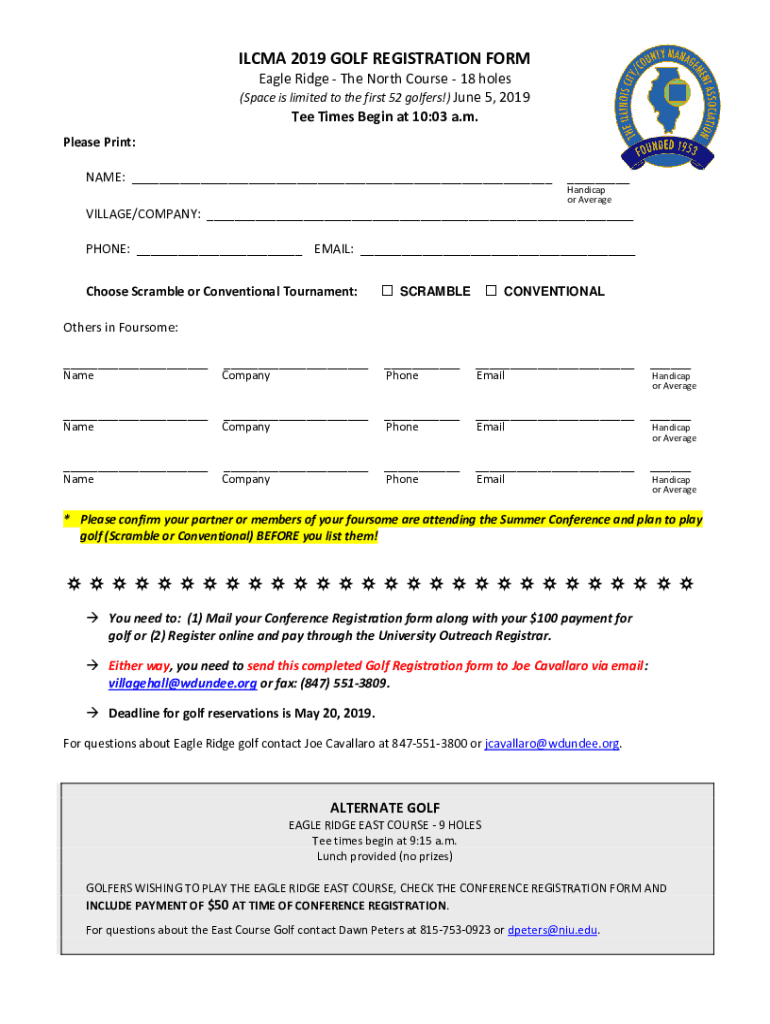
- Begin by entering your NAME and HANDICAP or AVERAGE in the designated fields. Ensure all information is printed clearly.
- Fill in your VILLAGE/COMPANY, PHONE, and EMAIL address accurately for communication purposes.
- Select your preferred tournament type by checking either SCRAMBLE or CONVENTIONAL.
- List the names and companies of others in your foursome, along with their respective PHONE numbers and EMAIL addresses. Confirm that they are attending the Summer Conference before listing them.
- Review all entered information for accuracy before submitting. Remember to send this completed form via email or fax as instructed.
Start using our platform today to streamline your golf registration process for free!
It's free
See more ilcma wp-contentuploads(Space is limited to the first 52 golfers!) June 5 - ILCMA versions
| Versions | Form popularity | Fillable & printable |
|---|---|---|
| 2019 | 4.8 Satisfied (29 Votes) |
Got questions?
How can I sign my ilcma wp-contentuploads(Space is limited to the first 52 golfers!) June 5 - ILCMA on iOS?
With DocHub, you can easily approve your ilcma wp-contentuploads(Space is limited to the first 52 golfers!) June 5 - ILCMA or any other document on iOS, even without setting up extra applications. You can access your DocHub account from any internet-connected browser and complete and sign your document in any preferred method with just a couple of clicks.
What browser do I need to edit ilcma wp-contentuploads(Space is limited to the first 52 golfers!) June 5 - ILCMA online?
If you need to edit your ilcma wp-contentuploads(Space is limited to the first 52 golfers!) June 5 - ILCMA on the internet quickly, it does not matter what browser you employ. DocHub’s straightforward editing instruments are accessible using any internet browser. Just open the appropriate tab within our editor, add your file, and fill it out without stress.
Security and compliance
At DocHub, your data security is our priority. We follow HIPAA, SOC2, GDPR, and other standards, so you can work on your documents with confidence.
Learn more


