American express name change 2026

Get Form
american express name change Preview on Page 1

Here's how it works

01. Edit your american express name change online
Type text, add images, blackout confidential details, add comments, highlights and more.

02. Sign it in a few clicks
Draw your signature, type it, upload its image, or use your mobile device as a signature pad.

03. Share your form with others
Send americanexpress name via email, link, or fax. You can also download it, export it or print it out.

How to use or fill out American Express Name Change with DocHub

Form edit decoration
9.5
Ease of Setup
DocHub User Ratings on G2
9.0
Ease of Use
DocHub User Ratings on G2
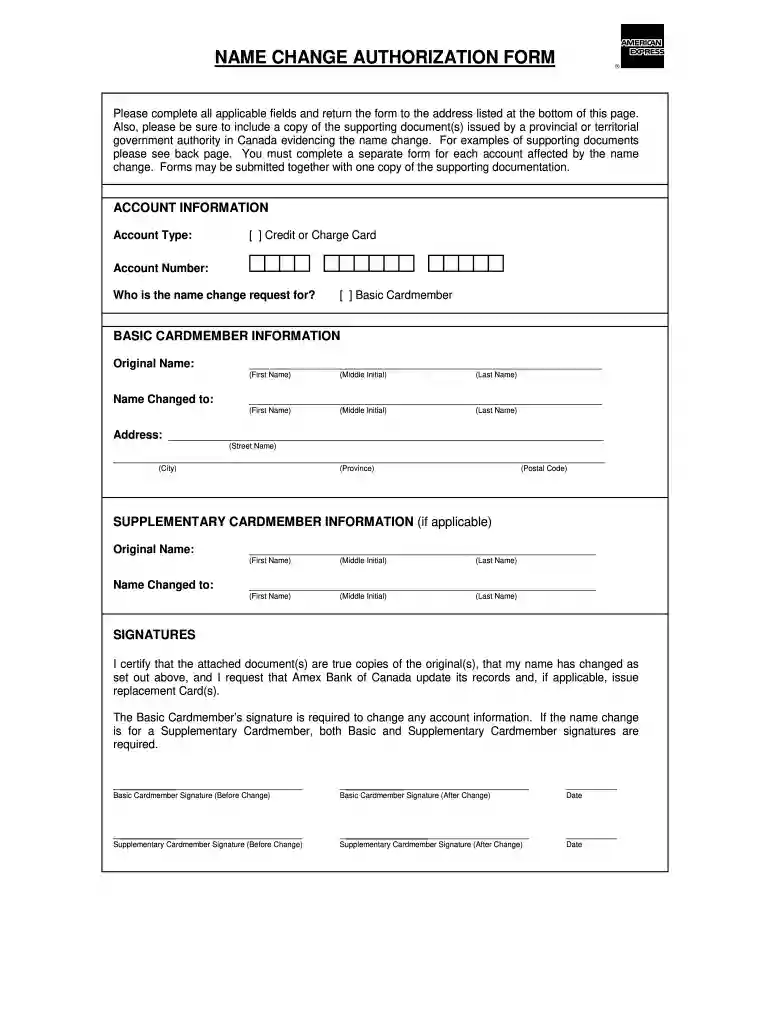
  1. Click ‘Get Form’ to open the American Express Name Change Authorization Form in our editor.
  2. Begin by filling out the 'Account Information' section. Select your account type (Credit or Charge Card) and enter your account number.
  3. Indicate who the name change request is for by selecting either 'Basic Cardmember' or 'Supplementary Cardmember'.
  4. In the 'Basic Cardmember Information' section, provide your original name and the new name you wish to adopt. Ensure all fields are completed accurately.
  5. Fill in your address details, including street name, city, province, and postal code.
  6. If applicable, complete the 'Supplementary Cardmember Information' section with the same details as above for any supplementary cardholders.
  7. Sign and date the form in the 'Signatures' section. Remember that both Basic and Supplementary Cardmembers must sign if changing a supplementary account.
  8. Attach copies of supporting documents that validate your name change and submit the completed form via fax or mail as instructed.

Start using our platform today to streamline your document editing process for free!

be ready to get more

Complete this form in 5 minutes or less

Get form

Got questions?

We have answers to the most popular questions from our customers. If you can't find an answer to your question, please contact us.
Contact us
If you want to upgrade or downgrade your Amex card, your next step is to call the issuer. Use the customer service number on the back of your credit card, and a representative will help. American Express also has a helpful online chat feature you can use to see about upgrading or downgrading your card.
Some credit card companies make this simple by allowing you to change your name online or via email. Others require a phone call or even a visit to one of their branch offices. Your new card will be sent to you in the mail, usually within a few weeks.
Most credit card issuers provide online instructions for how to change your name on credit cards. You can use the search function on their website to find these. This documentation necessary for a credit card name change typically includes a drivers license or government-issued photo identification (ID).
Call us 24/7 at 1-800-446-6307. I hereby authorize American Express National Bank to change the name on the account shown above, as well as all American Express Savings accounts where I am listed as a primary or joint owner.
Each issuer has different procedures for changing the name on a credit card; some allow you to do it online, while others require a call or branch visit. With all issuers, however, expect to provide legal documents as a proof of your name change.

Security and compliance

At DocHub, your data security is our priority. We follow HIPAA, SOC2, GDPR, and other standards, so you can work on your documents with confidence.

Learn more
ccpa2
pci-dss
gdpr-compliance
hipaa
soc-compliance