




Here's how it works



How to use or fill out Dr Roland Sing - Urologist Reviews and Ratings with DocHub

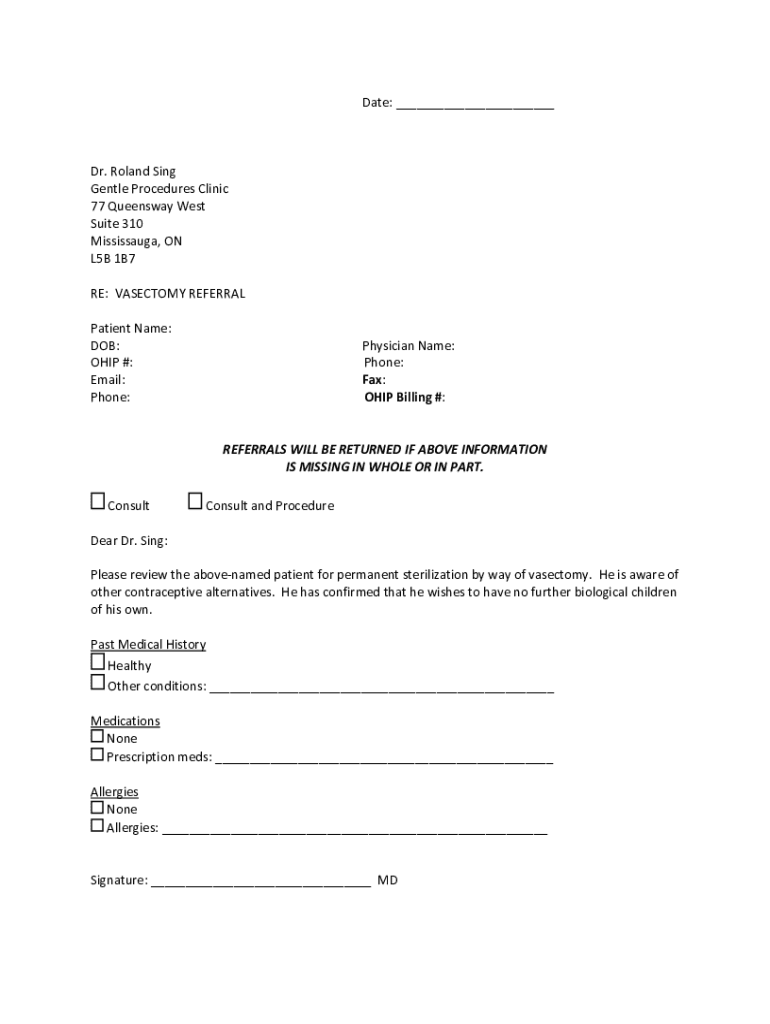
- Click ‘Get Form’ to open it in the editor.
- Begin by entering the date at the top of the form. This is essential for record-keeping.
- Fill in the patient’s name, date of birth (DOB), OHIP number, email, and phone number in the designated fields. Ensure all information is accurate to avoid delays.
- Next, provide the referring physician's name, phone number, fax number, and OHIP billing number. This information is crucial for processing referrals.
- In the 'Past Medical History' section, indicate if the patient is healthy or list any other conditions as necessary.
- For medications, specify any prescription medications or note 'None' if applicable.
- Document any allergies in the allergies section; if there are none, write 'None'.
- Finally, ensure that you sign at the bottom of the form before submitting it for review.
Start using our platform today to streamline your document editing and form completion!
It's free
See more Dr Roland Sing - Urologist Reviews and Ratings versions
Got questions?
Can I fill out and sign my dr roland sing online?
Sure, and it’s really easy! DocHub is an online PDF editor with advanced document processing features that allow you quickly modify your paperwork, complete blank fields and drop new ones for others to fill out, and create eSignatures in several ways. Import your dr roland sing, give information as requested, and decide how you want to eSign your template - by typing your name, drawing your signature, uploading its image, or using a QR code.
How do you edit vasectomy referral form from Google Drive?
If you store your paperwork in Google Drive, there is no need to download your vasectomy referral form on the computer and upload it back to our editor. A significantly easier way is to install a browser extension created by DocHub to simplify this flow. The extension allows editing PDFs right in your browser. Alternatively, you can integrate your DocHub and Gmail accounts for more efficient modifying.
Security and compliance
At DocHub, your data security is our priority. We follow HIPAA, SOC2, GDPR, and other standards, so you can work on your documents with confidence.
Learn more


