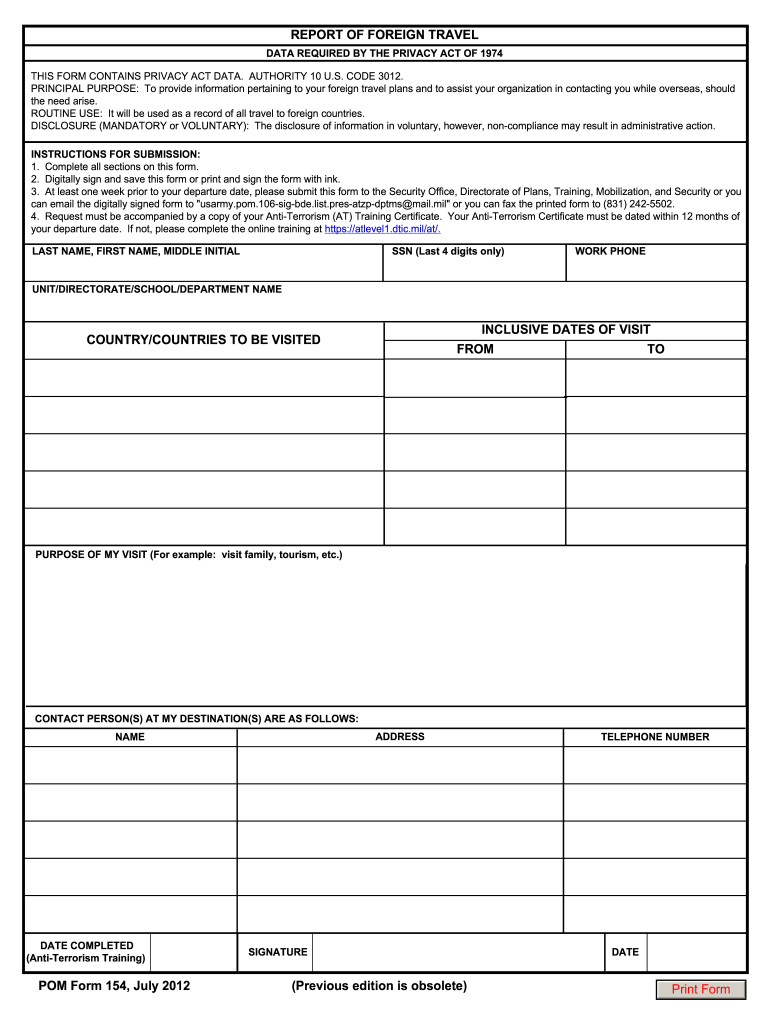
Form 154 report 2026

Get Form
form 154 01 Preview on Page 1

Here's how it works

01. Edit your form 154 01 online
Type text, add images, blackout confidential details, add comments, highlights and more.
02. Sign it in a few clicks
Draw your signature, type it, upload its image, or use your mobile device as a signature pad.
03. Share your form with others
Send mcs 154 form via email, link, or fax. You can also download it, export it or print it out.

How to use or fill out form 154 report with our platform

Form edit decoration
9.5
Ease of Setup
DocHub User Ratings on G2
9.0
Ease of Use
DocHub User Ratings on G2
  1. Click ‘Get Form’ to open the form 154 report in the editor.
  2. Begin by entering your last name, first name, and middle initial in the designated fields. This personal information is crucial for identification.
  3. Input the last four digits of your Social Security Number (SSN) for verification purposes.
  4. Fill in your work phone number and the name of your unit, directorate, school, or department to ensure proper communication.
  5. Specify the inclusive dates of your visit by entering the 'From' and 'To' dates accurately.
  6. List the country or countries you plan to visit along with the purpose of your visit, such as tourism or visiting family.
  7. Provide contact person(s) at your destination(s), including their address and name for emergency contact purposes.
  8. Ensure you complete the Anti-Terrorism Training section by entering the date completed and attaching a copy of your training certificate if required.
  9. Finally, digitally sign and save this form or print it out to sign with ink before submission.

Start using our platform today to fill out your form 154 report easily and efficiently!

See more form 154 report versions

We've got more versions of the form 154 report form. Select the right form 154 report version from the list and start editing it straight away!
Versions Form popularity Fillable & printable
2012 4.8 Satisfied (163 Votes)
be ready to get more

Complete this form in 5 minutes or less

Get form

Got questions?

We have answers to the most popular questions from our customers. If you can't find an answer to your question, please contact us.
Contact us

Yes, and it’s really easy! DocHub is an online PDF editor with advanced document management functions that allow you promptly edit your paperwork, complete blank fields and drop new ones for others to fill out, and create electronic signatures in several ways. Upload your dhs form 154 01, give information as requested, and choose how you want to eSign your template - by typing your name, drawing your signature, uploading its picture, or using a QR code.

You can easily edit fill out your form 154 on any iOS device. Open an internet browser of your liking, go to the DocHub website, authorize or create a new account, upload your file for editing, and make your desired alterations. Our service is mobile-friendly, so using its features on your smartphone will be a no-brainer, even on the first try.

Security and compliance

At DocHub, your data security is our priority. We follow HIPAA, SOC2, GDPR, and other standards, so you can work on your documents with confidence.

Learn more
ccpa2
pci-dss
gdpr-compliance
hipaa
soc-compliance
be ready to get more

Complete this form in 5 minutes or less

Get form