




Here's how it works



How to use or fill out Pima County Sheriff's Department: Home with our platform

- Click ‘Get Form’ to open it in the editor.
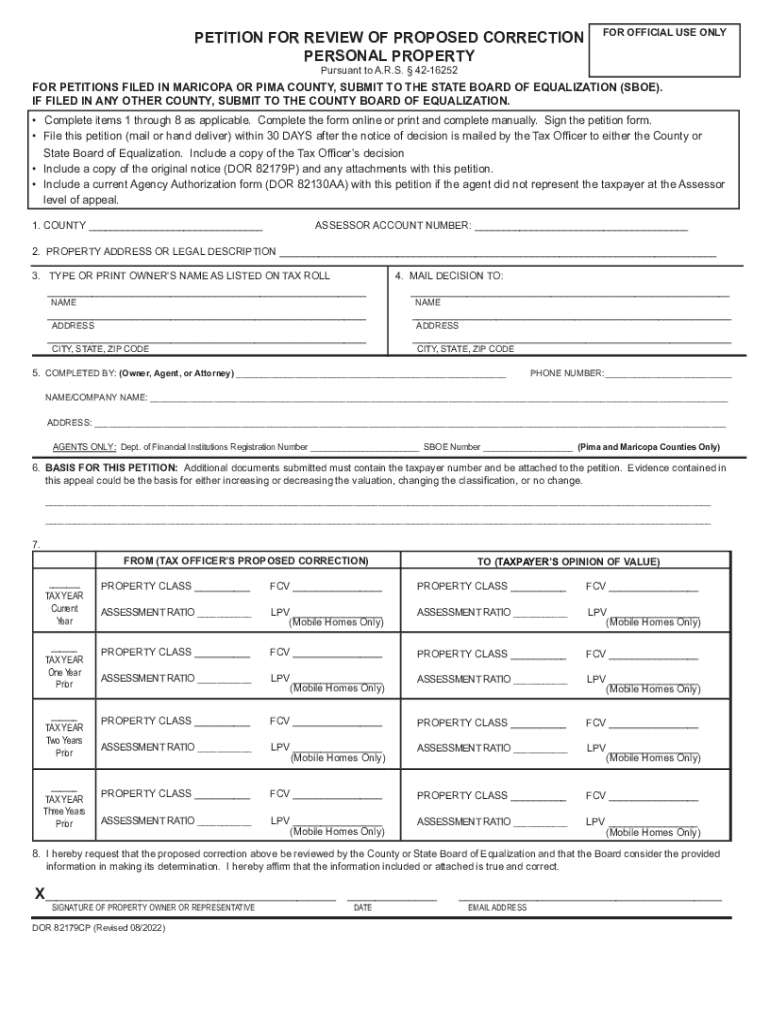
- Begin by filling out Section 1, where you will enter the COUNTY and ASSESSOR ACCOUNT NUMBER. Ensure accuracy as this information is crucial for processing your petition.
- In Section 2, provide the PROPERTY ADDRESS or LEGAL DESCRIPTION. This helps identify the property in question.
- Type or print the OWNER’S NAME as listed on the tax roll in Section 3. This should match official records.
- Section 4 requires you to specify where to MAIL THE DECISION. Fill in all fields completely, including NAME, ADDRESS, CITY, STATE, and ZIP CODE.
- Complete Section 5 with details about who is completing the form (Owner, Agent, or Attorney), including their PHONE NUMBER and NAME/COMPANY NAME.
- In Section 6, outline the BASIS FOR THIS PETITION. Attach any additional documents that support your case.
- Fill out Sections 7 and 8 regarding proposed corrections and affirming that all information is true before signing at the bottom of the form.
Start using our platform today to streamline your document editing and submission process for free!
It's free
See more Pima County Sheriff's Department: Home versions
Got questions?
What is the best way to electronically sign my Pima County Sheriff's Department: Home?
Many software applications are available on the market for document modifying and signing. DocHub is one of the most in-demand online solutions that comply with all data protection and compliance standards and guarantees your electronically signed paperwork is legally enforceable. All you need to try it out is to register an account, upload your Pima County Sheriff's Department: Home, provide the required details, and click Sign. Generate your eSignature by typing, drawing it, uploading its picture to your document, or scanning a unique QR code.
How to fill out Pima County Sheriff's Department: Home on the internet for free in 2024?
With a swift editing platform like DocHub, you do not require anything but a browser and internet connection to edit your Pima County Sheriff's Department: Home on the internet quickly. Upload your document or find the appropriate form in DocHub’s catalog, open our editor with one click, and complete it digitally. To revise your forms at any time, register a free account with DocHub.
How do I email the Pima Sheriff?
How do I contact Pima County Sheriff?
How do I file a report with Pima County Sheriff?
Security and compliance
At DocHub, your data security is our priority. We follow HIPAA, SOC2, GDPR, and other standards, so you can work on your documents with confidence.
Learn more


