
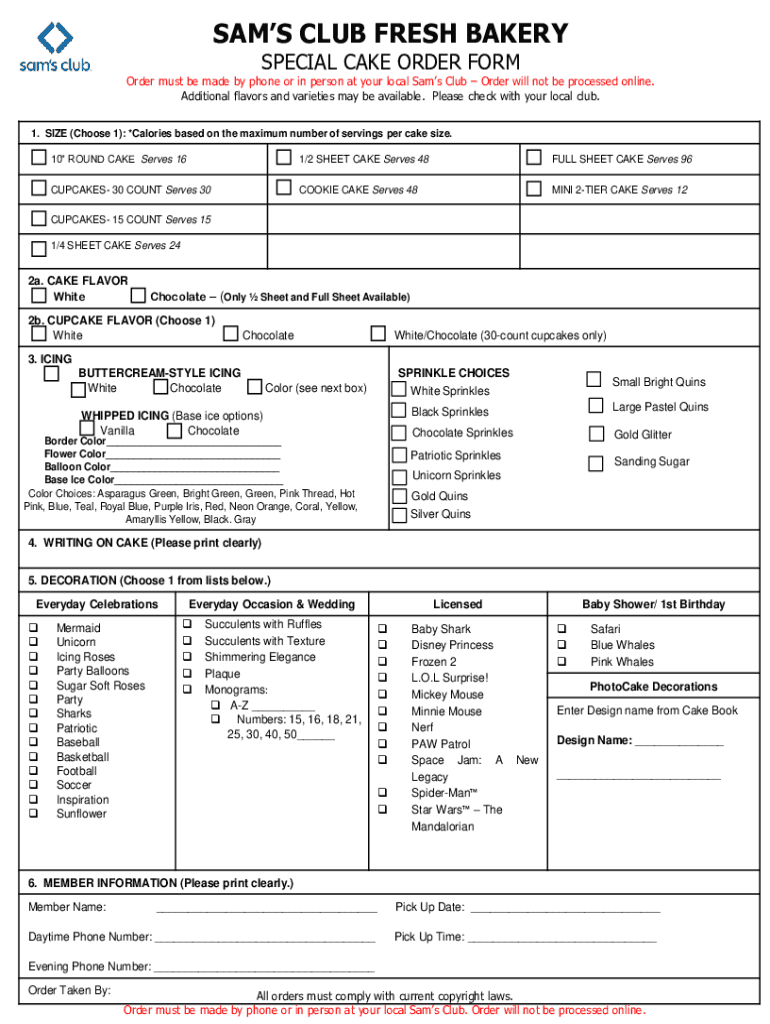







Overview of the Sam's Club Fresh Bakery Special Cake Order Form
The Sam's Club Fresh Bakery special cake order form is designed to facilitate the ordering process for custom cakes and cupcakes. This form is essential for members who wish to place special orders, allowing them to specify their preferences regarding size, flavor, icing, and decoration. It streamlines the ordering process, making it efficient and user-friendly for all customers.
Key Elements of the Sam's Club Cake Order Form
Several key elements are included in the Sam's Club cake order form, each serving a specific purpose in the ordering process.
-
Customer Information: Basic details such as name, membership number, and contact information are required. This ensures that the bakery can reach out with any questions or clarifications regarding the order.
-
Cake Specifications: Customers can select from various sizes (e.g., quarter sheet, half sheet, and full sheet cakes) and flavors, including vanilla, chocolate, and red velvet.
-
Icing and Decoration Options: The form provides choices for icing types (buttercream, fondant) and decoration styles (simple, themed), allowing for a customized design that suits the occasion.
-
Order Confirmation Details: Clear instructions for confirming the order details are provided, including placing orders in person or via phone at local Sam's Club locations.
Steps to Complete the Sam's Club Cake Order Form
Filling out the special cake order form involves several straightforward steps.
-
Obtain the Form: Access the form through official Sam's Club outlets or request it at a local store.
-
Fill in Customer Information: Provide your name, membership details, and contact number for order tracking.
-
Select Cake Specifications: Choose your desired cake size and flavor. For example, if ordering for a birthday party, you might select a half sheet cake in chocolate flavor.
-
Choose Icing and Decoration: Indicate your preferred icing type and describe any decoration requests. For instance, you might opt for buttercream icing with a festive birthday theme.
-
Submit the Order: Orders typically need to be submitted directly by calling the bakery or visiting the store.
Following this method ensures that all necessary information is included, helping prevent any potential issues with your order.
Who Typically Uses the Sam's Club Cake Order Form
The Sam's Club bakery special cake order form is primarily used by Sam's Club members planning to celebrate significant events. Target users include:
-
Party Planners: Individuals organizing parties or events often use the form to ensure their cake fits the theme and size requirements.
-
Parents: Families celebrating birthdays or milestones regularly utilize the form to order custom cakes tailored for their children’s events.
-
Businesses: Companies may use the form to order cakes for corporate events, employee recognition, or promotional activities.
The diverse user base demonstrates how the form caters to various occasions and customer needs.


Important Terms Related to the Sam's Club Cake Order Form
Understanding key terminology is crucial for effectively using the Sam's Club cake order form. Some important terms include:
-
Customization: Refers to the ability to tailor a cake's size, flavor, and decoration according to individual preferences.
-
Order Lead Time: The advance notice required to place an order, often specified by the bakery to ensure adequate preparation time.
-
Membership Number: A unique identifier assigned to each Sam's Club member, necessary for processing orders and acquiring discounts.
Being familiar with these terms can enhance the overall ordering experience and ensure clarity regarding what to expect.
Examples of Using the Sam's Club Cake Order Form
To illustrate its functionality, consider these scenarios involving the use of the Sam's Club cake order form:
-
Birthday Celebration: A member planning a child’s birthday party fills out the form for a themed cake, selecting a chocolate half sheet size with colorful icing and character decorations.
-
Corporate Event: A business manager orders a large cake for an office anniversary, specifying a vanilla flavor with elegant corporate branding on the icing.
-
Wedding Reception: A couple uses the form to request custom cupcakes in multiple flavors, with specific decoration requests for their wedding theme.
These examples represent just a few typical uses of the Sam's Club cake order form, highlighting its flexibility and adaptability for various events.


