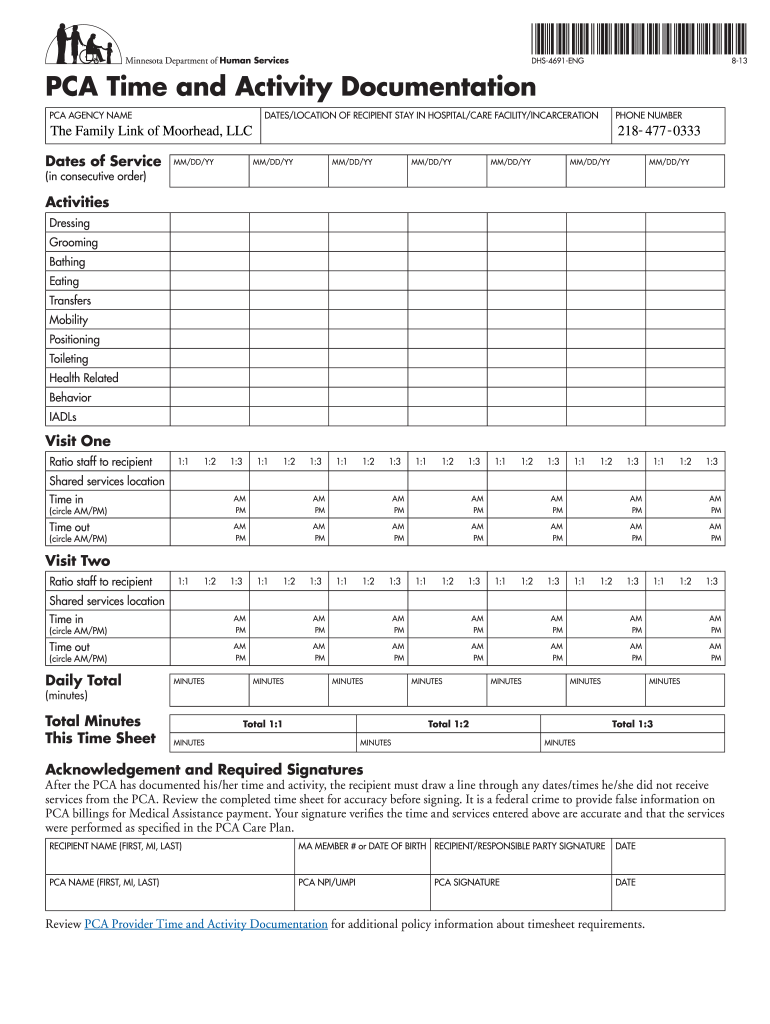
Pca timesheet 2026

Get Form
pca timesheet template Preview on Page 1

Here's how it works

01. Edit your pca timesheet template online
Type text, add images, blackout confidential details, add comments, highlights and more.
02. Sign it in a few clicks
Draw your signature, type it, upload its image, or use your mobile device as a signature pad.
03. Share your form with others
Send pca timesheets via email, link, or fax. You can also download it, export it or print it out.

How to use or fill out PCA timesheet with our platform

Form edit decoration
9.5
Ease of Setup
DocHub User Ratings on G2
9.0
Ease of Use
DocHub User Ratings on G2
  1. Click ‘Get Form’ to open the PCA timesheet in the editor.
  2. Begin by entering the PCA agency name and phone number at the top of the form. This information is essential for identification.
  3. Fill in the dates and location of the recipient's stay in a hospital, care facility, or incarceration. Ensure that these dates are in consecutive order.
  4. In the 'Activities' section, initial next to each activity you provided during your service. This includes tasks like dressing, grooming, bathing, and more.
  5. Document each visit by selecting the appropriate staff-to-recipient ratio (1:1, 1:2, or 1:3) and recording the time in and time out for each visit.
  6. Calculate daily totals for minutes spent providing care and enter them in the designated fields. Make sure to total all minutes across visits accurately.
  7. Finally, both the recipient and PCA must sign and date the form to verify that all information is accurate before submission.

Start using our platform today to streamline your PCA timesheet completion for free!

See more pca timesheet versions

We've got more versions of the pca timesheet form. Select the right pca timesheet version from the list and start editing it straight away!
Versions Form popularity Fillable & printable
2016 4.8 Satisfied (20 Votes)
2014 4.4 Satisfied (326 Votes)
2013 4.3 Satisfied (42 Votes)
2011 4 Satisfied (56 Votes)
be ready to get more

Complete this form in 5 minutes or less

Get form

Got questions?

We have answers to the most popular questions from our customers. If you can't find an answer to your question, please contact us.
Contact us

With DocHub, it’s quite simple. The editor offers users an add-on called DocHub for Gmail, which you can find in the Google Workspace Marketplace free of charge. Install it and grant it access to your Google account. Open your email with your pca timesheet attached and click on the add-on button in the right-side panel. Sign in to your DocHub account, and import the form to our editor, where you can complete it and sign.

When you edit your allied community resources evv with DocHub, you only require a stable web connection and virtually any browser installed on your device. No need to set up any third-party software or study tutorials. Simply open a tab with DocHub, drag and drop your file, and modify it immediately.

Types of Timesheets There are four main types of employee timesheets; daily, weekly, bi-weekly and monthly timesheets, which are used depending on the type of work to be performed and the preferred pay period. Most time cards, time clocks and timesheet calculators have these four alternatives.
How to use this weekly planner Fill in the date range. At the top of the sheet, next to From and To, write the start and end dates for the week youre planning. Add fixed events first. Block time for deep work. Add admin tasks and recurring work. Dont forget breaks. Leave a few blank blocks. Update it as the week goes on.
Tempus is a Web-based timesheet management system for staffing firms and their clients. Using Tempus, consultants working at client sites enter their weekly timesheets and submit them for approval to their client supervisors.

Security and compliance

At DocHub, your data security is our priority. We follow HIPAA, SOC2, GDPR, and other standards, so you can work on your documents with confidence.

Learn more
ccpa2
pci-dss
gdpr-compliance
hipaa
soc-compliance
be ready to get more

Complete this form in 5 minutes or less

Get form

People also ask

What should a time log include? Date. Clearly mark the date for each entry. Start and end times. Record the exact start and end times for each task. Task description. Provide a brief description of the task youre working on. Duration. Note the total time spent on each task. Priority level.
To begin with, managers can fill in the basic details and share the timesheets with their employees to key in their work hours. Step 1: Enter the Employees Name. Step 2: Add a Date Range. Step 3: Add Project Details. Step 4: Add Work Hours for Each Workday. Step 5: Determine Total Work Hours. Step 6: Add Notes, if Required.
How to Fill Out a Timesheet? Step 1 - Name and Surname. The name field in a timesheet should be filled with the name and surname of the team member filling out the timesheet. Step 2 - Date. Step 3 - Project Details. Step 4 - Add Working Hours. Step 5 - Calculate the Hours. Step 6 - Notes. Step 7 - Approval.
An employer and their personal assistants need to have a record of what hours they have worked, so the PA should complete a timesheet. The timesheet should be signed by you both.
A PCA timesheet must include employees first and last name, person served first and last name, dates of service including the dates not worked, time in and time out including the AM or PM portion, initials on what activities they helped the person served with, employees signature, person served signature or RP, PCA

allied community resources timesheets