




Here's how it works



How to use or fill out New Benefited Employee Pre-Employment Paperwork - Human with Our Platform

- Click ‘Get Form’ to open the New Benefited Employee Pre-Employment Paperwork in the editor.
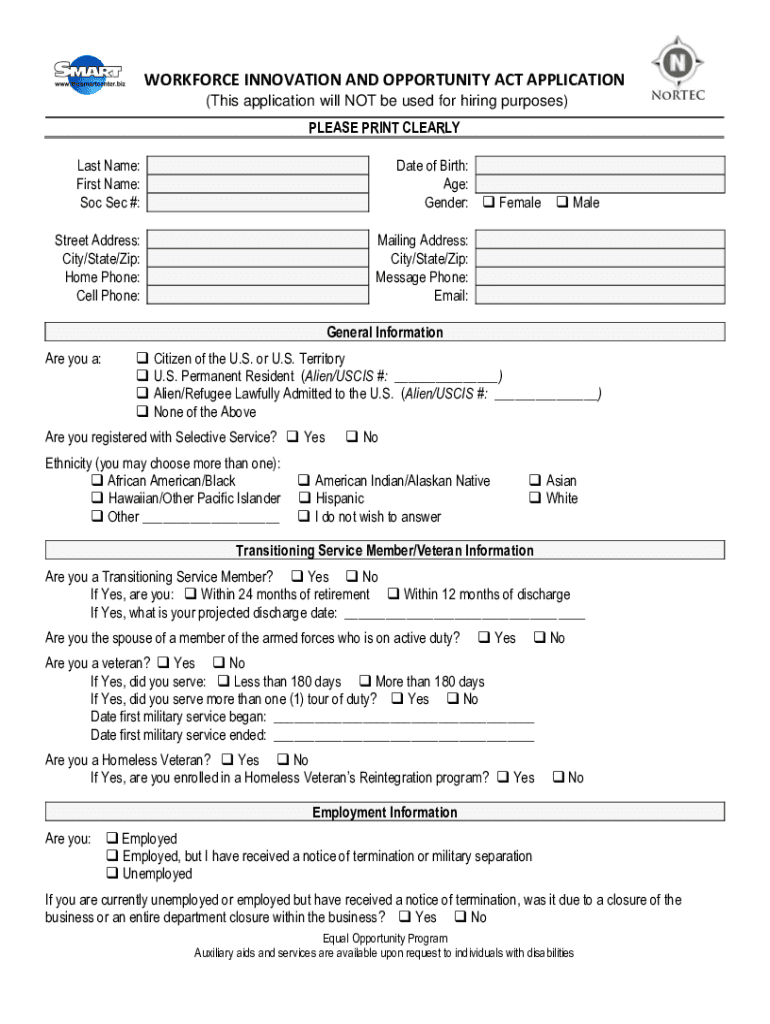
- Begin by filling in your personal information, including your last name, first name, and social security number. Ensure all details are printed clearly.
- Proceed to the General Information section. Indicate your citizenship status and whether you are registered with Selective Service. You can select multiple ethnicities if applicable.
- In the Transitioning Service Member/Veteran Information section, answer questions regarding your military service status and provide relevant dates.
- Complete the Employment Information section by indicating your current employment status and providing details about your most recent job.
- Fill out the Education section, specifying your highest completed grade and any degrees or certifications you hold.
- Finally, review all sections for accuracy before signing at the end of the document to certify that all information is true and complete.
Start using our platform today to easily fill out your New Benefited Employee Pre-Employment Paperwork for free!
It's free
See more New Benefited Employee Pre-Employment Paperwork - Human versions
Got questions?
How can I sign my New Benefited Employee Pre-Employment Paperwork - Human on iOS?
With DocHub, you can easily approve your New Benefited Employee Pre-Employment Paperwork - Human or any other document on iOS, even without setting up additional applications. You can access your DocHub account from any web-connected browser and fill out and sign your form in any preferred method with just a few clicks.
How to complete New Benefited Employee Pre-Employment Paperwork - Human on the internet free of charge in 2024?
Having a swift editing platform like DocHub, you do not require anything but a web browser and internet connection to edit your New Benefited Employee Pre-Employment Paperwork - Human on the internet easily. Upload your document or find the relevant form in DocHub’s catalog, open our editor with one click, and finish it electronically. To revise your forms anytime, register a free account with DocHub.
What documents to give to a new employer?
What federal forms are given to a newly hired employee?
What are 4 Cs for onboarding?
Security and compliance
At DocHub, your data security is our priority. We follow HIPAA, SOC2, GDPR, and other standards, so you can work on your documents with confidence.
Learn more


