Nebraska Route Survey Doc Template 2026

Get Form
Nebraska Route Survey Doc Template Preview on Page 1

Here's how it works

01. Edit your form online
Type text, add images, blackout confidential details, add comments, highlights and more.

02. Sign it in a few clicks
Draw your signature, type it, upload its image, or use your mobile device as a signature pad.

03. Share your form with others
Send it via email, link, or fax. You can also download it, export it or print it out.

How to use or fill out Nebraska Route Survey Doc Template with our platform

Form edit decoration
9.5
Ease of Setup
DocHub User Ratings on G2
9.0
Ease of Use
DocHub User Ratings on G2
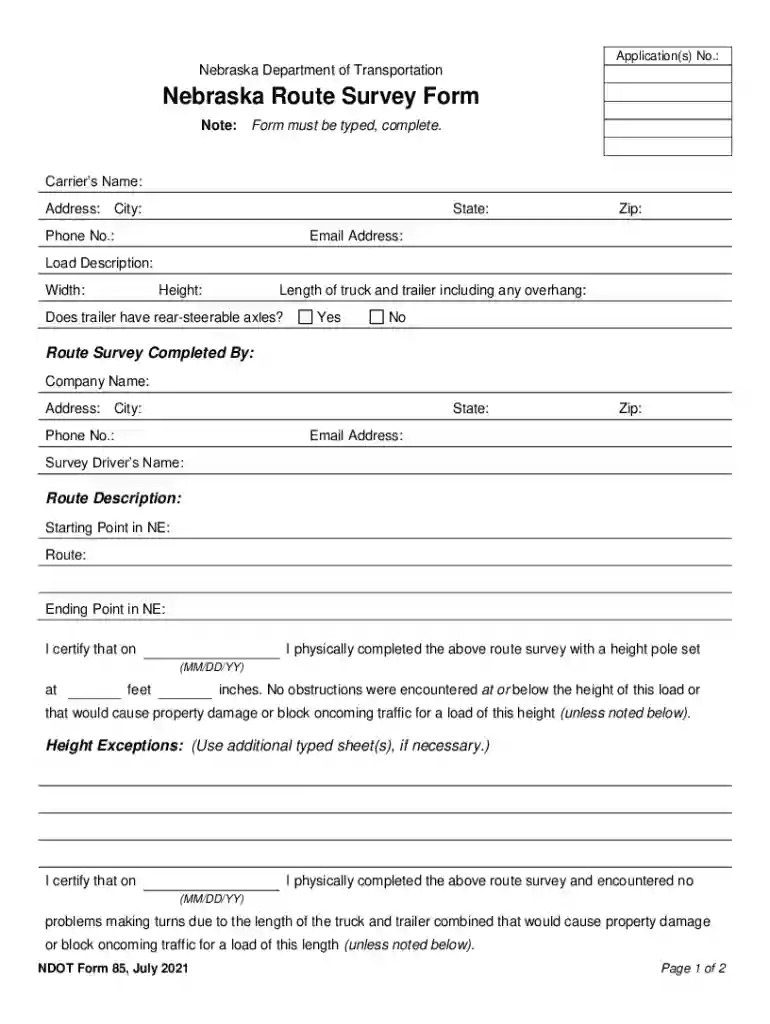
  1. Click ‘Get Form’ to open the Nebraska Route Survey Doc Template in the editor.
  2. Begin by entering the Carrier’s Name, Address, City, State, Phone No., Zip, and Email Address in the designated fields. Ensure all information is accurate and complete.
  3. Fill out the Load Description section by providing details such as Width, Height, and Length of the truck and trailer including any overhang. Indicate whether the trailer has rear-steerable axles by selecting 'Yes' or 'No'.
  4. Complete the Route Survey Completed By section with your Company Name, Address, City, State, Phone No., Zip, Email Address, and Survey Driver’s Name.
  5. In the Route Description section, specify the Starting Point in NE and Route as well as the Ending Point in NE.
  6. Certify that you have completed the route survey by filling in the date and height pole measurement. Note any obstructions if applicable.
  7. If applicable for loads 16 feet or higher, indicate if any utility lines are affected. Complete Certification if necessary.
  8. Finally, ensure to sign where indicated. Remember that typed or electronic signatures will not be accepted.

Start using our platform today to easily fill out your Nebraska Route Survey Doc Template for free!

See more Nebraska Route Survey Doc Template versions

We've got more versions of the Nebraska Route Survey Doc Template form. Select the right Nebraska Route Survey Doc Template version from the list and start editing it straight away!
Versions Form popularity Fillable & printable
2021 4.6 Satisfied (24 Votes)
2017 4.6 Satisfied (30 Votes)
be ready to get more

Complete this form in 5 minutes or less

Get form

Got questions?

We have answers to the most popular questions from our customers. If you can't find an answer to your question, please contact us.
Contact us

Of course, electronically drawing your signature is acceptable, but only if you utilize a tool that complies with industry laws and regulations. Try DocHub, which guarantees eSignature validity under ESIGN and UETA requirements. All you need to eSign your Nebraska Route Survey Doc Template is an account with DocHub and an internet connection. When you open your file in our editor, click Sign and choose the Draw option.

You can easily complete, modify, and even eSign your Nebraska Route Survey Doc Template utilizing DocHub. Create a new profile and begin your free trial. After that, you may upload the document with the form and simply make all the necessary edits. No need to print on paper or use a third-party application to sign it, as you can put your electronic signature on your document faster through DocHub.

Creating a Survey in Google Documents. Google Documents has the ability to quickly and easily set up a form that can be mailed to anyone. Responses are collected in a spreadsheet that can be used on its own or opened with Microsoft Excel.
A route survey is the starting point for any infrastructure project that cuts across the land. It answers critical questions: Whats the topography of the area? Are there any natural or man-made obstacles? How can the route align with existing infrastructure?
How to create a survey Open Canva. Launch Canva and search for Survey to make your own survey. Choose a survey template. Browse our survey templates and choose a format that best fits your research purposes. Add your survey questions. Personalize your survey template. Download, print, or share.

Security and compliance

At DocHub, your data security is our priority. We follow HIPAA, SOC2, GDPR, and other standards, so you can work on your documents with confidence.

Learn more
ccpa2
pci-dss
gdpr-compliance
hipaa
soc-compliance
be ready to get more

Complete this form in 5 minutes or less

Get form

People also ask

1. Under Start a new form, click on Blank (with the plus sign) to create a new custom survey, or click on any of the templates to start creating. 2. Name your survey, and describe the purpose of the survey.

Related links