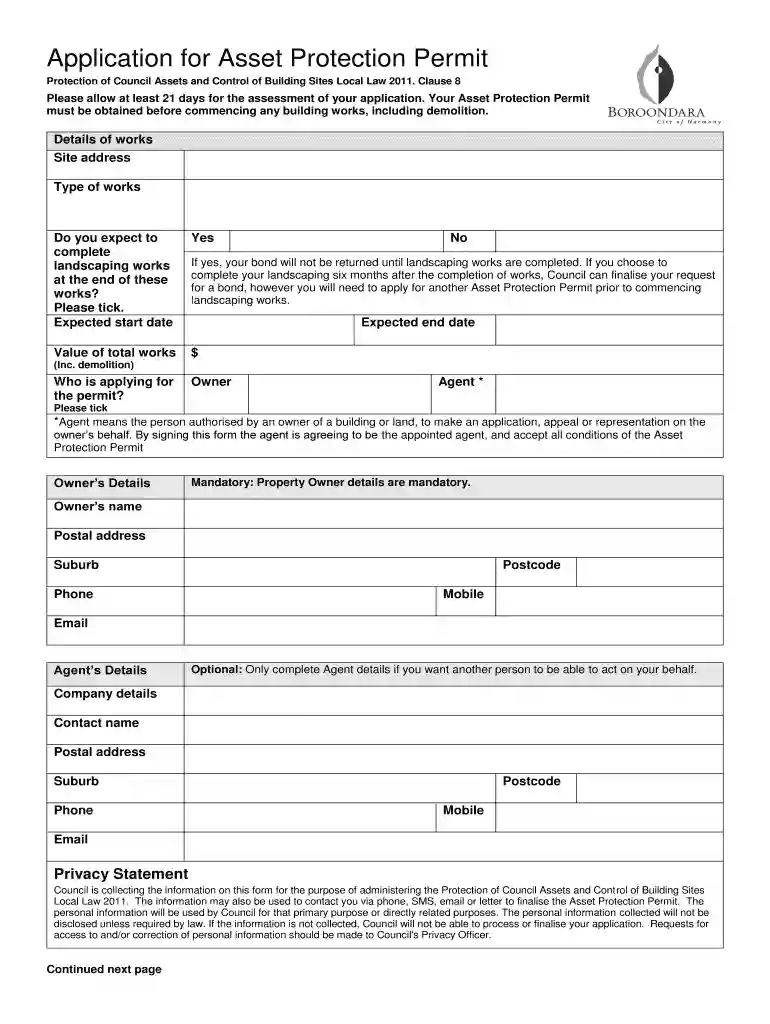
Application for Asset Protection Permit - City of Boroondara 2026

Get Form
boroondara asset protection permit Preview on Page 1

Here's how it works

01. Edit your boroondara asset protection permit online
Type text, add images, blackout confidential details, add comments, highlights and more.

02. Sign it in a few clicks
Draw your signature, type it, upload its image, or use your mobile device as a signature pad.

03. Share your form with others
Send asset protection permit boroondara via email, link, or fax. You can also download it, export it or print it out.

How to use or fill out Application for Asset Protection Permit - City of Boroondara with our platform

Form edit decoration
9.5
Ease of Setup
DocHub User Ratings on G2
9.0
Ease of Use
DocHub User Ratings on G2
  1. Click ‘Get Form’ to open it in the editor.
  2. Begin by entering the site address and type of works in the designated fields. Ensure accuracy as this information is crucial for your application.
  3. Indicate whether you expect to complete landscaping works at the end of your project by ticking 'Yes' or 'No'. If 'Yes', be aware that your bond will not be returned until landscaping is completed.
  4. Fill in the expected start and end dates for your works, including any demolition activities.
  5. Provide details about the applicant. If you are the owner, fill in your name, postal address, phone number, and email. If an agent is applying on your behalf, complete their details as well.
  6. Sign and date the declaration section at the bottom of the form. Both owner and agent signatures are required if applicable.

Start using our platform today to streamline your application process for free!

See more Application for Asset Protection Permit - City of Boroondara versions

We've got more versions of the Application for Asset Protection Permit - City of Boroondara form. Select the right Application for Asset Protection Permit - City of Boroondara version from the list and start editing it straight away!
Versions Form popularity Fillable & printable
2020 4.5 Satisfied (51 Votes)
be ready to get more

Complete this form in 5 minutes or less

Get form

Got questions?

We have answers to the most popular questions from our customers. If you can't find an answer to your question, please contact us.
Contact us

Managing your documentation with DocHub this way is very easy after you have downloaded its extension for Google Chrome. Navigate to the Chrome Web Store and install DocHub - Sign PDF from Gmail to obtain it. Give our tool access to your Google account, and then open an email containing application asset protection permit as an attachment and point to the file with your cursor - the DocHub extension key will automatically show up there. Click on it to open your form in our editor. Make any necessary edits, fill out the blanks, and click Sign to create your legally-binding electronic signature.

If you edit your asset protection permit city with DocHub, you will not need to look for other software or services to eSign it. An electronic signature is a component of DocHub’s extensive editing toolset, which enables you to apply changes in your form without switching between websites. Simply complete your form, double-check the correctness of the information and put your electronic signature at the end to make it submission-ready within a few minutes.

Call us anytime on (03) 9278 4444. If something causes a dangerous situation that needs to be addressed immediately, call us 24/7 on (03) 9278 4444, so we can keep our community safe.
Ashburton, Balwyn, Balwyn North, Burwood, Camberwell, Canterbury, Deepdeene,Glen Iris, Glenferrie South, Greythorn, Hawthorn, Hawthorn East, Kew, Kew East, Mont Albert and Surrey Hills.
The primary qualifications for becoming an asset protection specialist are registration and training. You must be at least 18 years old, pass a background check, and register with state authorities. You must also register to open carry, which is often part of your protective duties as security personnel.

Security and compliance

At DocHub, your data security is our priority. We follow HIPAA, SOC2, GDPR, and other standards, so you can work on your documents with confidence.

Learn more
ccpa2
pci-dss
gdpr-compliance
hipaa
soc-compliance