




Here's how it works



How to use or fill out 5607 University Center A with our platform

- Click ‘Get Form’ to open it in the editor.
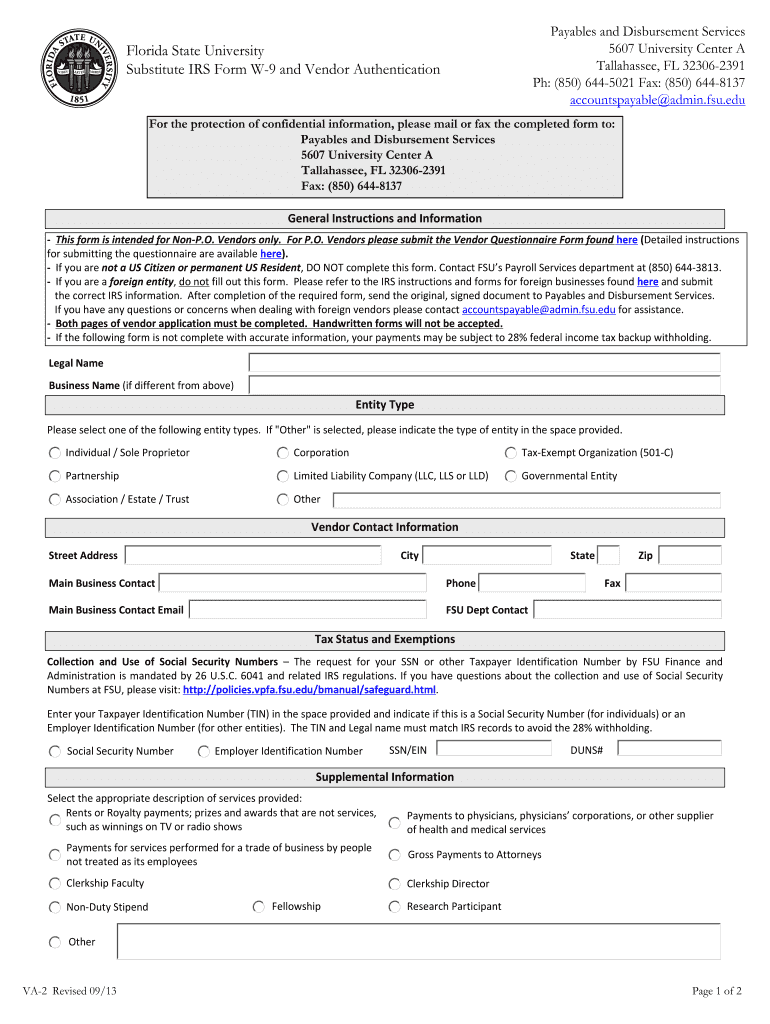
- Begin by filling in your Legal Name and Business Name (if applicable). Ensure that these names match IRS records to avoid any issues.
- Select your Entity Type from the provided options. If you choose 'Other', please specify the type in the designated space.
- Complete the Vendor Contact Information section, including your Street Address, City, State, Zip, Phone, and Email. This information is crucial for communication.
- In the Tax Status and Exemptions section, enter your Taxpayer Identification Number (TIN) and indicate whether it is a Social Security Number or Employer Identification Number.
- Select the appropriate description of services provided from the Supplemental Information section. Be thorough to ensure accurate processing.
- Review all entries for accuracy before signing. The Certification section requires your signature and date to validate the information provided.
Start using our platform today to fill out your form quickly and efficiently!
It's free
See more 5607 University Center A versions
Got questions?
Is it safe to sign my 5607 University Center A electronically?
You need to use only reliable software solutions with strong security compliance to sign your paperwork electronically. DocHub is just the type of software you need! It stores data on Amazon Web Servers and complies with all essential security requirements and eSignature regulations, so it’s a trustworthy way to electronically sign your 5607 University Center A or other documents with this tool.
How do you complete 5607 University Center A online?
You may complete and sign your 5607 University Center A online, even on a tight deadline. All you need to access high quality editing instruments on any device is a DocHub account, that you can sign up within a couple of moments. Once you sign up, add your document or find what you are looking for in our catalog, complete it using the editing instruments you need, and place your electronic signature on it at the end.
What is the billing address for FSU procurement services?
How do I contact FSU?
What is the address for FSU payment?
Security and compliance
At DocHub, your data security is our priority. We follow HIPAA, SOC2, GDPR, and other standards, so you can work on your documents with confidence.
Learn more


