
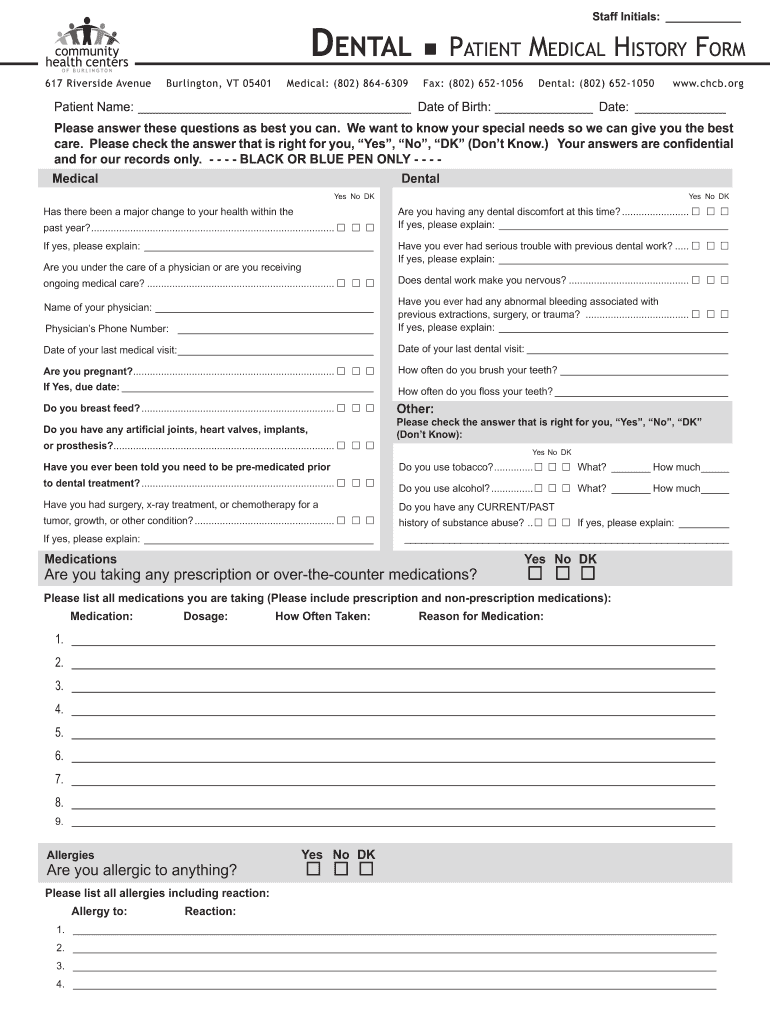





Dental patient medical form 2026

Get Form
dentist forms to fill out Preview on Page 1

Here's how it works

01. Edit your dentist forms to fill out online
Type text, add images, blackout confidential details, add comments, highlights and more.
02. Sign it in a few clicks
Draw your signature, type it, upload its image, or use your mobile device as a signature pad.
03. Share your form with others
Send dentist forms via email, link, or fax. You can also download it, export it or print it out.

How to use or fill out dental patient medical form with our platform

Form edit decoration
9.5
Ease of Setup
DocHub User Ratings on G2
9.0
Ease of Use
DocHub User Ratings on G2
  1. Click ‘Get Form’ to open the dental patient medical form in the editor.
  2. Begin by entering your personal information, including your name and date of birth, in the designated fields at the top of the form.
  3. Carefully read each question regarding your medical history. For each question, select 'Yes', 'No', or 'DK' (Don’t Know) as applicable. If you answer 'Yes' to any questions, provide additional details in the space provided.
  4. Fill out sections related to medications and allergies. List all medications you are currently taking along with their dosages and reasons for use.
  5. Complete the medical information section by checking relevant health issues and providing comments where necessary.
  6. Finally, review your entries for accuracy before signing at the bottom of the form. Ensure that you understand all statements regarding consent and appointment policies.

Start filling out your dental patient medical form online for free today!

See more dental patient medical form versions

We've got more versions of the dental patient medical form form. Select the right dental patient medical form version from the list and start editing it straight away!
Versions Form popularity Fillable & printable
2013 4.8 Satisfied (142 Votes)
be ready to get more

Complete this form in 5 minutes or less

Get form

Got questions?

We have answers to the most popular questions from our customers. If you can't find an answer to your question, please contact us.
Contact us

Yes, you can utilize DocHub for signing any business and private documentation, including your dental medical form. All eSignatures you create with our service are legally binding and court-admissible, as DocHub complies with standards required by ESIGN and UETA. Save your accomplished document with a detailed Audit Trail if necessary.

When you choose analog methods of completing your dental form, you can easily download your file for printing. Search DocHub’s Forms & Templates catalog to get the exact document template you require and open it for editing or download it on your device in the format of your liking. It is easy to complete your form electronically and place your handwritten signature on it after printing or eSign your document with DocHub.

To write a dental case report, you should begin by obtaining informed consent from the patient, gathering all relevant information about their medical and dental history, performing a thorough examination and diagnosis, developing a treatment plan, and documenting the treatment process and outcomes.
Note the findings. Normal findings might be documented as: White teeth with no loose, missing, chipped or broken teeth. Gums are pink in colour with no swelling, bleeding, or pain. Abnormal findings might be documented as: Slight yellow discolouration of the teeth.
Consider these tips before making entries in the dental record: Charting practices should be consistent in each setting and the dentist is always obligated to ensure that charting is accurate. Consider using the SOAP (Subjective, Objective, Assessment, and Plan) method for chart entries.

Security and compliance

At DocHub, your data security is our priority. We follow HIPAA, SOC2, GDPR, and other standards, so you can work on your documents with confidence.

Learn more
ccpa2
pci-dss
gdpr-compliance
hipaa
soc-compliance
be ready to get more

Complete this form in 5 minutes or less

Get form

People also ask

Manual Records Patient Information. Accurate general patient information which includes the patients full name, address and contact details. History. Dental History. Their ability and confidence to chew food. Chief Complaint. Clinical Examination. Radiographs. Diagnosis and Treatment plan.
The best dental case presentation combines speech with non-verbal cues and visual aids, such as diagrams or photos. Other best practices include: Holding the dental case presentation in a private consultation room, especially for major restorative work or patients needing multiple appointments.
Information typically noted in the dental record includes: personal data, such as the patients name, birth date, address and contact information including home, work and mobile telephone numbers. the patients place of employment. medical and dental histories, notes and updates.
Before your visit, your dental office will likely ask you to fill out some forms. These forms typically include your medical history, insurance information, and any specific concerns you have about your oral health.

dental health record form