




Here's how it works



How to use or fill out attestation secteur pont trial with our platform

- Click ‘Get Form’ to open the attestation secteur pont trial in the editor.
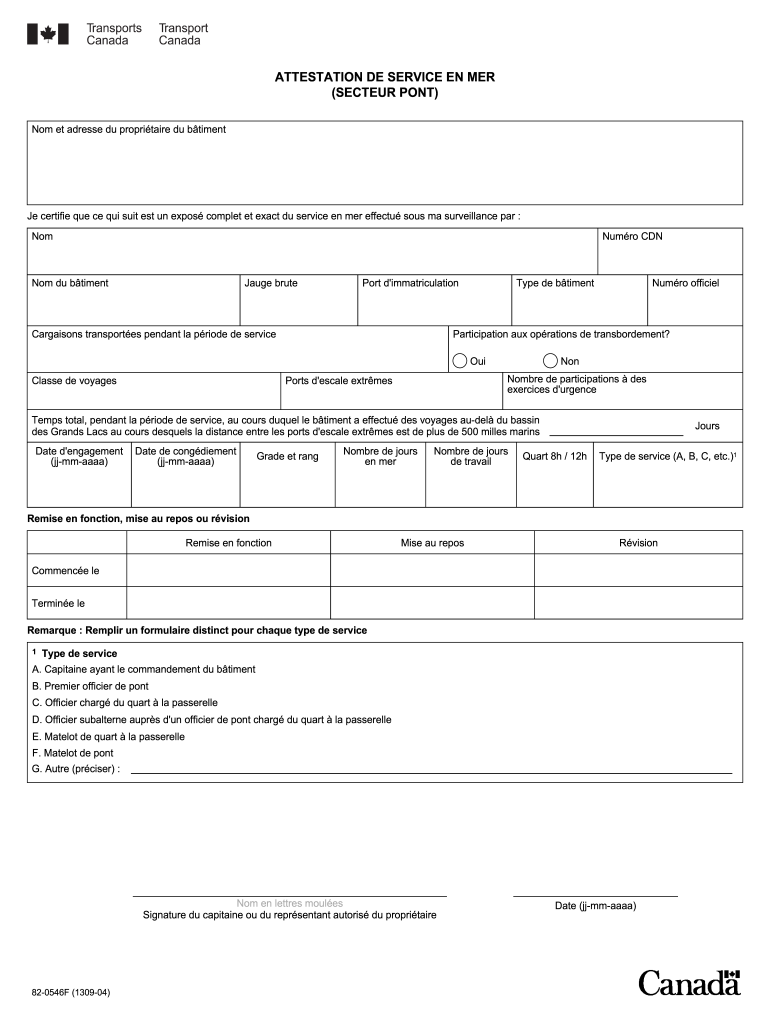
- Begin by entering the name and address of the building owner in the designated fields at the top of the form.
- Fill in the details for the service performed, including the name, CDN number, vessel name, gross tonnage, and port of registration.
- Document any cargo transported during the service period and specify if there was participation in transshipment operations by selecting 'Yes' or 'No'.
- Complete sections regarding travel class, official number, emergency exercise participation, and extreme port calls.
- Indicate total time spent beyond the Great Lakes basin and provide engagement and discharge dates in dd-mm-yyyy format.
- Specify rank and grade along with days at sea and work days. Choose between 8-hour or 12-hour shifts as applicable.
- Select type of service (A-G) from the options provided and indicate whether it was a recommissioning, resting, or revision period.
- Finally, ensure to sign with printed name and signature of the captain or authorized representative along with date.
Start using our platform today to fill out your attestation secteur pont trial easily and for free!
It's free
See more attestation secteur pont trial versions
| Versions | Form popularity | Fillable & printable |
|---|---|---|
| 2004 | 4.8 Satisfied (144 Votes) |
Got questions?
Is it secure to sign my attestation secteur pont trial electronically?
You need to use only reliable software solutions with strong security compliance to sign your paperwork electronically. DocHub is just the type of service you need! It stores data on Amazon Web Servers and complies with all necessary security criteria and eSignature laws, so it’s a trusted way to eSign your attestation secteur pont trial or other documents with this tool.
How do you get attestation secteur pont trial?
You can find the latest and most relevant version of the attestation secteur pont trial in our DocHub forms library. Search it by categories or use the search field to locate the exact template that suits your situation. You may open this form for editing after you find it.
Security and compliance
At DocHub, your data security is our priority. We follow HIPAA, SOC2, GDPR, and other standards, so you can work on your documents with confidence.
Learn more


