Change my address dmv 2025

Get Form
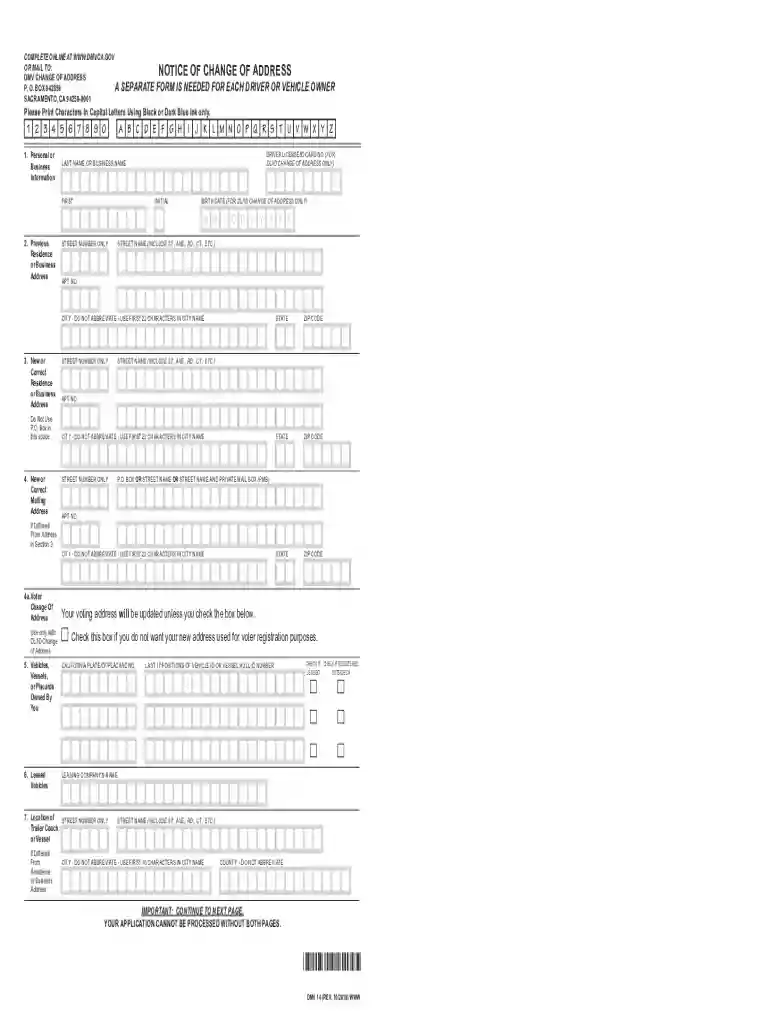
ca dmv 14 form Preview on Page 1

Here's how it works

01. Edit your ca dmv 14 form online
Type text, add images, blackout confidential details, add comments, highlights and more.

02. Sign it in a few clicks
Draw your signature, type it, upload its image, or use your mobile device as a signature pad.

03. Share your form with others
Send california dmv 14 via email, link, or fax. You can also download it, export it or print it out.

How to use or fill out change my address dmv with our platform

Form edit decoration
9.5
Ease of Setup
DocHub User Ratings on G2
9.0
Ease of Use
DocHub User Ratings on G2
  1. Click ‘Get Form’ to open the change my address DMV form in the editor.
  2. Begin by entering your personal or business information. Fill in your driver license or ID card number, last name, first name, and birth date as required.
  3. In Section 2, provide your previous residence or business address. Ensure you include the street number, street name, city (without abbreviations), and any apartment number if applicable.
  4. Next, move to Section 3 to input your new residence or business address. Avoid using a P.O. Box here; instead, provide a physical address.
  5. If your mailing address differs from the new residence address, complete Section 4 with the appropriate details.
  6. For vehicles owned by you, fill out Section 5 with the California plate number and any other relevant vehicle information.
  7. Finally, review all sections for accuracy before signing and dating the form in Section 10 to certify that all information is correct.

Start using our platform today to easily complete your DMV change of address form online for free!

See more change my address dmv versions

We've got more versions of the change my address dmv form. Select the right change my address dmv version from the list and start editing it straight away!
Versions Form popularity Fillable & printable
2021 4.1 Satisfied (35 Votes)
2018 4.9 Satisfied (39 Votes)
2018 4.4 Satisfied (287 Votes)
2013 4.3 Satisfied (58 Votes)
2004 4.4 Satisfied (303 Votes)
be ready to get more

Complete this form in 5 minutes or less

Get form

Got questions?

We have answers to the most popular questions from our customers. If you can't find an answer to your question, please contact us.
Contact us
Online: Change your address online. Expect it to take up to three days for processing. By mail: Download the DMV 14 form (PDF) (or call DMV at 1-800-777-0133 to request to have the form mailed to you; note this may take up to 5 days to receive) and mail the completed form to the address listed on the form.
Sign in to MyDMV. Under DMV Services, click Change My Address. Enter the required information.
You can update your address online, by mail, or in-person. Required documents include your driver license, vehicle registration, and proof of residency. The CA DMV offers an online Change of Address form (DMV 9374) for easy updates. In-person updates require a visit to a local CA DMV office.