




Here's how it works

01. Edit your mvdb 10 form online
Type text, add images, blackout confidential details, add comments, highlights and more.

02. Sign it in a few clicks
Draw your signature, type it, upload its image, or use your mobile device as a signature pad.

03. Share your form with others
Send it via email, link, or fax. You can also download it, export it or print it out.
How to use or fill out Wisconsin DMV Official Government Site - Motor vehicle with our platform

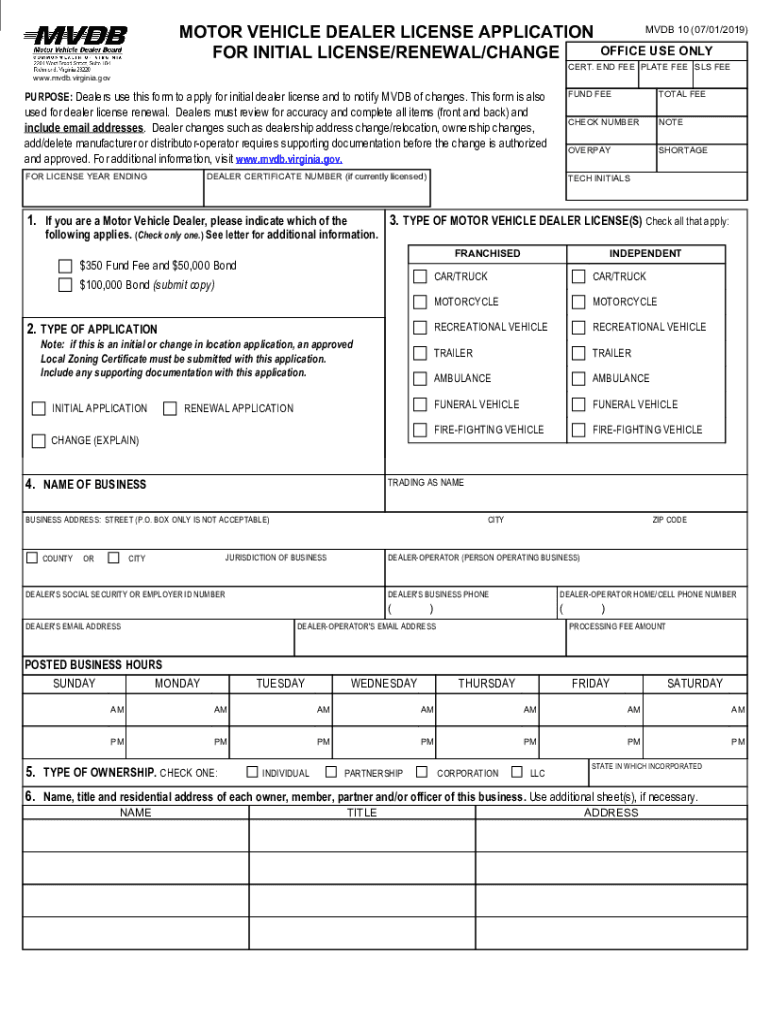
- Click ‘Get Form’ to open the Motor Vehicle Dealer License Application in the editor.
- Begin by filling out your dealer certificate number if you are currently licensed. If this is an initial application, ensure you have an approved Local Zoning Certificate ready.
- Indicate the type of application by checking the appropriate box: Initial, Renewal, or Change. Provide details for any changes in ownership or location as required.
- Complete the business information section, including the name of your business and its physical address. Remember that P.O. Boxes are not acceptable.
- Fill in the type of motor vehicle dealer license(s) you are applying for by checking all applicable boxes. Include your email address and phone numbers for contact purposes.
- Answer all questions regarding previous licenses and criminal history truthfully, as these responses are crucial for processing your application.
- Finally, review all entries for accuracy before signing and dating the certification at the bottom of the form.
Start using our platform today to streamline your form completion process for free!
Fill out Wisconsin DMV Official Government Site - Motor vehicle online
It's free
It's free
See more Wisconsin DMV Official Government Site - Motor vehicle versions
We've got more versions of the Wisconsin DMV Official Government Site - Motor vehicle form. Select the right Wisconsin DMV Official Government Site - Motor vehicle version from the list and start editing it straight away!
| Versions | Form popularity | Fillable & printable |
|---|---|---|
| 2019 | 4.1 Satisfied (29 Votes) |
Got questions?
We have answers to the most popular questions from our customers. If you can't find an answer to your question, please contact us.
Contact us
How do I renew my license plate sticker in Wisconsin?
To check drivers license status, you can use the following webpage. Enter the clients drivers license number, the last four digits of the clients Social Security Number, and the clients date of birth.
How much is the EZ tab in Wisconsin?
Most license plates, stickers and Certificate of Vehicle Registration are sent within 10 days from the processing date. To produce and mail personalized and some special plates will take an additional 6-8 weeks to be received in the mail.
Can you renew license plates in person in Wisconsin?
EZ-TAB gives you everything you need instantly. EZ-TAB is paid for and provided by RTI at $0 cost to the DMV or the State of WI.
Can I register my vehicle online in WI?
Wisconsin and out-of-state titles can be used to apply online. Note: you can apply online for both a Wisconsin title AND plates.
How much is a Wisconsin license plate sticker?
If you prefer, you may renew in person at a DMV customer service center that offers registration services or at a renewal service provider.
Security and compliance
At DocHub, your data security is our priority. We follow HIPAA, SOC2, GDPR, and other standards, so you can work on your documents with confidence.
Learn more


