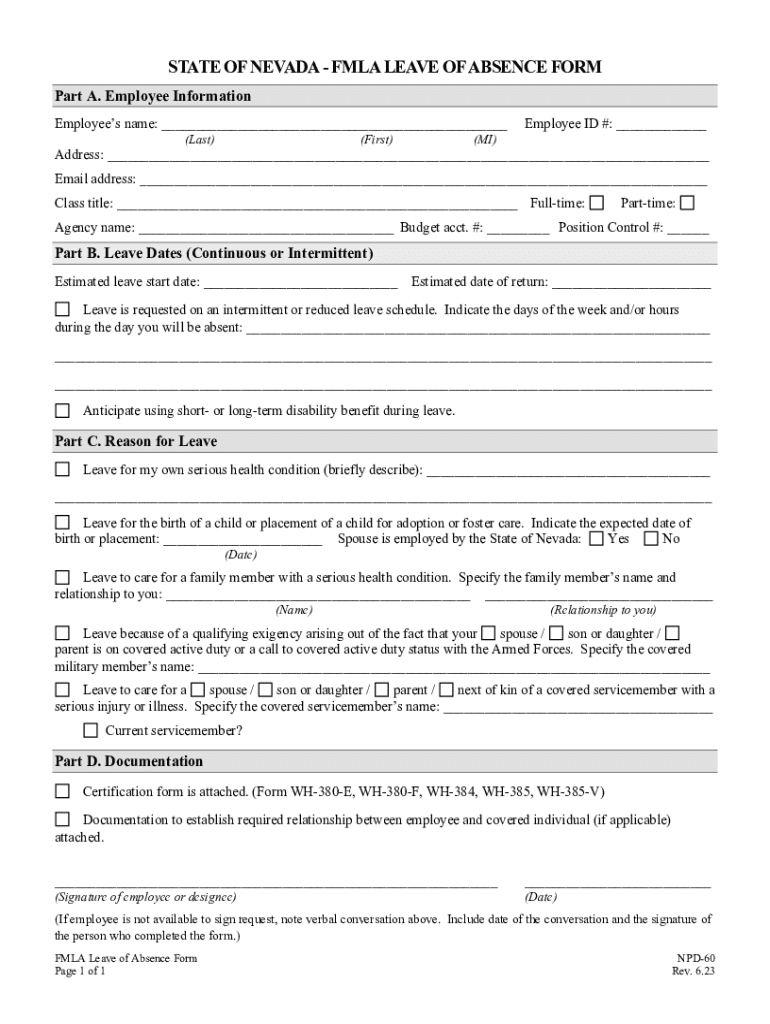
Family and Medical Leave (FMLA) Policy 2026

Get Form
medical fmla leave absence Preview on Page 1

Here's how it works

01. Edit your medical fmla leave absence online
Type text, add images, blackout confidential details, add comments, highlights and more.
02. Sign it in a few clicks
Draw your signature, type it, upload its image, or use your mobile device as a signature pad.
03. Share your form with others
Send it via email, link, or fax. You can also download it, export it or print it out.

How to use or fill out Family and Medical Leave (FMLA) Policy with our platform

Form edit decoration
9.5
Ease of Setup
DocHub User Ratings on G2
9.0
Ease of Use
DocHub User Ratings on G2
  1. Click ‘Get Form’ to open the Family and Medical Leave (FMLA) Policy in the editor.
  2. Begin with Part A: Employee Information. Fill in your name, employee ID, address, email, class title, and employment status (full-time or part-time). Ensure all details are accurate for proper identification.
  3. Move to Part B: Leave Dates. Enter your estimated leave start date and expected return date. If applicable, specify if the leave is intermittent or reduced schedule by detailing the days and hours you will be absent.
  4. In Part C: Reason for Leave, select the appropriate reason for your leave. Provide a brief description of your serious health condition or details regarding childbirth/adoption. If caring for a family member, include their name and relationship.
  5. Complete Part D: Documentation by confirming that any necessary certification forms are attached. Sign and date the form at the bottom to finalize your request.

Start using our platform today to easily complete your FMLA Policy form online for free!

See more Family and Medical Leave (FMLA) Policy versions

We've got more versions of the Family and Medical Leave (FMLA) Policy form. Select the right Family and Medical Leave (FMLA) Policy version from the list and start editing it straight away!
Versions Form popularity Fillable & printable
2023 4.6 Satisfied (56 Votes)
2014 4.6 Satisfied (30 Votes)
2011 4 Satisfied (33 Votes)
be ready to get more

Complete this form in 5 minutes or less

Get form

Got questions?

We have answers to the most popular questions from our customers. If you can't find an answer to your question, please contact us.
Contact us

Electronic document approval requires a software solution that works in compliance with data protection and eSignature regulations. DocHub is an excellent tool for that, because it meets all the above mentioned requirements. Whatever method you like to sign your Family and Medical Leave (FMLA) Policy in DocHub, your electronic signature will be legally binding and court-admissible.

Apart from a comprehensive toolset for editing PDFs on mobile devices, DocHub allows you to sign your Family and Medical Leave (FMLA) Policy along the way. Open our editor in your web browser, make changes using DocHub’s toolset, and complete your editing by eSigning the completed form.

This vagueness can make it difficult for HR professionals and supervisors to determine whether an employee requesting FMLA leave for such a reason is actually eligible. Employers also worry about possible employee abuse of FMLA leave, such as exaggerating the severity of medical conditions or fabricating medical notes.
When employees use their paid sick leave, contractors must provide workers with their regular pay and benefits. When eligible employees use their paid sick time, employers are required to pay workers their usual rate of pay. FMLA leave is unpaid leave.
You can receive up to: 35 weeks with the family caregiver benefit for children who are under 18 years of age. 15 weeks with the family caregiver benefit for adults. 26 weeks with the compassionate care benefit.

Security and compliance

At DocHub, your data security is our priority. We follow HIPAA, SOC2, GDPR, and other standards, so you can work on your documents with confidence.

Learn more
ccpa2
pci-dss
gdpr-compliance
hipaa
soc-compliance

People also ask

You dont need to apply for FMLA unless theres a chance you will run out of sick leave before you are released to return to work. FMLA not only protects your absence, but it also allows you to use any type of leave credits for it, including dock.
Employees are eligible for leave if they have worked for their employer at least 12 months, at least 1,250 hours over the past 12 months, and work at a location where the company employs 50 or more employees within 75 miles.

Related links