Ketchumidaho sites defaultCity of Ketchum 2026

Get Form
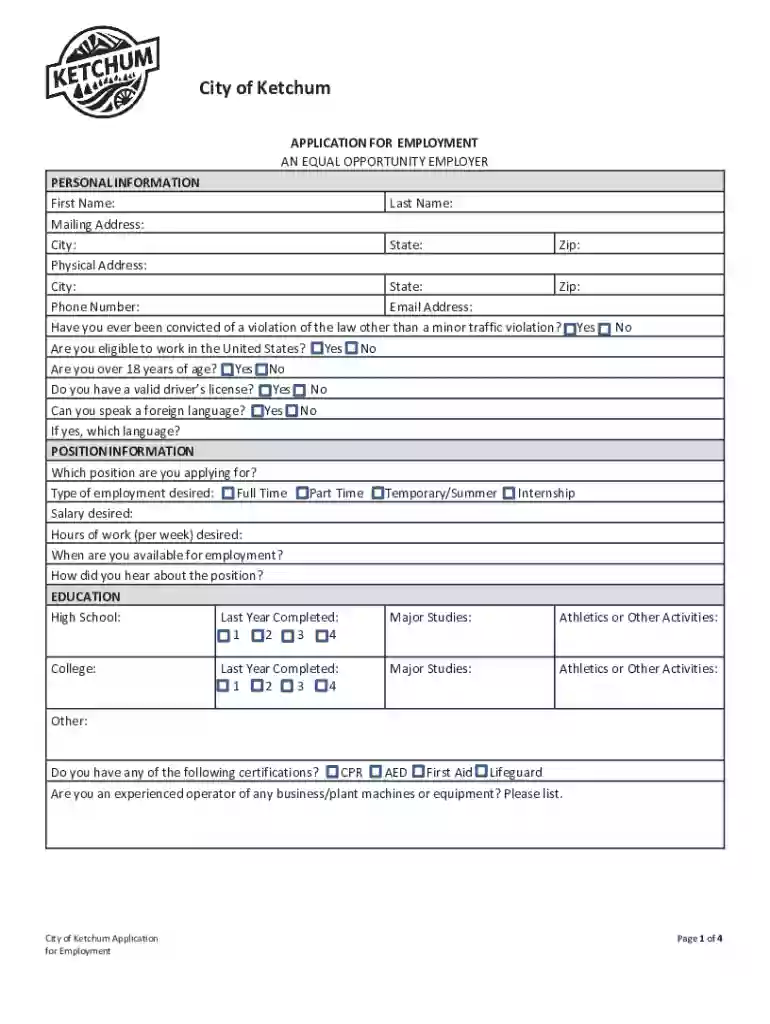
ketchumidaho sites defaultCity of Ketchum Preview on Page 1

Here's how it works

01. Edit your form online
Type text, add images, blackout confidential details, add comments, highlights and more.

02. Sign it in a few clicks
Draw your signature, type it, upload its image, or use your mobile device as a signature pad.

03. Share your form with others
Send it via email, link, or fax. You can also download it, export it or print it out.

How to use or fill out ketchumidaho sites defaultCity of Ketchum

Form edit decoration
9.5
Ease of Setup
DocHub User Ratings on G2
9.0
Ease of Use
DocHub User Ratings on G2
  1. Click ‘Get Form’ to open it in the editor.
  2. Begin by filling out the 'Personal Information' section. Enter your first and last name, mailing address, physical address, phone number, and email address. Ensure all details are accurate.
  3. Proceed to answer the eligibility questions regarding convictions, work authorization, age, driver's license status, and language proficiency.
  4. In the 'Position Information' section, specify the position you are applying for and your desired employment type (Full Time, Part Time, etc.). Indicate your salary expectations and availability.
  5. Complete the 'Education' section by listing your educational background including high school and college details along with any relevant certifications.
  6. Fill out your 'Employment History', detailing previous jobs with company names, addresses, supervisors, dates employed, responsibilities, and reasons for leaving.
  7. List three professional references in the designated area with their contact information.
  8. If applicable, complete the 'Military' section regarding veteran status and preferences.
  9. Finally, review all entries for accuracy before signing electronically at the bottom of the form to certify your information is correct.

Start using our platform today to streamline your application process for free!

See more ketchumidaho sites defaultCity of Ketchum versions

We've got more versions of the ketchumidaho sites defaultCity of Ketchum form. Select the right ketchumidaho sites defaultCity of Ketchum version from the list and start editing it straight away!
Versions Form popularity Fillable & printable
2016 4.8 Satisfied (90 Votes)
be ready to get more

Complete this form in 5 minutes or less

Get form

Got questions?

We have answers to the most popular questions from our customers. If you can't find an answer to your question, please contact us.
Contact us
Ernest Hemingways twenty-two year relationship with Idaho began in 1939, deepened over many long autumn stays in the Wood River Valley, and culminated with him making his final home in Ketchum in 1959. He died by suicide there in 1961 and is buried alongside family and close friends in the Ketchum cemetery.
Hemingway loved the surrounding area; he fished, hunted, and in the late 1950s bought a home overlooking the Big Wood River near the city. It was there he committed suicide; he and his wife Mary, his granddaughter, model and actress Margaux Hemingway, are buried in the Ketchum Cemetery.
In fact, Ernest Hemingway is buried here, and the Sun Valley Museum of Art is a worthy place to visit. But Ketchums real magic remains its place in the Sawtooth range, near rivers teeming with fish, beautiful alpine lakes, and plenty of peaks and valleys to explore on skis, by bike, or with hiking boots.

Security and compliance

At DocHub, your data security is our priority. We follow HIPAA, SOC2, GDPR, and other standards, so you can work on your documents with confidence.

Learn more
ccpa2
pci-dss
gdpr-compliance
hipaa
soc-compliance