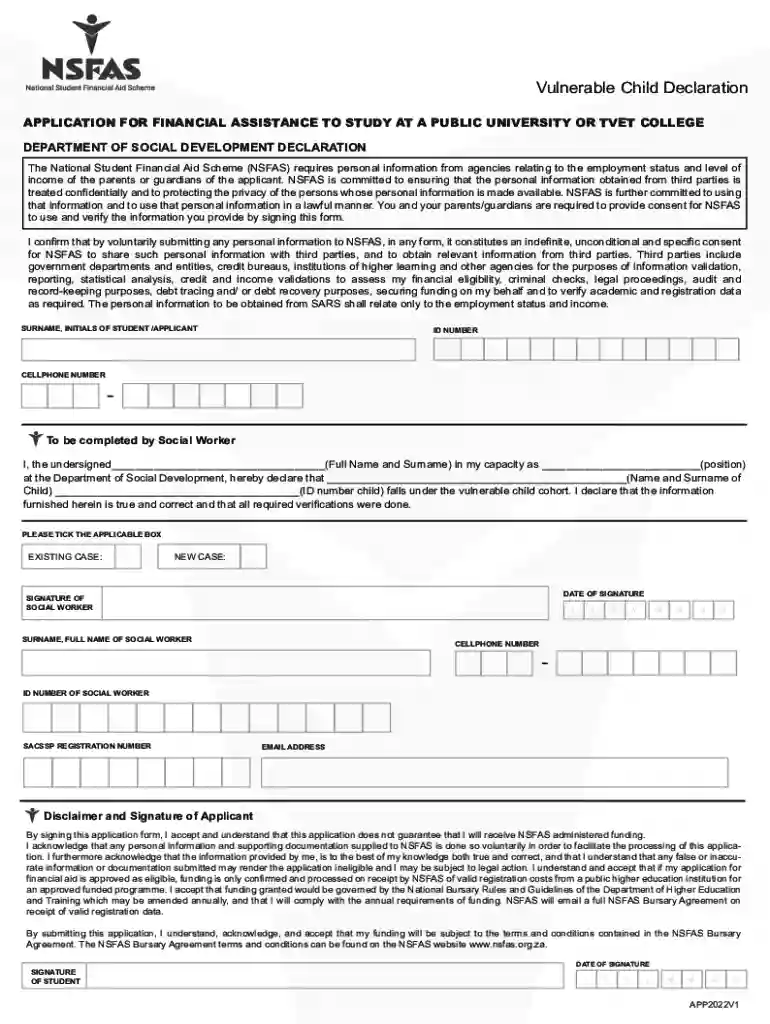
Vulnerable Child Declaration(Updated 04November2021) 2026

Get Form
vulnerable child declaration form 2024 Preview on Page 1

Here's how it works

01. Edit your vulnerable child declaration form 2024 online
Type text, add images, blackout confidential details, add comments, highlights and more.

02. Sign it in a few clicks
Draw your signature, type it, upload its image, or use your mobile device as a signature pad.

03. Share your form with others
Send vulnerable child meaning nsfas via email, link, or fax. You can also download it, export it or print it out.

How to use or fill out Vulnerable Child Declaration(Updated 04November2021) with our platform

Form edit decoration
9.5
Ease of Setup
DocHub User Ratings on G2
9.0
Ease of Use
DocHub User Ratings on G2
  1. Click ‘Get Form’ to open the Vulnerable Child Declaration in the editor.
  2. Begin by entering the surname and initials of the student/applicant in the designated fields. Ensure that you provide accurate information as it is crucial for processing.
  3. Fill in the ID number and cellphone number of the applicant. Double-check these details for correctness.
  4. The social worker must complete their section by providing their full name, position, and declaring the child's name and ID number. This confirms that the child falls under the vulnerable cohort.
  5. Select whether this is an existing or new case by ticking the appropriate box.
  6. The social worker should then sign and date the form, including their cellphone number, ID number, SACSSP registration number, and email address.
  7. Finally, as an applicant, review all provided information before signing to acknowledge understanding of NSFAS terms and conditions.

Start filling out your Vulnerable Child Declaration today for free using our platform!

See more Vulnerable Child Declaration(Updated 04November2021) versions

We've got more versions of the Vulnerable Child Declaration(Updated 04November2021) form. Select the right Vulnerable Child Declaration(Updated 04November2021) version from the list and start editing it straight away!
Versions Form popularity Fillable & printable
2022 4.8 Satisfied (25 Votes)
2021 4.5 Satisfied (43 Votes)
be ready to get more

Complete this form in 5 minutes or less

Get form

Got questions?

We have answers to the most popular questions from our customers. If you can't find an answer to your question, please contact us.
Contact us
UNDERSTANDING YOUR NSFAS APPLICATION STATUS! Provisionally Funded: This means that your application has passed all evaluation stages and you are funded provided you register at a TVET college or public university and there is availability of funds.
Follow these steps: Step 1: Open the NSFAS Official Web Portal. Step 2: Go to myNSFAS Account Step 3: Log In to Your Account. Step 4: Click on View Applications Step 5: Get Your NSFAS Status. Step 1: Save the NSFAS WhatsApp Number. Step 2: Start a Chat. Step 3: Send Your Details.
ID NUMBER OF SOCIAL WORKER. APPLICANT ID NUMBER. ORPHAN OR VULNERABLE CHILD FORM. This form is only to be completed by applicants who are under the age of 18 and who are orphans OR, who are vulnerable children in that they have been exposed to abuse, neglect, exploitation, risk of violence and substance abuse.
NSFAS is a bursary scheme funded by the Department of Higher Education and Training for those who do not have the financial means to fund their studies and cannot access bank funding, study loans or bursaries. Apply online . Applications open for a limited time at the end of each year.

Security and compliance

At DocHub, your data security is our priority. We follow HIPAA, SOC2, GDPR, and other standards, so you can work on your documents with confidence.

Learn more
ccpa2
pci-dss
gdpr-compliance
hipaa
soc-compliance