




Here's how it works



How to use or fill out Medical Aesthetics Intake Form - Calgary with our platform

- Click ‘Get Form’ to open it in the editor.
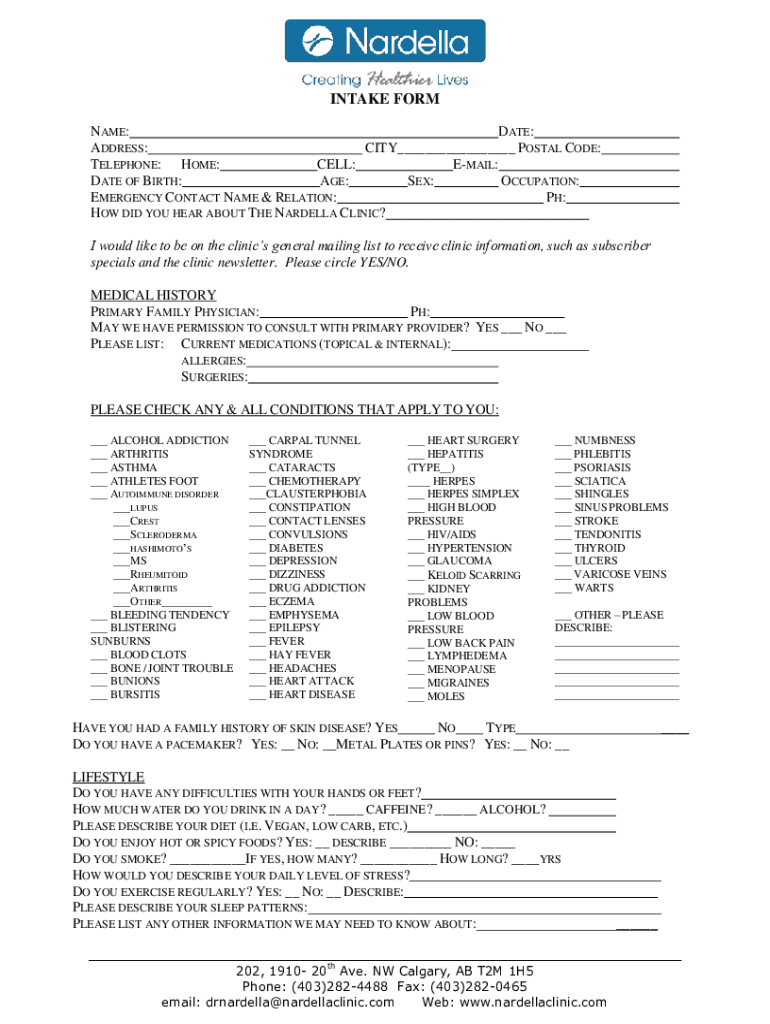
- Begin by entering your personal information in the designated fields, including your name, date, address, and contact details. Ensure accuracy for effective communication.
- Proceed to the medical history section. Fill in your primary family physician's details and indicate if you permit consultation with them. List any current medications, allergies, and past surgeries.
- In the lifestyle section, provide insights into your daily habits such as water intake, diet preferences, and exercise routines. This information is crucial for personalized care.
- For women, complete the pregnancy-related questions if applicable. This helps in tailoring treatments appropriately.
- Finally, review all entries for completeness before signing at the bottom of the form to confirm that all information is accurate and up-to-date.
Start filling out your Medical Aesthetics Intake Form today using our platform for a seamless experience!
It's free
See more Medical Aesthetics Intake Form - Calgary versions
Got questions?
Can I sign my Medical Aesthetics Intake Form - Calgary in electronic format?
Based on eSignature laws, forms approved digitally have the same validity as traditionally approved ones. You can eSign almost any business and private documentation. Four types of paperwork still require wet signatures only - wills and testamentary trusts, court orders and other court papers, state statutes governing divorce, adoption, or other family law, and notice of cancellation of utility services. If you follow the guidelines and utilize a safe and compliant software solution, like DocHub, you can eSign your Medical Aesthetics Intake Form - Calgary without printing it.
Can I sign my Medical Aesthetics Intake Form - Calgary while I edit it?
If you edit your Medical Aesthetics Intake Form - Calgary with DocHub, you will not need to look for other applications or services to eSign it. An electronic signature is a component of DocHub’s substantial editing toolset, which enables you to implement changes in your form without switching between websites. Just complete your form, double-check the correctness of the information and put your electronic signature at the end to make it submission-ready within a few minutes.
Security and compliance
At DocHub, your data security is our priority. We follow HIPAA, SOC2, GDPR, and other standards, so you can work on your documents with confidence.
Learn more


