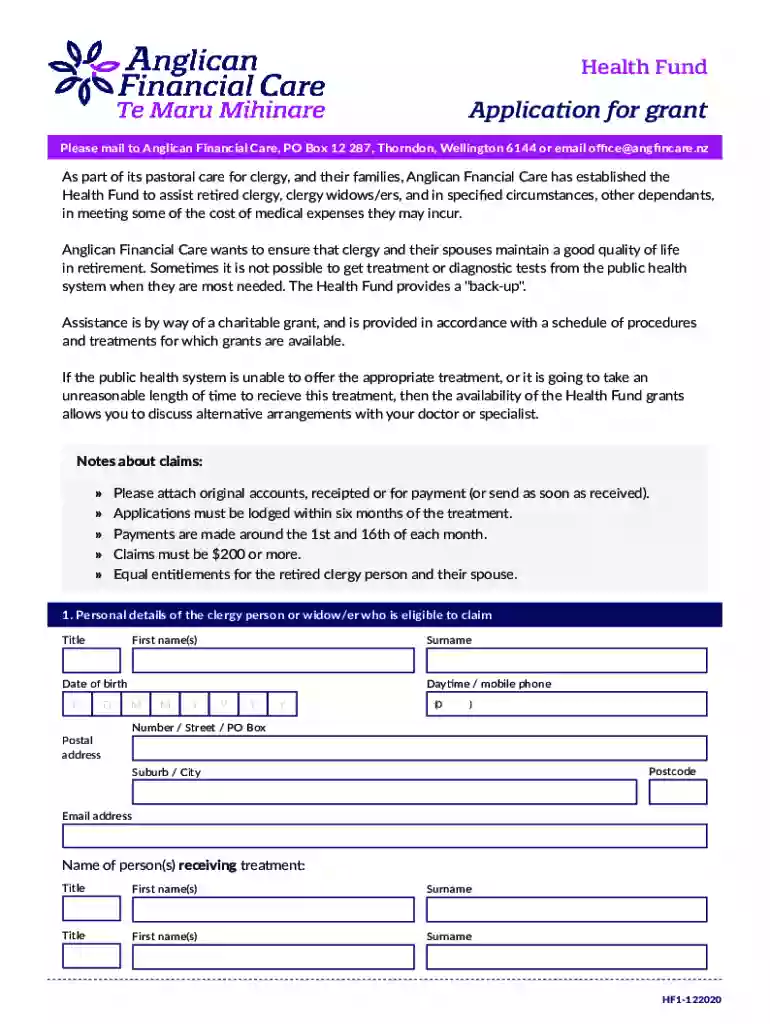
Health Fund - Anglican Financial CareAnglican Financial 2026

Get Form
Health Fund - Anglican Financial CareAnglican Financial Preview on Page 1

Here's how it works

01. Edit your form online
Type text, add images, blackout confidential details, add comments, highlights and more.

02. Sign it in a few clicks
Draw your signature, type it, upload its image, or use your mobile device as a signature pad.

03. Share your form with others
Send it via email, link, or fax. You can also download it, export it or print it out.

How to use or fill out Health Fund - Anglican Financial Care with our platform

Form edit decoration
9.5
Ease of Setup
DocHub User Ratings on G2
9.0
Ease of Use
DocHub User Ratings on G2
  1. Click ‘Get Form’ to open it in the editor.
  2. Begin by filling out the personal details section. Enter the title, first name(s), surname, date of birth, and contact information including daytime/mobile phone and email address.
  3. In the categories section, review the medical procedures covered by the Health Fund. If your treatment falls under these categories, proceed to Section 3.
  4. For treatments eligible for public health funding, indicate whether assistance has been sought from the public health system. Provide details and reasons for any urgency regarding your procedure.
  5. Complete the claim details table by listing all non-surgical and surgical costs along with provider information and dates of service.
  6. Fill in your payment details, specifying whether you prefer direct credit to your bank account or payment to the service provider.
  7. Finally, sign the declaration confirming that all information is accurate and submit your application within six months of treatment.

Start using our platform today to easily complete your Health Fund application for free!

See more Health Fund - Anglican Financial CareAnglican Financial versions

We've got more versions of the Health Fund - Anglican Financial CareAnglican Financial form. Select the right Health Fund - Anglican Financial CareAnglican Financial version from the list and start editing it straight away!
Versions Form popularity Fillable & printable
2020 4.8 Satisfied (241 Votes)
2019 4 Satisfied (37 Votes)
be ready to get more

Complete this form in 5 minutes or less

Get form

Got questions?

We have answers to the most popular questions from our customers. If you can't find an answer to your question, please contact us.
Contact us

Microsoft Word doesn’t have signing tools to generate valid eSignatures and enforceable paperwork. Fortunately, DocHub is an online eSignature-compliant editor that supports various document formats, such as .doc files. Sign in to your account and add the Word version of your Health Fund - Anglican Financial CareAnglican Financial from your device and cloud, or URL - our editor will automatically convert it into an editable PDF. Make all required modifications in your form and click Sign to generate your own legally-binding electronic signature. You will find four signing methods from which to choose.

As a comprehensive document editing service, DocHub is accessible on mobile devices. Open DocHub in your choice of mobile browser and use our intelligent mobile-friendly toolset to complete your Health Fund - Anglican Financial CareAnglican Financial.

What is a Retirement Fund? Retirement funds, also known as pension funds, are investment options that allow an individual to save a certain portion of their income for their retirement. These funds offer a regular source of finance after one retires; a retiree receives annuity on their investment until their demise.
The Retire Fund is a retirement savings scheme for those associated with, or who work for, the Anglican Church in Aotearoa, New Zealand and Polynesia or other approved charitable organisations. Benefits are paid as a lump sum; there are no pension benefits.
New Zealand Superannuation is the pension paid by the government to most New Zealand residents from age 65. Any eligible New Zealander receives NZ Super regardless of how much they earn through paid work, savings and investments, what other assets they own, or how much taxes they have paid.

Security and compliance

At DocHub, your data security is our priority. We follow HIPAA, SOC2, GDPR, and other standards, so you can work on your documents with confidence.

Learn more
ccpa2
pci-dss
gdpr-compliance
hipaa
soc-compliance
be ready to get more

Complete this form in 5 minutes or less

Get form