IELTS TEST REPORT AUTHORIZATION FORM - British Council 2026

Get Form
trf sample Preview on Page 1

Here's how it works

01. Edit your trf sample online
Type text, add images, blackout confidential details, add comments, highlights and more.
02. Sign it in a few clicks
Draw your signature, type it, upload its image, or use your mobile device as a signature pad.
03. Share your form with others
Send test report form number ielts via email, link, or fax. You can also download it, export it or print it out.

How to use or fill out IELTS TEST REPORT AUTHORIZATION FORM - British Council with DocHub

Form edit decoration
9.5
Ease of Setup
DocHub User Ratings on G2
9.0
Ease of Use
DocHub User Ratings on G2
  1. Click ‘Get Form’ to open the IELTS TEST REPORT AUTHORIZATION FORM in our editor.
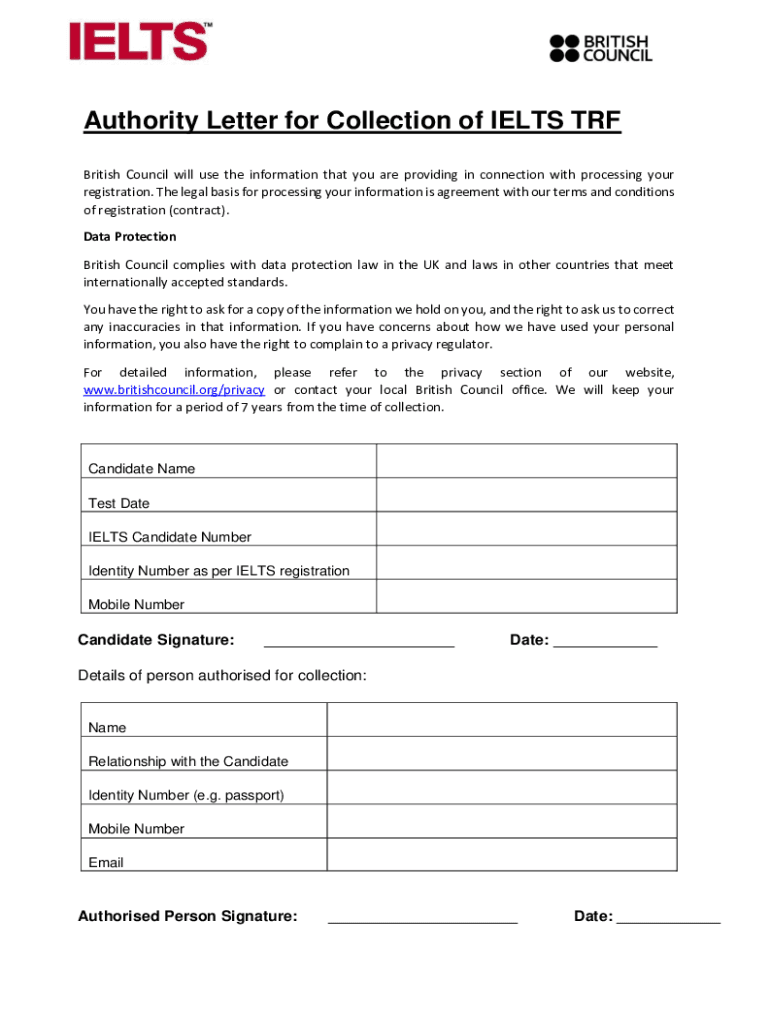
  2. Begin by entering your Candidate Name, Test Date, and IELTS Candidate Number in the designated fields. Ensure that all information matches your registration details.
  3. Fill in your Identity Number as per IELTS registration and provide your Mobile Number for contact purposes.
  4. Sign the form in the Candidate Signature section and date it appropriately.
  5. Next, complete the details of the person authorized for collection. This includes their Name, Relationship with you, Identity Number (e.g., passport), Mobile Number, and Email.
  6. The authorized person must also sign and date the form in their respective section.
  7. Review all entries for accuracy before saving or exporting the completed form from our platform.

Start using our platform today to easily fill out your IELTS TEST REPORT AUTHORIZATION FORM for free!

See more IELTS TEST REPORT AUTHORIZATION FORM - British Council versions

We've got more versions of the IELTS TEST REPORT AUTHORIZATION FORM - British Council form. Select the right IELTS TEST REPORT AUTHORIZATION FORM - British Council version from the list and start editing it straight away!
Versions Form popularity Fillable & printable
2019 4.8 Satisfied (165 Votes)
2018 4.5 Satisfied (45 Votes)
be ready to get more

Complete this form in 5 minutes or less

Get form

Got questions?

We have answers to the most popular questions from our customers. If you can't find an answer to your question, please contact us.
Contact us
You can download the electronic version (eTRF) of your certificate from the Test Taker Portal . We will not issue an additional paper Test Report Form. You can send your electronic Test Report Form (eTRF) to the organisations youre applying to in the following ways: print out and send by post.
How to download your e-TRF? Log in to your IELTS profile here. Access your results. Download your e-TRF.
You can also view your results through the Test Taker portal If you registered through the British Council, you will receive an email with a link to view your IELTS scores. If you registered through IDP, you can access your IELTS results on your IDP account .
You can download the electronic version (eTRF) from the Test Taker portal 3-8 days after your test. We will not issue an additional paper Test Report Form. You can print your electronic Test Report Form (eTRF) to send it to the organisations you are applying to, or you can send it via email.
You can collect your Test Report Form (TRF) at IDP IELTS offices when your results are released, or even download an IELTS e-TRF. You need to bring the form of identity you used when you registered for the test to pick up your TRF. Contact your IELTS test centre for more information.

People also ask

A letter of authorization to include: authorize full name, candidate number, test date signature. A copy of your passport. He/she must bring a recognized form of photo ID and a copy of the same for our records.
You (the test taker) need to complete the section in pink. Scan and send the form to info@ilacielts.com at least 7 days before your test. Bring the Consent Form with you on test day. If you do not, you cannot take your test and you will not qualify for a refund or transfer.

Related links