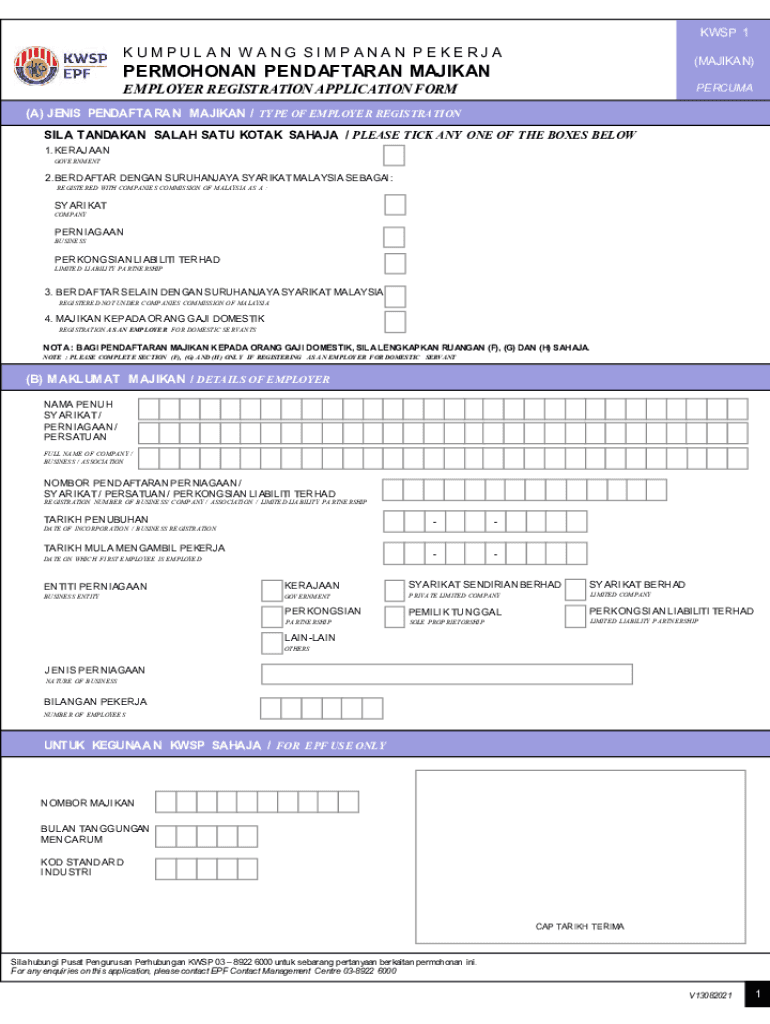
Register kwsp majikan 2026

Get Form
kwsp online register Preview on Page 1

Here's how it works

01. Edit your kwsp online register online
Type text, add images, blackout confidential details, add comments, highlights and more.
02. Sign it in a few clicks
Draw your signature, type it, upload its image, or use your mobile device as a signature pad.
03. Share your form with others
Send borang pendaftaran majikan kwsp via email, link, or fax. You can also download it, export it or print it out.

How to use or fill out register kwsp majikan with our platform

Form edit decoration
9.5
Ease of Setup
DocHub User Ratings on G2
9.0
Ease of Use
DocHub User Ratings on G2
  1. Click ‘Get Form’ to open the register kwsp majikan in the editor.
  2. Begin by selecting the type of employer registration in Section (A). Tick only one box that applies to your situation, such as Government or Registered with Companies Commission of Malaysia.
  3. In Section (B), provide your full name, registration number, date of incorporation, and details about your business entity. Ensure all information is accurate and clearly written.
  4. Complete Section (C) with your business address, email, and contact numbers. This ensures that all correspondence reaches you without delay.
  5. If applicable, fill out Section (D) with details of the business owner or director including their name, designation, and identification number.
  6. For employers of domestic servants, complete Sections (F) and (G) with relevant details about the employer and domestic servant respectively.
  7. Finally, sign Section (H) to confirm that all information provided is true. Don’t forget to include your official stamp if required.

Start using our platform today for free to streamline your document editing and form completion!

See more register kwsp majikan versions

We've got more versions of the register kwsp majikan form. Select the right register kwsp majikan version from the list and start editing it straight away!
Versions Form popularity Fillable & printable
2021 4.8 Satisfied (105 Votes)
2014 4 Satisfied (51 Votes)
be ready to get more

Complete this form in 5 minutes or less

Get form

Got questions?

We have answers to the most popular questions from our customers. If you can't find an answer to your question, please contact us.
Contact us
To note, only Malaysian citizens and permanent residents can open an EPF account and activate their i-Akaun at the SST. For foreign applicants, they must visit the counter to register their EPF account and bring along Borang KWSP 3 (Daftar) as well as their passport or other proof of identification.
KWSP i-Akaun App Log in to the KWSP i-Akaun app and click the Not yet Registered function and then Register Now. Check I am not a robot in the reCAPTCHA box, and verify the required images. Take a photo of the front of your MyKad/MyPR, complete the Verification.
Yes, employers who hire non-Malaysian citizen employees with valid passes and who are permitted to work by the Immigration Department of Malaysia are required to register and contribute to the EPF for those employees. However, employers who hire domestic servants are exempted from mandatory contributions.
Failure to comply is subject to penalties as listed below. An employer who fails to register with EPF within 7 days from the date he employs an employee. Imprisonment term not exceeding 3 years or to a fine not exceeding RM10,000 or both. Failure to make contribution on or before the 15th day of the month.
Required documents DocumentsPurpose Form KWSP 9K (AHL) Checklist Official withdrawal application Copy of valid passport Proof of identity Form KWSP 3 (Pindaan) Required for mail submissions or failed thumbprint verification Bank passbook/Savings account statement Must be an active account with an EPF panel bank Mar 24, 2025

Security and compliance

At DocHub, your data security is our priority. We follow HIPAA, SOC2, GDPR, and other standards, so you can work on your documents with confidence.

Learn more
ccpa2
pci-dss
gdpr-compliance
hipaa
soc-compliance
be ready to get more

Complete this form in 5 minutes or less

Get form

People also ask

What is the difference between the EPF Account 1 and Account 2? Your EPF savings contain two accounts, each varying in savings and withdrawal allowances. Account 1 retains 70% of your monthly contribution, while Account 2 holds the remaining 30%. Withdrawals are restricted in Account 1 until you turn 50 years old.
Step 1: Prepare your MyKad or MyPR and ensure youre in a safe and well-lit area. Step 2: Open the KWSP i-Akaun application. Step 3: Tap on the Dont have EPF account menu. Step 4: Follow the on-screen steps until your registration is successful.

kwsp login majikan