




Here's how it works

01. Edit your ma berklee entering student immunization online
Type text, add images, blackout confidential details, add comments, highlights and more.

02. Sign it in a few clicks
Draw your signature, type it, upload its image, or use your mobile device as a signature pad.

03. Share your form with others
Send ma berklee college entering student immunization via email, link, or fax. You can also download it, export it or print it out.
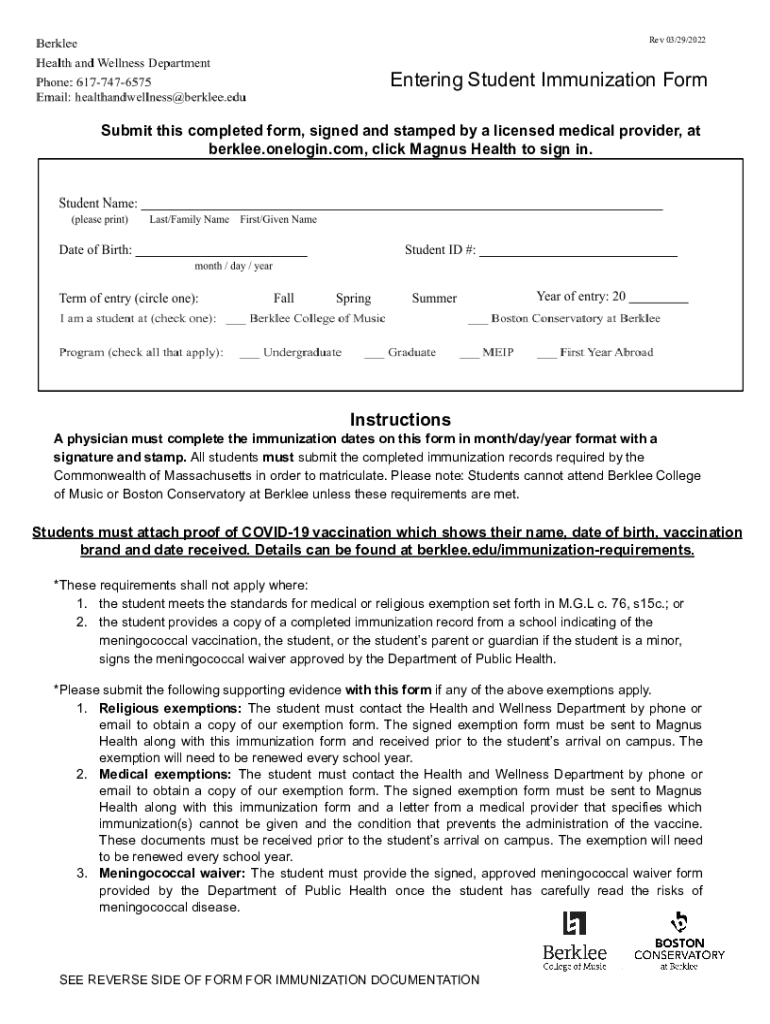
How to use or fill out Massachusetts Berklee Music Entering with Our Platform

- Click ‘Get Form’ to open the Massachusetts Berklee Music Entering form in the editor.
- Begin by entering your Student Last/Family Name and Date of Birth in the designated fields. Ensure accuracy as this information is crucial for identification.
- Proceed to fill out the immunization details. For each vaccine listed, input the dates in month/day/year format. Make sure to include all required vaccines such as MMR, Tdap, and Hepatitis B.
- If applicable, attach proof of COVID-19 vaccination by uploading a document that includes your name, date of birth, vaccination brand, and date received.
- Review your entries for completeness and accuracy. Ensure that a licensed medical provider has signed and stamped the form before submission.
- Once completed, submit the form at berklee.onelogin.com by clicking Magnus Health to sign in.
Start filling out your Massachusetts Berklee Music Entering form online for free today!
Fill out massachusetts berklee music entering online
It's free
It's free
See more massachusetts berklee music entering versions
We've got more versions of the massachusetts berklee music entering form. Select the right massachusetts berklee music entering version from the list and start editing it straight away!
| Versions | Form popularity | Fillable & printable |
|---|---|---|
| 2022 | 4.8 Satisfied (65 Votes) |
Security and compliance
At DocHub, your data security is our priority. We follow HIPAA, SOC2, GDPR, and other standards, so you can work on your documents with confidence.
Learn more


