Mn birth certificate application 2026

Get Form
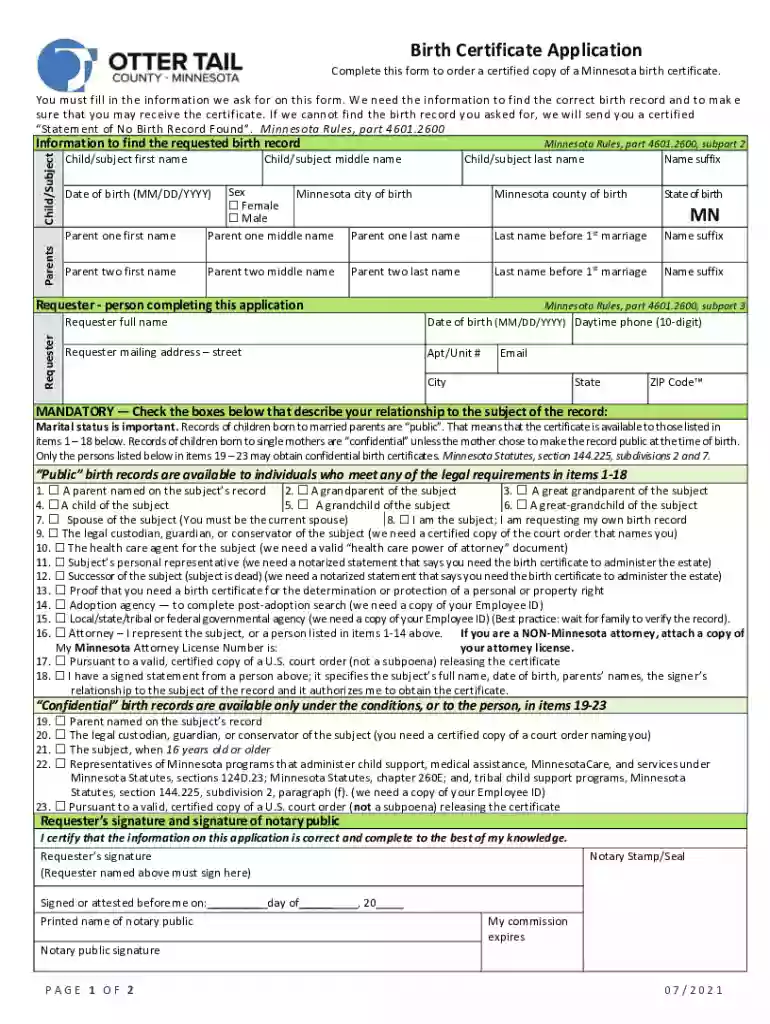
mn birth certificate application form Preview on Page 1

Here's how it works

01. Edit your mn birth certificate application form online
Type text, add images, blackout confidential details, add comments, highlights and more.

02. Sign it in a few clicks
Draw your signature, type it, upload its image, or use your mobile device as a signature pad.

03. Share your form with others
Send mn birth certificate application via email, link, or fax. You can also download it, export it or print it out.

How to use or fill out mn birth certificate application with DocHub

Form edit decoration
9.5
Ease of Setup
DocHub User Ratings on G2
9.0
Ease of Use
DocHub User Ratings on G2
  1. Click ‘Get Form’ to open the Minnesota birth certificate application in our platform's editor.
  2. Begin by filling in the child's information, including first, middle, and last names, as well as the county and city of birth. Ensure accuracy to avoid delays.
  3. Next, provide details for both parents, including their full names and any name suffixes. This section is crucial for verifying relationships.
  4. Complete the requester section with your full name, date of birth, contact information, and mailing address. This ensures you receive the certificate promptly.
  5. Indicate your relationship to the child by checking the appropriate boxes. This is important for determining access to public or confidential records.
  6. Finally, review all entered information for accuracy before signing. Use our platform’s tools to add your signature and notary details if required.

Start using our platform today to fill out your Minnesota birth certificate application easily and for free!

See more mn birth certificate application versions

We've got more versions of the mn birth certificate application form. Select the right mn birth certificate application version from the list and start editing it straight away!
Versions Form popularity Fillable & printable
2021 4.8 Satisfied (83 Votes)
2018 4.2 Satisfied (32 Votes)
be ready to get more

Complete this form in 5 minutes or less

Get form

Got questions?

We have answers to the most popular questions from our customers. If you can't find an answer to your question, please contact us.
Contact us
The cost is $26. (Additional copies are $19 each.)
Appear in person at the Vital Statistics Department nearest you in the state of Minnesota. When you arrive you will need to complete a Birth Certificate Application docHubing your right to the copy, and present valid photo identification such as your drivers license. The cost for a certified copy is $26.
For fastest service, request your records in person at a county vital records office - find one near you using the Directory of County Offices. Most of the time, you can receive your order while you wait.

Security and compliance

At DocHub, your data security is our priority. We follow HIPAA, SOC2, GDPR, and other standards, so you can work on your documents with confidence.

Learn more
ccpa2
pci-dss
gdpr-compliance
hipaa
soc-compliance