




Here's how it works



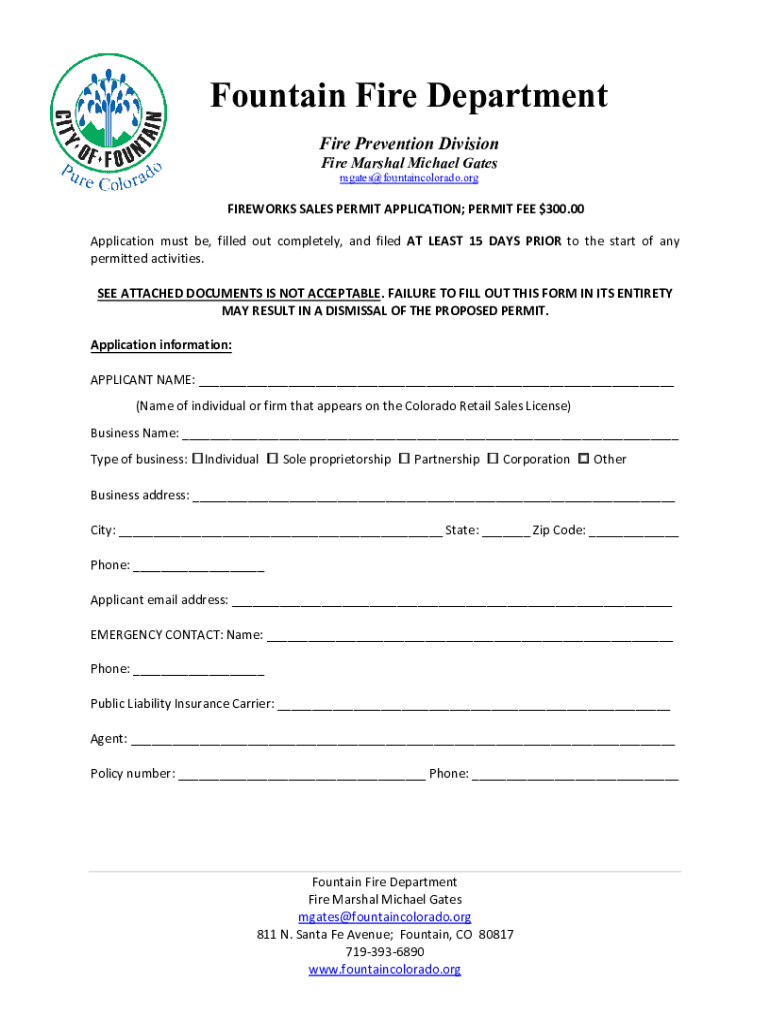
How to use or fill out Michael Gates - Fire Mar - Fountain Fire Department

- Click ‘Get Form’ to open it in the editor.
- Begin by entering your name in the 'APPLICANT NAME' field, ensuring it matches your Colorado Retail Sales License.
- Fill in the 'Business Name' and select the type of business from the provided options.
- Complete the 'Business Address' section with your full address, including city, state, and zip code.
- Provide your phone number and email address for contact purposes.
- In the 'EMERGENCY CONTACT' section, enter a name and phone number for emergencies.
- List your Public Liability Insurance Carrier details along with the agent's name and policy number.
- Fill out the 'Retail Outlet Information' section based on your sales location and structure type.
- Attach all required documentation as specified in the application instructions before submission.
- Review all entries for accuracy before signing and dating at the bottom of the form.
Start filling out your application today using our platform for a seamless experience!
It's free
See more Michael Gates - Fire Mar - Fountain Fire Department versions
| Versions | Form popularity | Fillable & printable |
|---|---|---|
| 2019 | 4.8 Satisfied (217 Votes) |
Got questions?
What is the best way to electronically sign my Michael Gates - Fire Mar - Fountain Fire Department?
A lot of software solutions are available on the market for document editing and signing. DocHub is one of the most widely used online solutions that comply with all data protection and compliance requirements and guarantees your electronically signed paperwork is legally enforceable. All you need to try it out is to sign up for an account, add your Michael Gates - Fire Mar - Fountain Fire Department, provide the necessary information, and click Sign. Generate your electronic signature by typing, drawing it, uploading its image to your document, or scanning a unique QR code.
How do you edit Michael Gates - Fire Mar - Fountain Fire Department online?
With DocHub, you have several convenient methods to edit your Michael Gates - Fire Mar - Fountain Fire Department online. You can drag and drop the form and modify it straight at the DocHub site or use our browser extension to fill out your form immediately. On top of that, you can modify your PDF on your smartphone, as DocHub works with all the available mobile platforms.
Security and compliance
At DocHub, your data security is our priority. We follow HIPAA, SOC2, GDPR, and other standards, so you can work on your documents with confidence.
Learn more


