Residential & Commercial Building Permit Application - City of 2026

Get Form
Residential & Commercial Building Permit Application - City of Preview on Page 1

Here's how it works

01. Edit your form online
Type text, add images, blackout confidential details, add comments, highlights and more.

02. Sign it in a few clicks
Draw your signature, type it, upload its image, or use your mobile device as a signature pad.

03. Share your form with others
Send it via email, link, or fax. You can also download it, export it or print it out.

How to use or fill out Residential & Commercial Building Permit Application - City of with our platform

Form edit decoration
9.5
Ease of Setup
DocHub User Ratings on G2
9.0
Ease of Use
DocHub User Ratings on G2
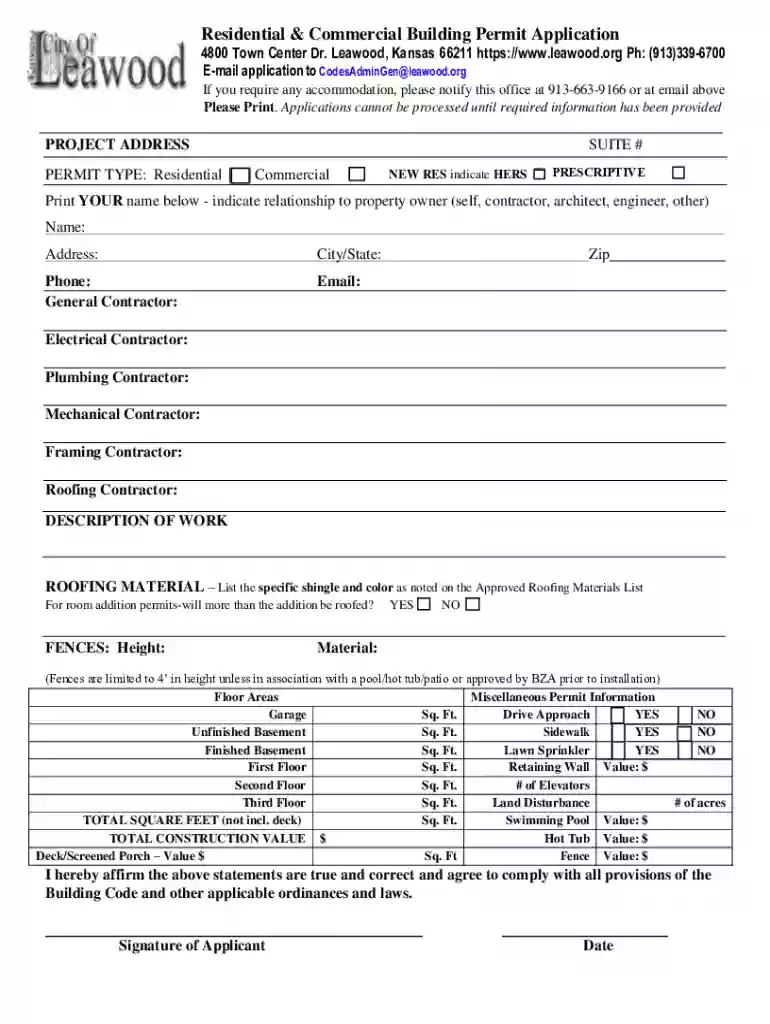
  1. Click ‘Get Form’ to open the Residential & Commercial Building Permit Application in the editor.
  2. Begin by entering the PROJECT ADDRESS in the designated field. Ensure accuracy as this is crucial for processing your application.
  3. Select the PERMIT TYPE by checking either 'Residential' or 'Commercial'. If applicable, indicate if it’s a new residential project and specify HERS requirements.
  4. Print your name and indicate your relationship to the property owner (self, contractor, architect, engineer, etc.) in the provided fields.
  5. Fill in contact details including address, phone number, and email. Don’t forget to list all contractors involved (General, Electrical, Plumbing, Mechanical, Framing, Roofing).
  6. Provide a detailed DESCRIPTION OF WORK. For roofing permits, specify materials and colors from the Approved Roofing Materials List.
  7. Complete any additional sections regarding floor areas and miscellaneous permit information. Be sure to include total square footage and construction values where required.
  8. Finally, affirm that all statements are true by signing and dating at the bottom of the form before submission.

Start using our platform today to easily complete your Residential & Commercial Building Permit Application for free!

See more Residential & Commercial Building Permit Application - City of versions

We've got more versions of the Residential & Commercial Building Permit Application - City of form. Select the right Residential & Commercial Building Permit Application - City of version from the list and start editing it straight away!
Versions Form popularity Fillable & printable
2021 4.8 Satisfied (71 Votes)
be ready to get more

Complete this form in 5 minutes or less

Get form

Got questions?

We have answers to the most popular questions from our customers. If you can't find an answer to your question, please contact us.
Contact us

With DocHub, you can quickly approve your Residential & Commercial Building Permit Application - City of or any other document on iOS, even without setting up additional applications. You can access your DocHub account from any internet-connected browser and fill out and sign your form in any way you like with just a few clicks.

If you store your files in Google Drive, there is no need to download your Residential & Commercial Building Permit Application - City of on your computer and upload it back to our editor. A much simpler way is to set up a browser extension developed by DocHub to streamline this flow. The extension allows editing PDFs right in your internet browser. Alternatively, you can integrate your DocHub and Gmail accounts for more efficient editing.

A New York State licensed Professional Engineer (PE) or Registered Architect (RA) must submit construction plans to obtain a permit. A Department plan examiner will review the plans for any legal/zoning objections. When objections are satisfied, the Department will approve the application.
Zoning permits dictate how a specific building can be used, such as residential or retail. Building permits dictate how a building should be properly constructed to ensure the safety and longevity of a building and the community around it.
Building permit fees for different types of renovations. The cost of a building permit can range from $30 to $500 for smaller projects, such as plumbing and electrical work. Bigger projects, such as construction, building, or remodeling will require permits with a higher fee, ranging from $600 to $3,000 and more.

Security and compliance

At DocHub, your data security is our priority. We follow HIPAA, SOC2, GDPR, and other standards, so you can work on your documents with confidence.

Learn more
ccpa2
pci-dss
gdpr-compliance
hipaa
soc-compliance
be ready to get more

Complete this form in 5 minutes or less

Get form

People also ask

Job applications are overall plans filed with the Department of Buildings, outlining development, changes, or alterations with a property. Permits are issued by the DOB in response to a job application, granting permission to perform specific work.
Various state regulations require contractors to pull permits. California, for example, mandates that anyone who works on your home must be licensed by the Contractors State Licensing Board (CSLB) if the project is over $500. Check the requirements where you live before starting your project.
The average permit cost is between $400 and $2,500. Cost varies by town or city. In some places, permits have flat fees based on project types. You could also pay based on the value of the project.

Related links