Youtube watchp r i m e p a t h - YouTube 2025

Get Form
youtube watchp r i m e p a t h - YouTube Preview on Page 1

Here's how it works

01. Edit your form online
Type text, add images, blackout confidential details, add comments, highlights and more.

02. Sign it in a few clicks
Draw your signature, type it, upload its image, or use your mobile device as a signature pad.

03. Share your form with others
Send it via email, link, or fax. You can also download it, export it or print it out.

How to use or fill out youtube watchp r i m e p a t h - YouTube with our platform

Form edit decoration
9.5
Ease of Setup
DocHub User Ratings on G2
9.0
Ease of Use
DocHub User Ratings on G2
  1. Click ‘Get Form’ to open the youtube watchp r i m e p a t h - YouTube document in the editor.
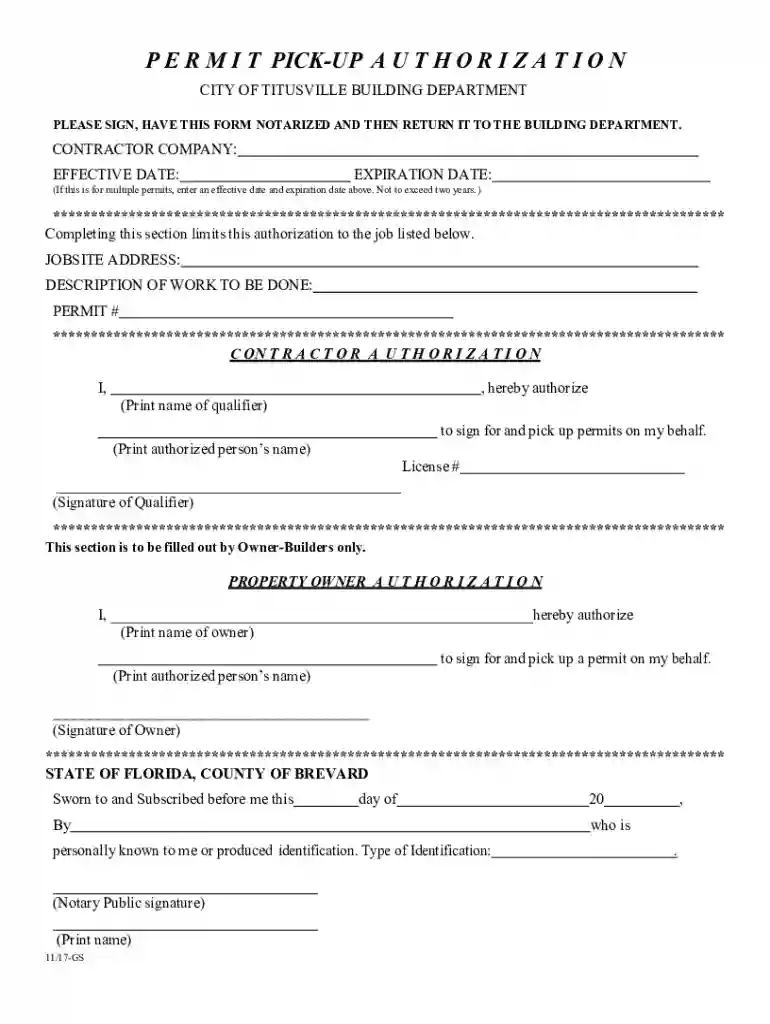
  2. Begin by entering the 'Contractor Company' name, followed by the 'Effective Date' and 'Expiration Date'. Ensure these dates do not exceed two years if multiple permits are involved.
  3. In the section labeled 'Jobsites Address', provide the specific location where the work will be performed. Follow this with a brief 'Description of Work to Be Done' and include the relevant 'Permit #' for reference.
  4. For contractor authorization, fill in your name in the designated area, authorizing another individual to sign and pick up permits on your behalf. Include their name and license number, then sign where indicated.
  5. If you are an owner-builder, complete the property owner authorization section by providing your name and authorizing another person to act on your behalf. Ensure they also sign this section.
  6. Finally, have the document notarized as required before returning it to the Building Department.

Start using our platform today for free to streamline your document editing and signing process!

See more youtube watchp r i m e p a t h - YouTube versions

We've got more versions of the youtube watchp r i m e p a t h - YouTube form. Select the right youtube watchp r i m e p a t h - YouTube version from the list and start editing it straight away!
Versions Form popularity Fillable & printable
2017 4.8 Satisfied (126 Votes)
2002 4.3 Satisfied (43 Votes)
be ready to get more

Complete this form in 5 minutes or less

Get form

Got questions?

We have answers to the most popular questions from our customers. If you can't find an answer to your question, please contact us.
Contact us

If you frequently deal with documents stored in your Google Drive, DocHub is a perfect solution for you to easily and quickly complete, adjust, and approve them. This editor integrates well with Google apps, so you can export your youtube watchp r i m e p a t h - YouTube from your Google Drive to the editor without downloading and re-uploading it. Right-click on your file, choose Open With → DocHub PDF Sign and Edit. In our editor, add and assign Signature Fields for all people involved, then click on the Menu button above → Send → choose how you want to share your paperwork.

You can easily edit fill out your youtube watchp r i m e p a t h - YouTube on any iOS device. Open an internet browser of your liking, visit the DocHub site, authorize or create a new account, upload your file for editing, and make your desired adjustments. Our service is mobile-friendly, so using its functions on your smartphone will be a no-brainer, even on the first try.

At the top right, click your profile photo . At the bottom, click Restricted Mode. In the top-right box that opens, to turn Restricted Mode on or off, click Activate Restricted Mode.
To browse incognito, tap your profile picture, then tap Turn on Incognito . You can only use this feature if youre signed in. Incognito mode lets you stay signed in, but acts like youre signed out.
Android TV Sign in to your account. From the Home screen, scroll to the Apps row. Select YouTube. Scroll and select Settings. Select Restricted Mode or Safety Mode. Select On or Off.

People also ask

0:20 1:46 So this should hopefully be a pretty straightforward. Process here guys and without further adoMoreSo this should hopefully be a pretty straightforward. Process here guys and without further ado lets go ahead and jump right into it. So all you have to do is select your user profile icon in the top
To get started: Open up the YouTube app. Click the co-watch icon to start a watch party. Invite friends and family from your followers listthatll trigger a notification on their end to watch together in YouTube.
Use the Upload Date Filter for New Videos: Click the Videos tab. Select Sort by Date added (oldest) to view videos in order.
1:22 2:24 Channel. Just make sure youre not using a brand account or a different account tap on your icon inMoreChannel. Just make sure youre not using a brand account or a different account tap on your icon in the upper. Right hand corner.
1:50 2:40 Picture. Then click on YouTube Studio. Then click settings channel advanced settings and then scrollMorePicture. Then click on YouTube Studio. Then click settings channel advanced settings and then scroll down to automatic captions here youll see a box that shows dont show potentially inappropriate