Greenport 2026

Get Form
Greenport Preview on Page 1

Here's how it works

01. Edit your form online
Type text, add images, blackout confidential details, add comments, highlights and more.

02. Sign it in a few clicks
Draw your signature, type it, upload its image, or use your mobile device as a signature pad.

03. Share your form with others
Send it via email, link, or fax. You can also download it, export it or print it out.

How to use or fill out Greenport with our platform

Form edit decoration
9.5
Ease of Setup
DocHub User Ratings on G2
9.0
Ease of Use
DocHub User Ratings on G2
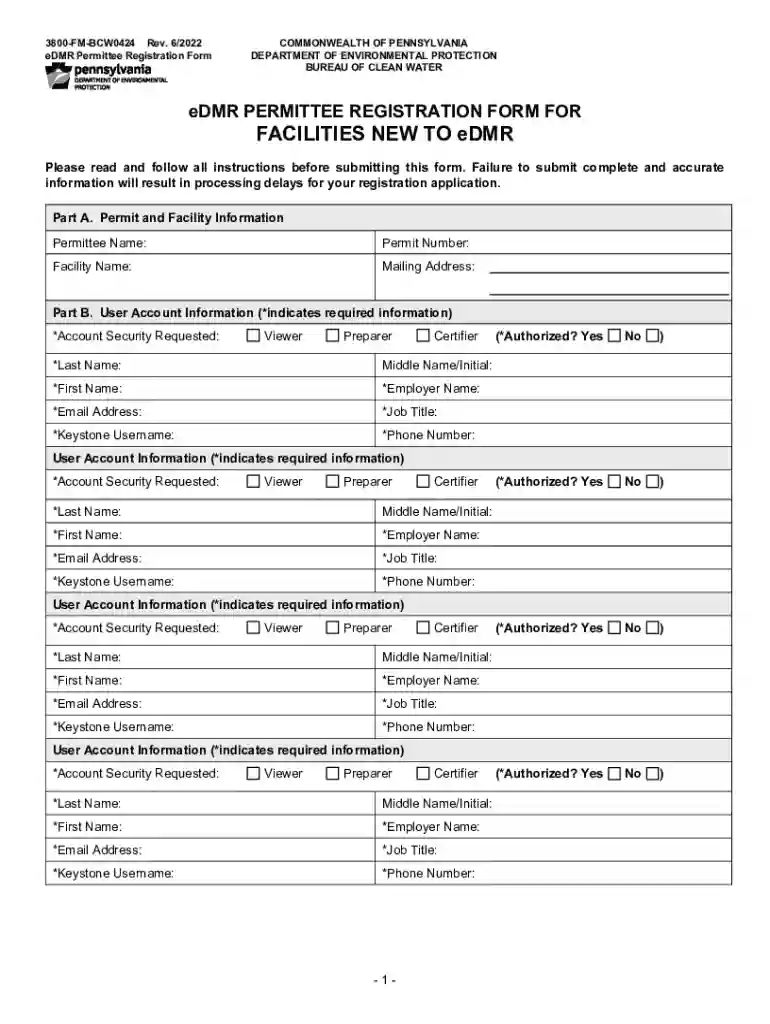
  1. Click ‘Get Form’ to open the Greenport registration form in the editor.
  2. In Part A, enter the Permittee Name, Permit Number, Facility Name, and Mailing Address. Ensure all information is accurate to avoid processing delays.
  3. Move to Part B for User Account Information. Select the appropriate Account Security Requested (Viewer, Preparer, Certifier) for each user. Fill in required fields marked with an asterisk (*), including Last Name, First Name, Employer Name, Email Address, Job Title, Keystone Username, and Phone Number.
  4. For each Certifier listed, check 'Yes' if they are authorized to submit reports. This is crucial for account creation.
  5. Complete Part C by typing or printing your name and title. Sign and date the certification statement to confirm accuracy of the information provided.
  6. Submit the completed form via email or mail as instructed at the end of the document. For faster processing, combine relevant pages into one PDF file.

Start filling out your Greenport registration form today using our platform for free!

See more Greenport versions

We've got more versions of the Greenport form. Select the right Greenport version from the list and start editing it straight away!
Versions Form popularity Fillable & printable
2022 4.9 Satisfied (29 Votes)
2013 4 Satisfied (56 Votes)
be ready to get more

Complete this form in 5 minutes or less

Get form

Got questions?

We have answers to the most popular questions from our customers. If you can't find an answer to your question, please contact us.
Contact us
No, the Hamptons are comprised of hamlets in East Hampton and Southampton, on Long Islands South Fork. However, Greenport is located near the Hamptons and has some similarities.
Sound View Greenport from $133. Greenport Hotel Deals Reviews - KAYAK. Sound View Greenport - Hotels - Kayak kayak.com Greenport-Hotels-Sound-View kayak.com Greenport-Hotels-Sound-View
Also located on Long Island, Greenport has the same beauty but a more laid-back vibe. Its well-known for its wineries and farms, and unlike the Hamptons and Montauk, it has year-round appeal, offering something special during every season.
Top Attractions in Greenport Antique Carousel. 4.7. (157) Amusement Theme Parks. Kontokosta Winery. 3.8. (237) East End Seaport Maritime Museum. 4.1. (44) Railroad Museum of Long Island. 4.0. (26) Greenport Harbor Brewing Co. 4.3. (87) Camera Obscura. 4.1. (19) Nova Constellatio Gallery. 4.5. (11) The Village Blacksmith. 4.2. (6)
With the highest concentration of shops, restaurants, galleries, and boutique hotels, Greenport is a destination for day-trippers and residents alike. With access to Shelter Island and the Hamptons via ferry, this idyllic seaside locale presents a rare opportunity to embrace the entire East End with ease.

Security and compliance

At DocHub, your data security is our priority. We follow HIPAA, SOC2, GDPR, and other standards, so you can work on your documents with confidence.

Learn more
ccpa2
pci-dss
gdpr-compliance
hipaa
soc-compliance
be ready to get more

Complete this form in 5 minutes or less

Get form

People also ask

Where to stay on the North Fork. The best areas to stay on the North Fork are Greenport and Southold, which are two of the main villages and the most charming areas to stay.

Related links