Type text, add images, blackout confidential details, add comments, highlights and more.
02. Sign it in a few clicks
Draw your signature, type it, upload its image, or use your mobile device as a signature pad.
03. Share your form with others
Send 2023 nana dividend via email, link, or fax. You can also download it, export it or print it out.
How to use or fill out nana regional corporation dividend with our platform
Ease of Setup
DocHub User Ratings on G2
Ease of Use
DocHub User Ratings on G2
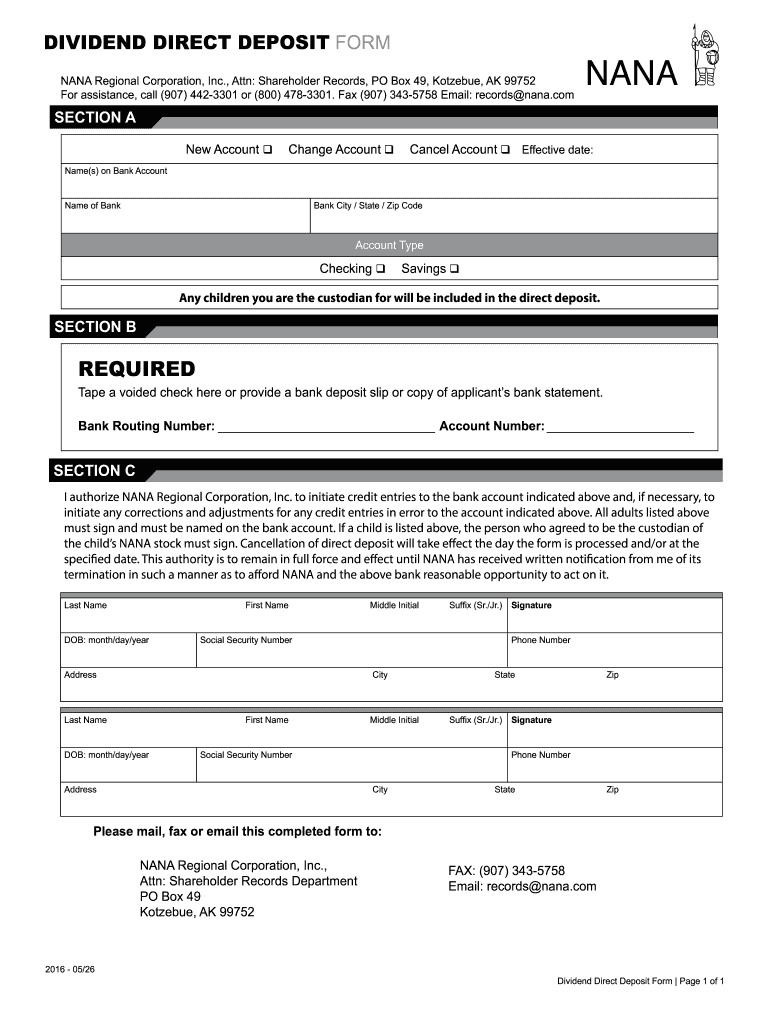
Click ‘Get Form’ to open the Nana Regional Corporation Dividend form in the editor.
In Section A, select whether you are opening a new account, changing an existing account, or canceling an account. Fill in the effective date and provide your name(s) as they appear on the bank account.
Enter the name of your bank along with its city, state, and zip code. Choose your account type by selecting either Checking or Savings.
In Section B, tape a voided check or provide a bank deposit slip or a copy of your bank statement. Fill in your Bank Routing Number and Account Number accurately.
Section C requires authorization. Ensure all adults listed sign the form. If applicable, include signatures for any custodians of children’s accounts. Provide personal details such as last name, first name, date of birth, social security number, and address for each individual.
Finally, review all information for accuracy before submitting. You can mail, fax, or email the completed form to NANA Regional Corporation using the provided contact details.
Start filling out your Nana Regional Corporation Dividend form online for free today!
Fill out nana regional corporation dividend online It's free
See more nana regional corporation dividend versions
We've got more versions of the nana regional corporation dividend form. Select the right nana regional corporation dividend version from the list and start editing it straight away!
by R Snigaroff 2021 Cited by 2 NANA Regional Corporation: To improve the quality of life for our From 2004 to 2017, regional ANC dividends per share averaged.Read more
Cookie consent notice
This site uses cookies to enhance site navigation and personalize your experience.
By using this site you agree to our use of cookies as described in our Privacy Notice.
You can modify your selections by visiting our Cookie and Advertising Notice.