




Here's how it works



How to use or fill out DMA-5048 with our platform

- Click ‘Get Form’ to open the DMA-5048 in the editor.
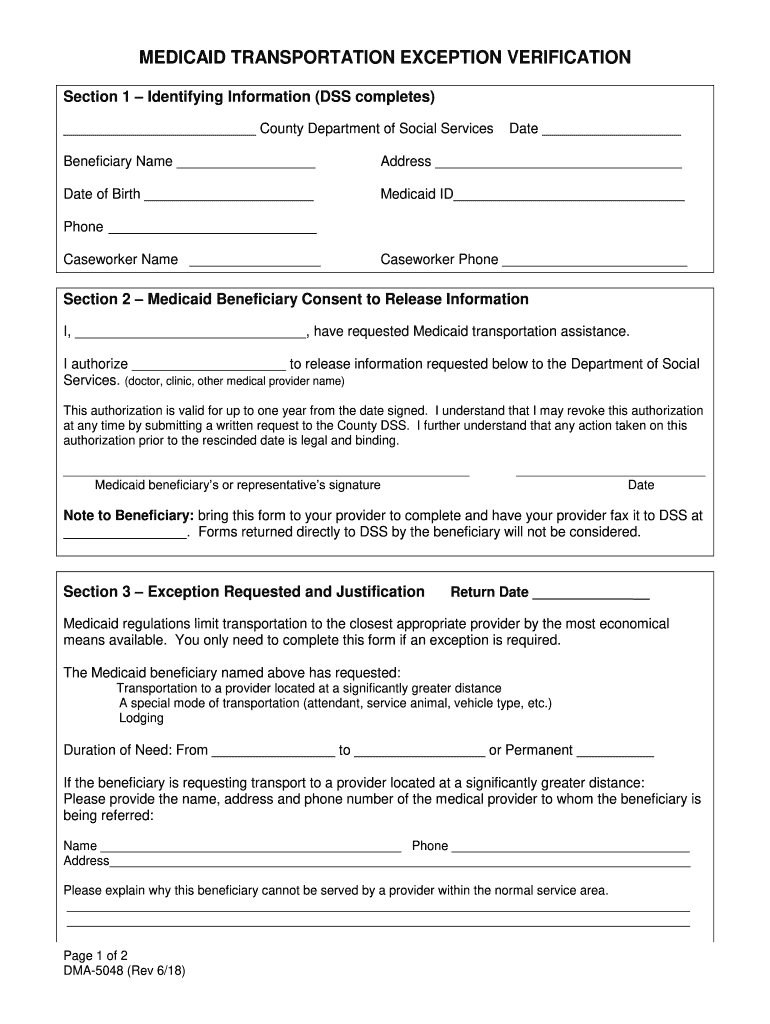
- Begin with Section 1, where you will enter identifying information. Fill in the County Department of Social Services, date, beneficiary name, address, date of birth, Medicaid ID, phone number, caseworker name, and caseworker phone.
- Move to Section 2 for Medicaid Beneficiary Consent. Enter the beneficiary's name and authorize a medical provider to release necessary information by filling in their details. Ensure the signature and date are completed.
- In Section 3, specify the exception requested and justification. Indicate if transportation is needed to a distant provider or if special accommodations are required. Provide detailed explanations as prompted.
- Complete Section 4 by having the provider print their name, phone number, and sign with the date to attest that all statements are true.
Start using our platform today for free to streamline your DMA-5048 form completion!
It's free
Got questions?
How can I sign my DMA-5048 without printing?
eSignatures are a perfect alternative to traditional signing, as they save time, effort, and costs people spend on printing, scanning, and paper delivery. You can eSign your DMA-5048 utilizing a trustworthy and powerful online document processing services like DocHub. It complies with major eSignature regulations (ESIGN and UETA), so all forms approved there are legally binding and have the same validity as physically signed ones.
How do you fill out DMA-5048 online?
You can get and edit your DMA-5048 online by using DocHub. Its simple yet feature-rich design allows you to start productive work right after you register your account. Create your profile and add your file, then our interface will guide you via our stress-free form completion experience.
What is non-emergency medical transportation?
Does NC Medicaid pay for transportation?
What is the phone number for NC Medicaid transportation?
Security and compliance
At DocHub, your data security is our priority. We follow HIPAA, SOC2, GDPR, and other standards, so you can work on your documents with confidence.
Learn more


