




Here's how it works



How to use or fill out leads portal louisiana with DocHub

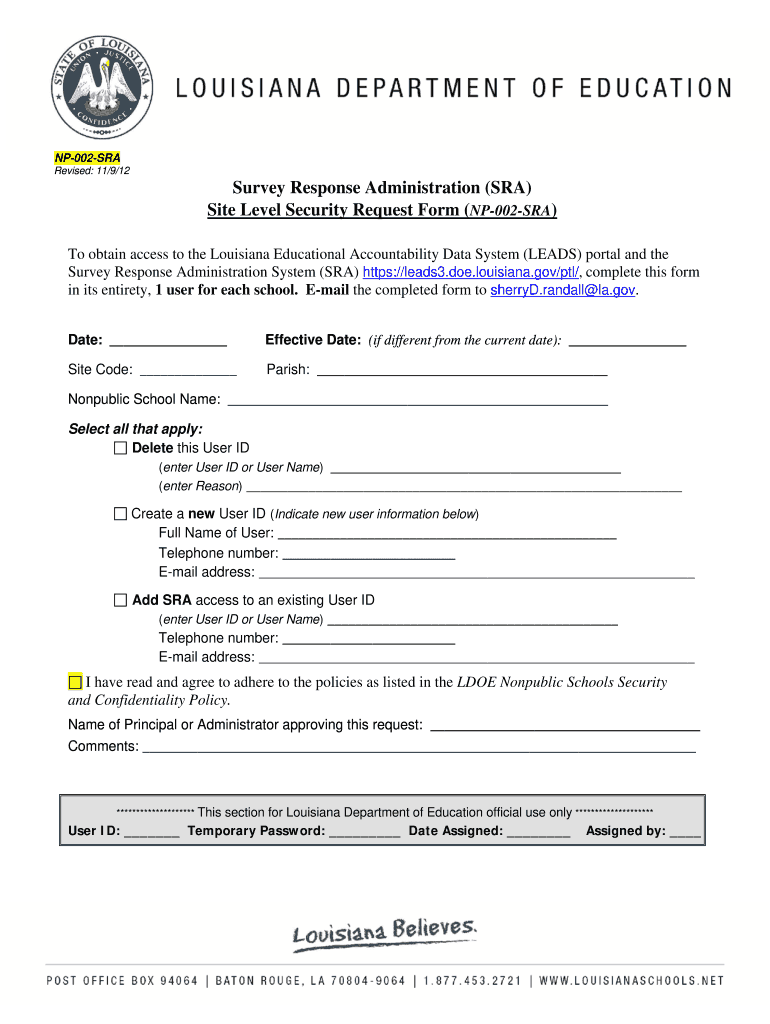
- Click ‘Get Form’ to open the leads portal louisiana form in our editor.
- Begin by entering the current date in the 'Date' field. If the effective date differs from today, specify it in the 'Effective Date' section.
- Fill in your Site Code and Parish information accurately to ensure proper identification.
- Provide the Nonpublic School Name clearly, as this is essential for processing your request.
- Select one of the options: Delete a User ID, Create a new User ID, or Add SRA access to an existing User ID. Fill out the corresponding fields based on your selection.
- If creating a new user, enter their Full Name, Telephone number, and E-mail address. For existing users, provide their User ID along with updated contact details.
- Ensure you read and agree to the policies by checking the appropriate box and signing off with the name of the Principal or Administrator approving this request.
- Finally, add any comments if necessary before submitting your completed form via email to sherryD.randall@la.gov.
Start using our platform today for free to streamline your document editing and submission process!
It's free
See more leads portal louisiana versions
| Versions | Form popularity | Fillable & printable |
|---|---|---|
| 2012 | 4.8 Satisfied (140 Votes) |
Got questions?
Can I use DocHub to create legal electronic signatures on my louisiana leads portal?
Yes, you can utilize DocHub for signing any business and private documentation, including your louisiana leads portal. All electronic signatures you create with our tool are legally binding and court-admissible, as DocHub complies with standards required by ESIGN and UETA. Save your accomplished form with a detailed Audit Trail if needed.
Can I print my leads louisiana department of education and finish it on my own?
If you go for analog methods of completing your leads louisiana department of education, it is simple to download your file for printing. Search DocHub’s Forms & Templates catalog to get the exact document template you require and open it for editing or download it on your device in the format of your liking. It is possible to complete your form electronically and put your handwritten signature on it right after printing or eSign your document with DocHub.
What is the tier 1 curriculum in Louisiana?
What are leads in Louisiana education?
Why does Louisiana rank so low in education?
Security and compliance
At DocHub, your data security is our priority. We follow HIPAA, SOC2, GDPR, and other standards, so you can work on your documents with confidence.
Learn more


