




Here's how it works



How to use or fill out PDF Park Reservation Application - City of Dalworthington Gardens with DocHub

- Click ‘Get Form’ to open the PDF Park Reservation Application in our editor.
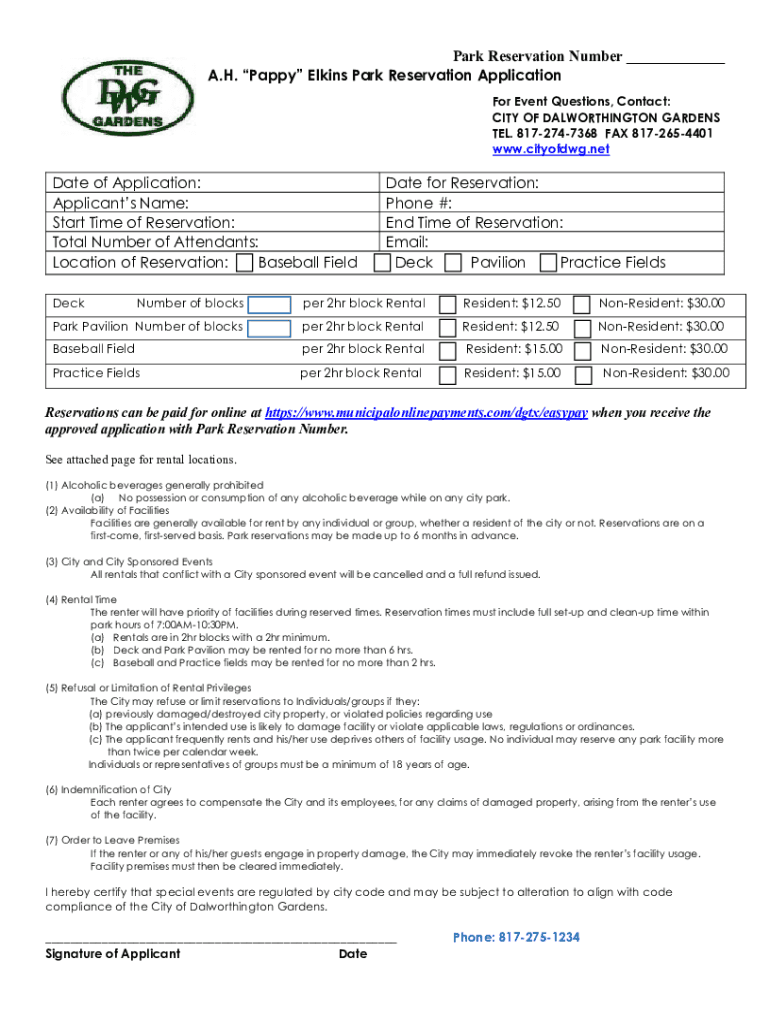
- Begin by entering the 'Date of Application' at the top of the form. This helps track your reservation request.
- Fill in your 'Applicant’s Name' and contact details, including 'Phone #' and 'Email', ensuring that you provide accurate information for communication.
- Specify the 'Start Time' and 'End Time of Reservation', along with the 'Total Number of Attendants'. This information is crucial for managing space and resources.
- Select your desired location for reservation by checking the appropriate boxes for Baseball Field, Deck, Pavilion, or Practice Fields.
- Indicate the number of blocks you wish to reserve per 2-hour block rental. Be mindful of resident versus non-resident rates.
- Review all entered information for accuracy before signing at the bottom. Your signature certifies compliance with city regulations.
Start filling out your application today using our platform for a seamless experience!
It's free
See more PDF Park Reservation Application - City of Dalworthington Gardens versions
Got questions?
What do I need to sign my PDF Park Reservation Application - City of Dalworthington Gardens electronically?
Electronic document approval requires a software solution that works in compliance with data protection and eSignature laws. DocHub is a great tool for that, since it fulfills all the above mentioned requirements. Whatever method you like to sign your PDF Park Reservation Application - City of Dalworthington Gardens in DocHub, your eSignature will be legally binding and court-admissible.
How do you get PDF Park Reservation Application - City of Dalworthington Gardens?
You can find the latest and most relevant version of the PDF Park Reservation Application - City of Dalworthington Gardens in our DocHub forms collection. Search it by categories or utilize the search field to find the exact template that fits your case. You can open this form for editing after you find it.
Security and compliance
At DocHub, your data security is our priority. We follow HIPAA, SOC2, GDPR, and other standards, so you can work on your documents with confidence.
Learn more


