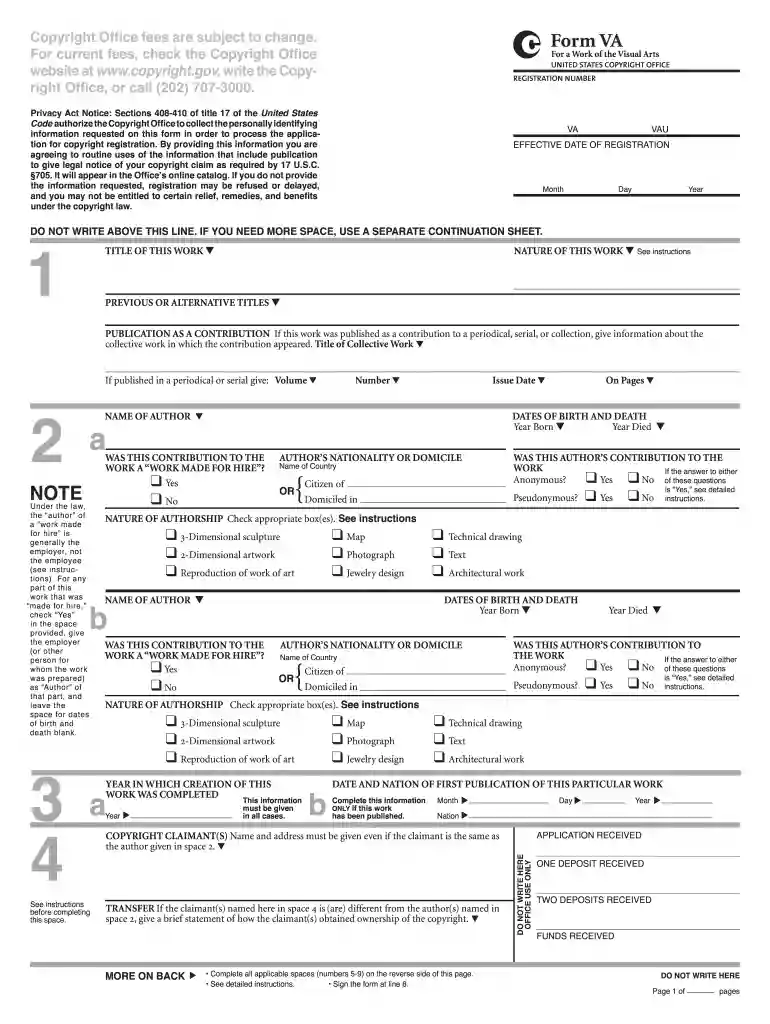
4 Form VA - US Copyright Office - copyright Preview on Page 1

4 Form VA - US Copyright Office - copyright 2026

Here's how it works

  • 01. Edit your form online

    Type text, add images, blackout confidential details, add comments, highlights and more.

  • 02. Sign it in a few clicks

    Draw your signature, type it, upload its image, or use your mobile device as a signature pad.

  • 03. Share your form with others

    Send it via email, link, or fax. You can also download it, export it or print it out.

How to use or fill out 4 Form VA - US Copyright Office - copyright with our platform

Form edit decoration
9.5
Ease of Setup
DocHub User Ratings on G2
9.0
Ease of Use
DocHub User Ratings on G2
  1. Click ‘Get Form’ to open the 4 Form VA in the editor.
  2. In SPACE 1, enter the title of your work. Ensure it matches exactly as it appears on your copies.
  3. For SPACE 2, provide the name(s) of the author(s). If applicable, indicate if the work was made for hire and include relevant details.
  4. In SPACE 3, specify the year of creation and publication details if applicable. Remember to differentiate between creation and publication dates.
  5. Complete SPACE 4 by listing the copyright claimant's name and address. If different from the author, briefly explain how ownership was obtained.
  6. Fill out SPACE 5 regarding any previous registrations. Indicate if this is a new registration or a changed version of an earlier work.
  7. Finally, ensure you sign in SPACE 8 and provide a return address in SPACE 9 before submitting your application.

Start using our platform today to streamline your copyright registration process for free!

See more 4 Form VA - US Copyright Office - copyright versions

We've got more versions of the 4 Form VA - US Copyright Office - copyright form. Select the right 4 Form VA - US Copyright Office - copyright version from the list and start editing it straight away!

VersionsForm popularityFillable & printable
20194.8 Satisfied (164 Votes)

be ready to get more

Complete this form in 5 minutes or less

Got questions?

We have answers to the most popular questions from our customers. If you can't find an answer to your question, please contact us.

The USPTO grants patents and registers trademarks. The U.S. Copyright Office at the Library of Congress registers copyrights. Use the IP Identifier to learn what kind of intellectual property you have.
How do I register my copyright? To register a work, submit a completed application form, and a nonreturnable copy or copies of the work to be registered. See Circular 1, Copyright Basics, section Registration Procedures., and Circular 4, Copyright Office Fees. Where can I get application forms?
How do I register my copyright? To register a work, submit a completed application form, and a nonreturnable copy or copies of the work to be registered. See Circular 1, Copyright Basics, section Registration Procedures., and Circular 4, Copyright Office Fees.
Online registration through the electronic Copyright Office (eCO) is the preferred way to register basic claims. Paper versions of Form TX (literary works); Form VA (visual arts works); Form PA (performing arts); Form SR (sound recordings) are available on the Copyright Office website.
In the United States copyright law, a copyright notice is a notice of statutorily prescribed form that informs users of the underlying claim to copyright ownership in a published work.

Security and compliance

At DocHub, your data security is our priority. We follow HIPAA, SOC2, GDPR, and other standards, so you can work on your documents with confidence.

Related links

U.S. Copyright Office | U.S. Copyright Office

To submit claims or discuss copyright-related matters, visit our Public Information Office by making an appointment. 20559-6000 (202) 707-3000 or 1 (877) 476-

Learn more
If you believe that this page should be taken down, please follow our DMCA take down process here