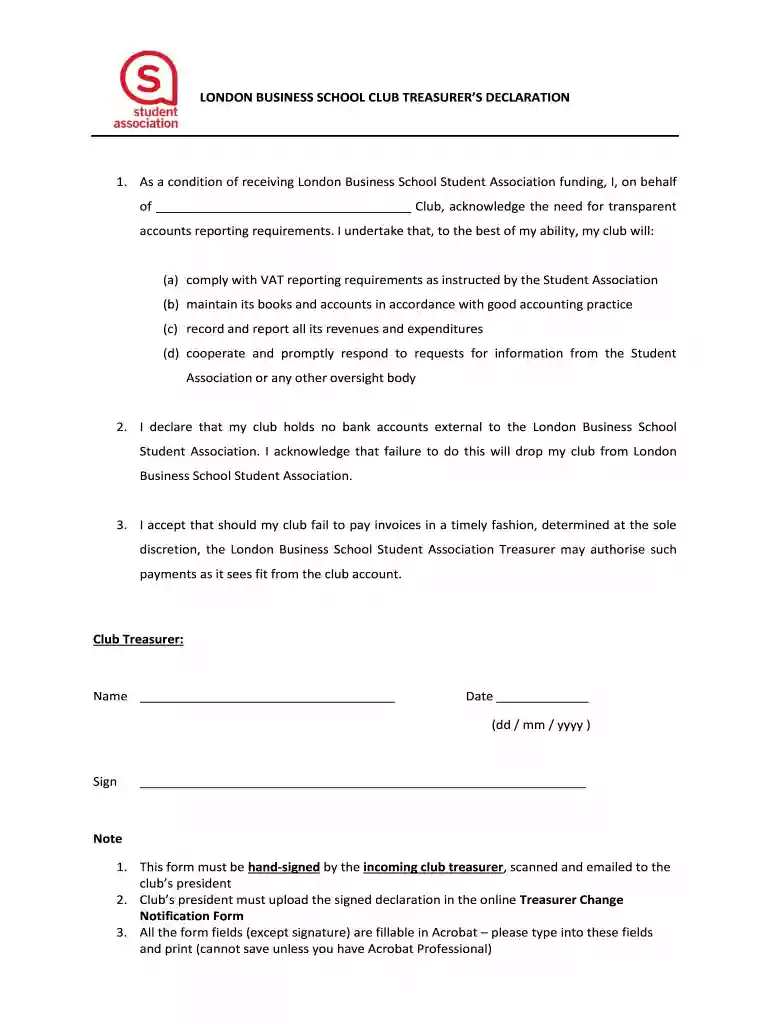
Student Treasurer's Club - London Business School 2026

Get Form
Student Treasurer's Club - London Business School Preview on Page 1

Here's how it works

01. Edit your form online
Type text, add images, blackout confidential details, add comments, highlights and more.

02. Sign it in a few clicks
Draw your signature, type it, upload its image, or use your mobile device as a signature pad.

03. Share your form with others
Send it via email, link, or fax. You can also download it, export it or print it out.

How to use or fill out Student Treasurer's Club - London Business School with our platform

Form edit decoration
9.5
Ease of Setup
DocHub User Ratings on G2
9.0
Ease of Use
DocHub User Ratings on G2
  1. Click ‘Get Form’ to open the Student Treasurer's Club declaration in the editor.
  2. Begin by filling in the name of your club in the designated field. This is crucial for identifying your organization.
  3. In the next section, ensure you acknowledge compliance with VAT reporting requirements and good accounting practices by checking the appropriate boxes or typing your acknowledgment.
  4. Record all revenues and expenditures accurately in the provided fields, ensuring transparency as required by the Student Association.
  5. Complete the declaration regarding external bank accounts by confirming that your club holds no such accounts. This is essential for maintaining your club’s status.
  6. Fill in your name as Club Treasurer and date of signing. Ensure this is done accurately to avoid any issues with submission.
  7. After completing all fields, print the document for hand-signing. Remember to scan and email it to your club’s president as per instructions.

Start using our platform today to streamline your form completion process for free!

See more Student Treasurer's Club - London Business School versions

We've got more versions of the Student Treasurer's Club - London Business School form. Select the right Student Treasurer's Club - London Business School version from the list and start editing it straight away!
Versions Form popularity Fillable & printable
2014 4.8 Satisfied (116 Votes)
be ready to get more

Complete this form in 5 minutes or less

Get form

Got questions?

We have answers to the most popular questions from our customers. If you can't find an answer to your question, please contact us.
Contact us

Many software applications are available on the market for document modifying and signing. DocHub is one of the most popular online solutions that comply with all security and compliance requirements and guarantees your electronically signed documentation is legally enforceable. All you need to give it a try is to sign up for an account, upload your Student Treasurer's Club - London Business School, fill out the requested details, and click Sign. Create your electronic signature by typing, drawing it, uploading its image to your template, or scanning a unique QR code.

When you edit your Student Treasurer's Club - London Business School with DocHub, you will not need to look for other software or services to sign it. An electronic signature is a component of DocHub’s comprehensive editing toolset, which allows you to implement changes in your form without switching between platforms. Just complete your form, double-check the correctness of the information and put your electronic signature at the end to make it submission-ready within minutes.

Harvard Business School ranks at 1st amongst all business schools of world, as per FT ranking of 2020 whereas London Business School ranks at 7th position. Last 3 year trend shows that HBS rank has been continuously improving. On the other hand, LBS ranking dropped from 4th in 2018 to 7th in 2020.
ing to the US News and World Report Rankings 2023, The school was recognized and registered by the Federal University of London in 1965. LBS is one of the top business schools not just in the UK but across the world, with prominent and world-class business experts. It has an acceptance rate of 20%.
Your CV and application essays typically present these aspects of your profile. Additionally, two professional references are required, along with your GPA scores. The acceptance rate at LBS is highly competitive and it is crucial for prospective applicants to put their best foot forward.

Security and compliance

At DocHub, your data security is our priority. We follow HIPAA, SOC2, GDPR, and other standards, so you can work on your documents with confidence.

Learn more
ccpa2
pci-dss
gdpr-compliance
hipaa
soc-compliance
be ready to get more

Complete this form in 5 minutes or less

Get form

People also ask

London Business Schools Masters in Management (MiM) program is highly ranked by prestigious organizations. ing QS World University Rankings ranked #3 spot in the for Masters in Management and was ranked #4 in the Financial Times Masters in Management Rankings 2021.
Founded in 1964 and located in the Marylebone neighborhood of London, the London Business School is routinely ranked among the top business schools in the world.
LBS Community However, the LBS community is uniquely international and is full of leaders who are driven to change the status quo. As London Business School Admissions says, We nurture our students to challenge the status quo, to question the norm and to develop the skills to become the worlds best business leaders.

Related links