




Here's how it works



How to use or fill out Baylor College of Medicine Department of Pathology with our platform

- Click ‘Get Form’ to open the Baylor College of Medicine application in the editor.
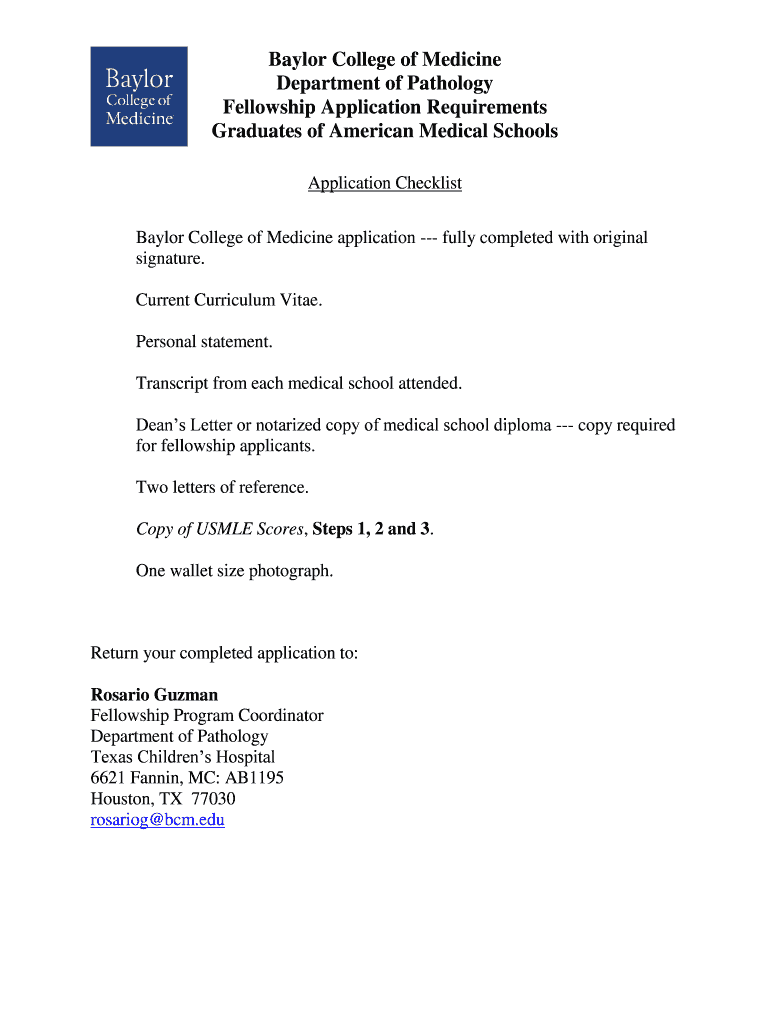
- Begin by filling out your personal information, including your name, contact details, and citizenship status. Ensure that all fields are completed accurately.
- Attach your current Curriculum Vitae and personal statement. Use the upload feature to easily add these documents from your device.
- Provide transcripts from each medical school attended. If applicable, include notarized copies as specified in the checklist.
- Complete the sections for letters of reference and USMLE scores. Make sure to gather all necessary documentation before submission.
- Review your application thoroughly for any missing information or errors. Utilize our platform’s editing tools to make adjustments as needed.
- Once satisfied, sign the application digitally and save it. You can then send it directly via email or print it for mailing.
Start using our platform today to streamline your application process for free!
It's free
See more Baylor College of Medicine Department of Pathology versions
| Versions | Form popularity | Fillable & printable |
|---|---|---|
| 2018 | 4.8 Satisfied (113 Votes) |
Got questions?
How can I sign my Baylor College of Medicine Department of Pathology online?
Log in to your DocHub account and add your Baylor College of Medicine Department of Pathology to our editor using one of its upload methods - from your device, cloud storage, secure URL, or your DocHub folders if you have already processed your form before. Open our editor, click the Sign button in the top toolbar, and choose your signing method. You can upload a picture of your handwritten signature, draw it, type in your name, or utilize a QR code as an alternative.
How do you edit Baylor College of Medicine Department of Pathology online?
With DocHub, there are several convenient methods to edit your Baylor College of Medicine Department of Pathology online. You can drag and drop the form and modify it directly at the DocHub site or use our browser extension to fill out your form immediately. Additionally, you can modify your PDF on your smartphone, as DocHub is compatible with all the accessible mobile platforms.
Security and compliance
At DocHub, your data security is our priority. We follow HIPAA, SOC2, GDPR, and other standards, so you can work on your documents with confidence.
Learn more


