




Here's how it works



How to use or fill out Authorization to Provide Informed Consent for a Minor - Kaiser with our platform

- Click ‘Get Form’ to open it in the editor.
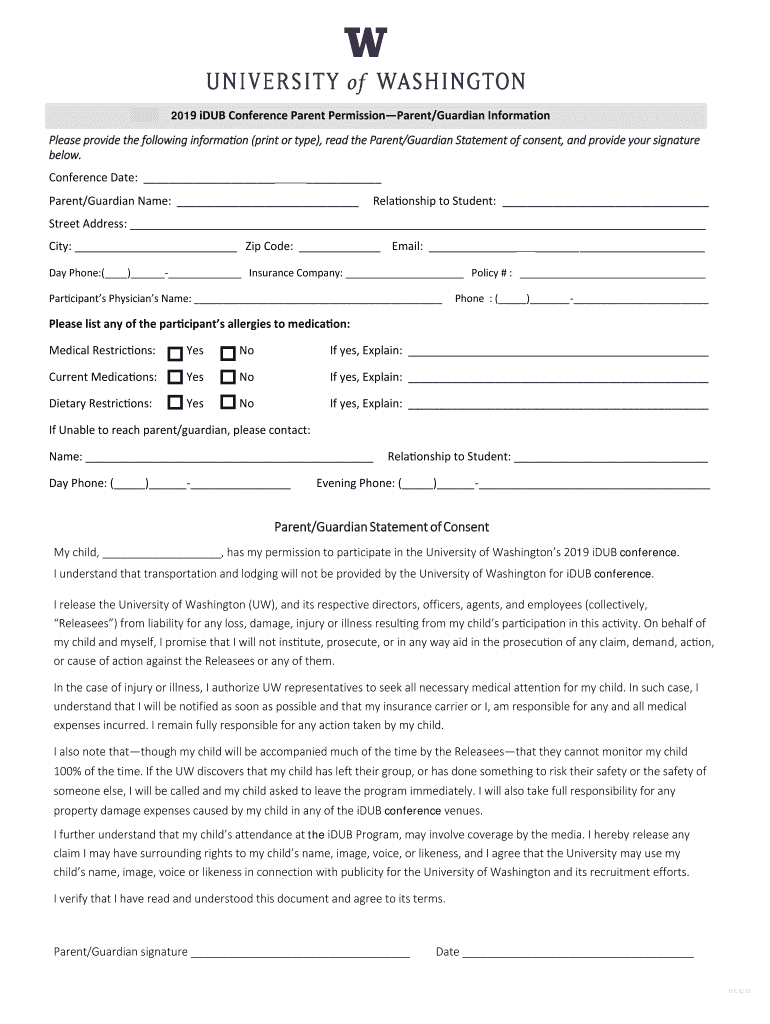
- Begin by entering the conference date at the top of the form. This is essential for identifying the specific event.
- Fill in your name as the parent or guardian, along with your relationship to the student. This establishes your authority to provide consent.
- Complete your contact information, including street address, city, zip code, email, and day phone number. Ensure accuracy for any necessary communication.
- Provide details about your child’s physician and any allergies or medical restrictions they may have. This information is crucial for their safety during the event.
- Read through the Parent/Guardian Statement of Consent carefully. Once you understand and agree to its terms, sign and date at the bottom of this section.
- Lastly, review all entries for completeness before submitting. Our platform allows you to save and share this document easily.
Start using our platform today to fill out your Authorization to Provide Informed Consent for a Minor - Kaiser form quickly and efficiently!
It's free
See more Authorization to Provide Informed Consent for a Minor - Kaiser versions
| Versions | Form popularity | Fillable & printable |
|---|---|---|
| 2019 | 4.8 Satisfied (125 Votes) |
Got questions?
How can I send my Authorization to Provide Informed Consent for a Minor - Kaiser from Google Drive for approval?
If you often work with documents stored in your Google Drive, DocHub is a superb option for you to easily and quickly complete, adjust, and approve them. This editor integrates properly with Google services, so you can export your Authorization to Provide Informed Consent for a Minor - Kaiser from your Google Drive to the editor without the need of downloading and re-uploading it. Right-click on your document, select Open With → DocHub PDF Sign and Edit. In our editor, add and assign Signature Fields for all people involved, then click on the Menu option above → Send → select how you want to share your paperwork.
How do you fill out Authorization to Provide Informed Consent for a Minor - Kaiser on iOS?
You need only an internet connection and a browser to complete your Authorization to Provide Informed Consent for a Minor - Kaiser on an iOS phone. Open the DocHub website and authenticate. Then, add your document or choose it from the list in your dashboard. Then use our editing instruments to complete your form and save all your adjustments. You may also send it to a specified recipient straight away.
What is the informed consent process for children?
Does Kaiser do informed consent?
What are the 6 elements that need to be present for informed consent?
Security and compliance
At DocHub, your data security is our priority. We follow HIPAA, SOC2, GDPR, and other standards, so you can work on your documents with confidence.
Learn more


