




Here's how it works



How to use or fill out SS1 Form Instructions for Disposing of a computer with our platform

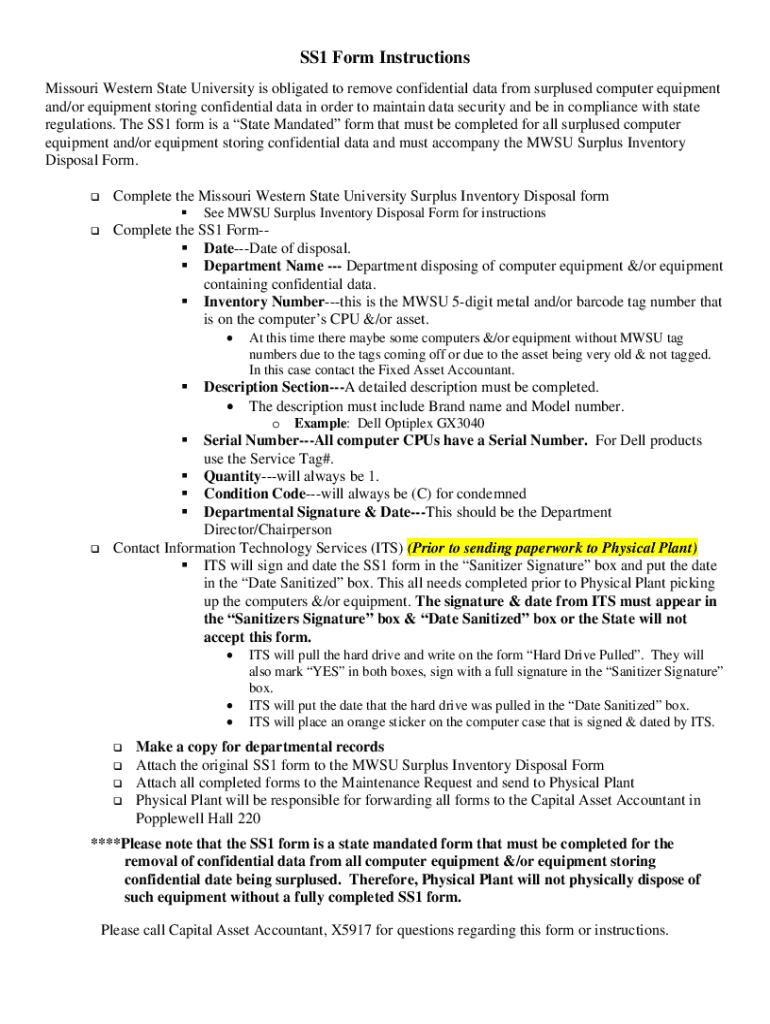
- Click ‘Get Form’ to open the SS1 Form in the editor.
- Begin by filling out the Date field, indicating the date of disposal.
- Enter your Department Name, specifying which department is disposing of the equipment.
- Input the Inventory Number, which is the MWSU 5-digit metal and/or barcode tag number found on the computer's CPU.
- In the Description Section, provide a detailed description including Brand name and Model number (e.g., Dell Optiplex GX3040).
- Fill in the Serial Number for the computer CPU. For Dell products, use the Service Tag#.
- Set Quantity to 1 and Condition Code to (C) for condemned.
- Ensure that the Departmental Signature & Date are completed by the Department Director/Chairperson.
- Contact Information Technology Services (ITS) before sending paperwork to Physical Plant for their signature and date in designated boxes.
- Make a copy for departmental records and attach the original SS1 form to the MWSU Surplus Inventory Disposal Form before submission.
Start using our platform today to streamline your document editing and ensure compliance with state regulations!
It's free
See more SS1 Form Instructions for Disposing of a computer versions
| Versions | Form popularity | Fillable & printable |
|---|---|---|
| 2018 | 4.8 Satisfied (102 Votes) |
Got questions?
Can I complete and sign my SS1 Form Instructions for Disposing of a computer online?
Yes, and it’s really straightforward! DocHub is an online PDF editor with advanced document processing features that allow you promptly modify your documents, fill out empty fields and drop new ones for others to fill out, and create eSignatures in several ways. Upload your SS1 Form Instructions for Disposing of a computer, provide information as required, and decide how you want to eSign your template - by typing your name, drawing your signature, uploading its picture, or using a QR code.
How do you edit SS1 Form Instructions for Disposing of a computer online?
With DocHub, you have several convenient methods to edit your SS1 Form Instructions for Disposing of a computer online. You can drag and drop the form and edit it straight at the DocHub website or use our browser extension to fill out your form right away. On top of that, you can edit your PDF on your smartphone, as DocHub works with all the accessible mobile platforms.
Security and compliance
At DocHub, your data security is our priority. We follow HIPAA, SOC2, GDPR, and other standards, so you can work on your documents with confidence.
Learn more


