




Here's how it works



How to use or fill out NJROTC HEALTH RISK SCREENING QUESTIONNAIRE with our platform

- Click ‘Get Form’ to open the NJROTC HEALTH RISK SCREENING QUESTIONNAIRE in the editor.
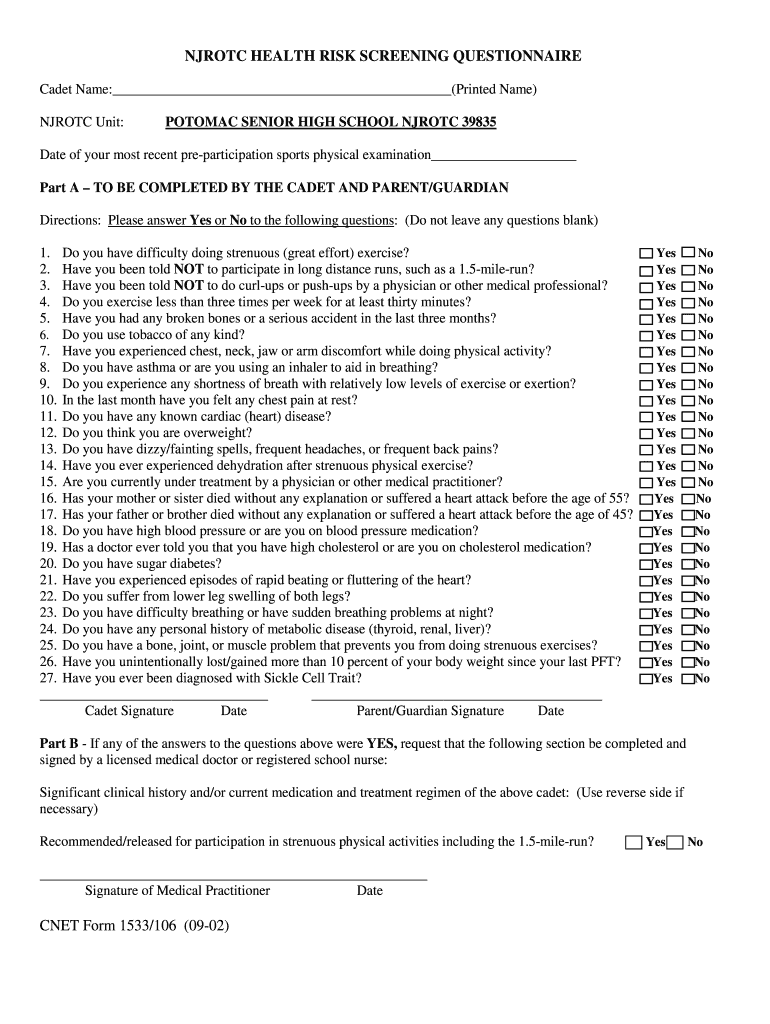
- Begin by entering your Cadet Name and NJROTC Unit at the top of the form. This personal information is essential for identification.
- Fill in the date of your most recent pre-participation sports physical examination. This ensures that all health assessments are current.
- In Part A, answer each question with a 'Yes' or 'No'. Make sure not to leave any questions blank, as this could delay processing.
- If you answer 'Yes' to any question, proceed to Part B. Here, a licensed medical doctor or registered school nurse must complete and sign the section regarding significant clinical history.
- Finally, ensure both the Cadet and Parent/Guardian sign and date the form at the bottom before submission.
Start using our platform today for free to easily fill out your NJROTC HEALTH RISK SCREENING QUESTIONNAIRE!
It's free
See more NJROTC HEALTH RISK SCREENING QUESTIONNAIRE versions
| Versions | Form popularity | Fillable & printable |
|---|---|---|
| 2002 | 4.8 Satisfied (82 Votes) |
Got questions?
Can I sign my NJROTC HEALTH RISK SCREENING QUESTIONNAIRE in electronic format?
According to eSignature regulations, forms signed electronically have the same validity as traditionally approved ones. You can eSign almost any business and private paperwork. Four types of paperwork still require wet signatures only - wills and testamentary trusts, court orders and other court forms, state statutes regulating divorce, adoption, or other family law, and notice of cancellation of utility services. If you follow the regulations and utilize a reliable and compliant software solution, like DocHub, you can eSign your NJROTC HEALTH RISK SCREENING QUESTIONNAIRE without printing it.
How do you fill out NJROTC HEALTH RISK SCREENING QUESTIONNAIRE on iOS?
You need only an internet connection and a web browser to fill out your NJROTC HEALTH RISK SCREENING QUESTIONNAIRE on an iOS phone. Open the DocHub website and authenticate. Then, add your document or select it from the list in your dashboard. Then use our editing instruments to fill out your form and save all your modifications. You may also send it to a specified recipient straight away.
What are the different types of screening tests?
What is a health questionnaire for?
What is a health screening questionnaire?
Security and compliance
At DocHub, your data security is our priority. We follow HIPAA, SOC2, GDPR, and other standards, so you can work on your documents with confidence.
Learn more


