




Here's how it works



How to use or fill out Disability Certification Form 2020-21 - Financial Aid with our platform

- Click ‘Get Form’ to open the Disability Certification Form 2020-21 in the editor.
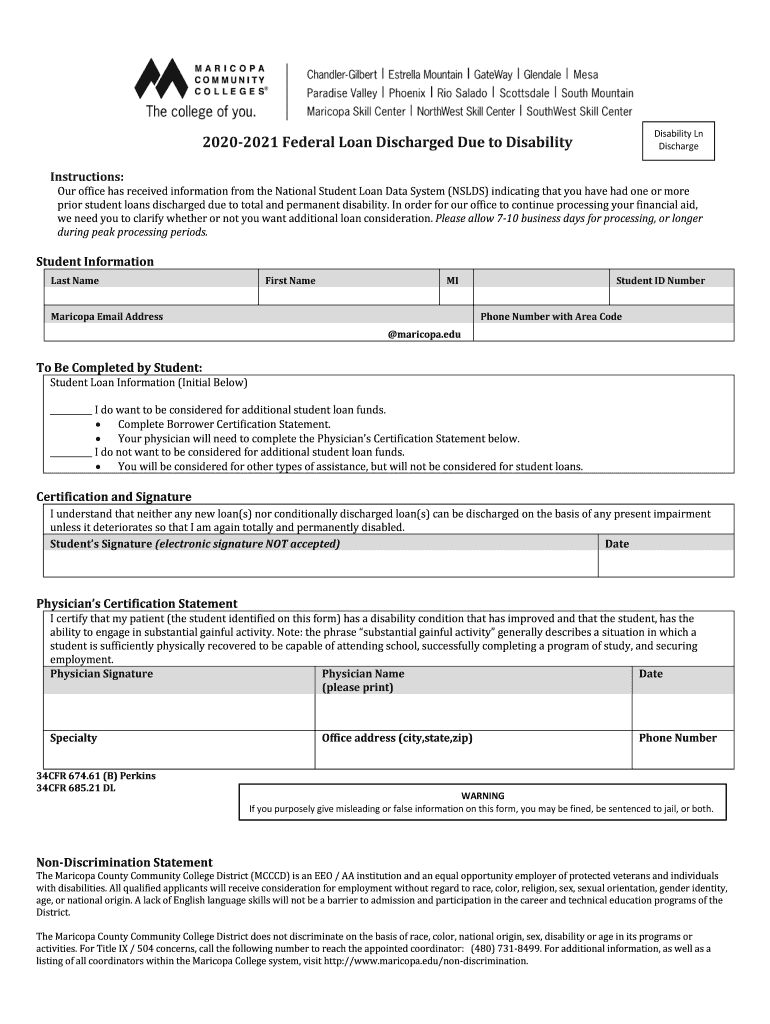
- Begin by filling out your personal information in the 'Student Information' section. Enter your last name, first name, middle initial, Maricopa email address, student ID number, and phone number.
- In the 'To Be Completed by Student' section, indicate your preference regarding additional student loan funds by checking the appropriate box. If you wish to be considered for additional funds, complete the Borrower Certification Statement.
- Ensure that your physician completes the Physician’s Certification Statement. This includes their signature, printed name, date, specialty, office address, and phone number.
- Finally, sign and date the certification statement yourself. Remember that electronic signatures are not accepted for this form.
Start using our platform today to easily fill out and submit your Disability Certification Form for free!
It's free
See more Disability Certification Form 2020-21 - Financial Aid versions
Got questions?
Can I sign my Disability Certification Form 2020-21 - Financial Aid electronically?
Based on eSignature laws, forms signed digitally have the same validity as those approved with pen and paper. You can eSign almost any business and private paperwork. Four types of documents still require handwritten signatures only - wills and testamentary trusts, court orders and other court papers, state statutes regulating divorce, adoption, or other family law, and notice of cancellation of utility services. If you follow the rules and use a safe and compliant software solution, like DocHub, you can eSign your Disability Certification Form 2020-21 - Financial Aid without printing it.
How do you fill out Disability Certification Form 2020-21 - Financial Aid online?
You can find and edit your Disability Certification Form 2020-21 - Financial Aid online with the help of DocHub. Its simple but feature-rich design allows you to start effective work immediately after you register your account. Create your profile and add your document, then our interface will guide you via our stress-free form completion experience.
How long does FAFSA take to process?
What is the meaning of SFA in financial aid?
What is the number for financial aid at San Francisco State University?
Security and compliance
At DocHub, your data security is our priority. We follow HIPAA, SOC2, GDPR, and other standards, so you can work on your documents with confidence.
Learn more


